<?xml version="1.0" encoding="utf-8"?>
<feed xmlns="http://www.w3.org/2005/Atom">
    <id>https://about.gitlab.com/blog</id>
    <title>GitLab</title>
    <updated>2025-09-23T21:19:36.468Z</updated>
    <generator>https://github.com/jpmonette/feed</generator>
    <author>
        <name>The GitLab Team</name>
    </author>
    <link rel="alternate" href="https://about.gitlab.com/blog"/>
    <link rel="self" href="https://about.gitlab.com/atom.xml"/>
    <subtitle>GitLab Blog RSS feed</subtitle>
    <icon>https://about.gitlab.com/favicon.ico</icon>
    <rights>All rights reserved 2025</rights>
    <entry>
        <title type="html"><![CDATA[GitLab 18.4: AI-native development with automation and insight]]></title>
        <id>https://about.gitlab.com/blog/gitlab-18-4-ai-native-development-with-automation-and-insight/</id>
        <link href="https://about.gitlab.com/blog/gitlab-18-4-ai-native-development-with-automation-and-insight/"/>
        <updated>2025-09-23T00:00:00.000Z</updated>
        <content type="html"><![CDATA[<p>As a developer, you know modern development isn't just about writing code — it's about managing change across the entire software development lifecycle.</p>
<p>In <a href="https://about.gitlab.com/blog/gitlab-18-3-expanding-ai-orchestration-in-software-engineering/">GitLab 18.3</a>, we laid the groundwork for true human-AI collaboration. We introduced leading AI tools such as Claude Code, Codex CLI, Amazon Q CLI, and Gemini CLI as native integrations to GitLab, delivered our first preview of the GitLab Model Context Protocol (<a href="https://about.gitlab.com/topics/ai/model-context-protocol/">MCP</a>) server in partnership with Cursor, and shipped two new flows, Issue to MR and Convert CI File for Jenkins Flows, to help teams tackle every day problems.</p>
<p>With <a href="https://about.gitlab.com/releases/2025/09/18/gitlab-18-4-released/">GitLab 18.4</a> we are expanding your ability to build and share custom agents, collaborate more effectively through Agentic Chat, navigate codebases with the Knowledge Graph, and keep pipelines green with the Fix Failed Pipelines Flow, while also delivering greater security and governance over your AI usage.</p>
<p>&lt;div style=&quot;padding:56.25% 0 0 0;position:relative;&quot;&gt;&lt;iframe src=&quot;https://player.vimeo.com/video/1120293274?badge=0&amp;autopause=0&amp;player_id=0&amp;app_id=58479&quot; frameborder=&quot;0&quot; allow=&quot;autoplay; fullscreen; picture-in-picture; clipboard-write; encrypted-media; web-share&quot; referrerpolicy=&quot;strict-origin-when-cross-origin&quot; style=&quot;position:absolute;top:0;left:0;width:100%;height:100%;&quot; title=&quot;18.4 Release video placeholder&quot;&gt;&lt;/iframe&gt;&lt;/div&gt;&lt;script src=&quot;https://player.vimeo.com/api/player.js&quot;&gt;&lt;/script&gt;</p>
<blockquote>
<p>Have questions on the latest features in the GitLab 18.4 release? <a href="https://www.linkedin.com/events/q-a-code-exploringgitlab18-4and7373772262312906753/theater/">Join us for The Developer Show</a> live on LinkedIn on Sept. 23 at 10:00 am PT, or on-demand shortly after!</p>
</blockquote>
<h2>Build your experience</h2>
<p><em>Start your day by pulling from the AI Catalog — a library of specialized agents that surface priorities, automate routine work, and keep you focused on building.</em></p>
<h3>AI Catalog as your library of specialized agents</h3>
<p>With GitLab 18.4, we're introducing the GitLab Duo AI Catalog — a central library where teams can create, share, and collaborate with custom-built agents across their organization. Every team has ‘their way' of doing things. So creating a custom agent is just like training a fellow engineer on the ‘right way' to do things in your organization.</p>
<p>For example, a custom Product Planning agent can file bugs in the specific format, following your labeling standards, or a Technical Writer agent can draft concise documentation following your conventions, or a Security agent can make sure your security and compliance standards are met for every MR. Instead of functioning as disconnected tools, these agents become part of the natural stream of work inside GitLab — helping accelerate tasks without disrupting established processes.</p>
<p><strong>Note:</strong> This capability is currently only available on GitLab.com. We plan to deliver this to our self-managed customers next month in the 18.5 release.</p>
<h2>Stay in your flow</h2>
<p><em>GitLab Duo Agentic Chat makes collaboration with agents seamless.</em></p>
<h3>Smarter Agentic Chat to streamline collaboration with agents</h3>
<p>As the centerpiece of GitLab Duo Agent Platform, <a href="https://docs.gitlab.com/user/gitlab_duo_chat/agentic_chat/">Agentic Chat</a> gives you a seamless way to collaborate with AI agents. The latest update to Agentic Chat with GitLab 18.4 improves the chat experience and expands how sessions are managed and surfaced.</p>
<ul>
<li>
<p><strong>Chat with custom agent</strong></p>
<p>Let's start with your newly-created custom agent. Once designed, you can immediately put that agent to work through Agentic Chat. For example, you could ask your new agent “give me a list of assignments” to get started with your priorities for the day. Additionally, you now have the ability to start fresh conversations with new agents and resume previous conversations with agents without losing context.</p>
</li>
<li>
<p><a href="https://docs.gitlab.com/user/gitlab_duo/model_selection/#select-a-model-to-use-in-gitlab-duo-agentic-chat"><strong>User model selection</strong></a></p>
<p>With previous releases, you're able to select models at a namespace level, but in 18.4 you can now choose models at the user level for a given chat session. This empowers you to make the call on which LLM is right for the job, or experiment with different LLMs to see which delivers the best answer for your task.</p>
</li>
<li>
<p><strong>Improved formatting and visual design</strong></p>
<p>We hope you love the new visual design for GitLab Duo Agentic Chat, including improved handling of tool call approvals to ensure your experience is more enjoyable.</p>
</li>
<li>
<p><strong>Agent Sessions available through Agentic Chat</strong></p>
<p>Sessions are expanding to become a core part of the Agentic Chat experience. Any agent run or flow now appears in the Sessions overview available from Agentic Chat. Within each session, you'll see rich details like job logs, user information, and tool metadata — providing critical transparency into how agents are working on your behalf.</p>
<p><strong>Note:</strong> Sessions in Agentic Chat is available on GitLab.com only, this enhancement is planned for self-managed customers next month in the 18.5 update.</p>
</li>
</ul>
<h2>Unlock your codebase</h2>
<p><em>With agents, context is king. With Knowledge Graph, you can give your agents more context so they can reason faster and give you better results.</em></p>
<h3>Introducing the GitLab Knowledge Graph (Beta)</h3>
<p>The <a href="https://gitlab-org.gitlab.io/rust/knowledge-graph/">GitLab Knowledge Graph</a> in 18.4 transforms how developers and agents understand and navigate complex codebases. The Knowledge Graph provides a connected map of your entire project, linking files, routes, and references across the software development lifecycle. By leveraging tools such as go-to-definition, codebase search, and reference tracking through in-chat queries, developers gain the ability to ask precise questions like “show me all route files” or “what else does this change impact?”
This deeper context helps teams move faster and with more confidence — whether it's onboarding new contributors, conducting deep research across a project, or exploring how a modification impacts dependent code. The more of your ecosystem that lives in GitLab, the more powerful the Knowledge Graph becomes, giving both humans and AI agents the foundation to build with accuracy, speed, and full project awareness. In future releases, we'll be stitching all of your GitLab data into the Knowledge Graph, including plans, MRs, security vulnerabilities, and more.
This release of the Knowledge Graph focuses on local code indexing, where the <code>gkg</code> CLI turns your codebase into a live, embeddable graph database for RAG. You can install it with a simple one-line script, parse local repositories, and connect via MCP to query your workspace.
Our vision for the Knowledge Graph project is twofold: building a vibrant community edition that developers can run locally today, which will serve as the foundation for a future, fully-integrated Knowledge Graph Service within GitLab.com and self-managed instances.
&lt;div style=&quot;padding:56.25% 0 0 0;position:relative;&quot;&gt;&lt;iframe src=&quot;https://player.vimeo.com/video/1121017374?badge=0&amp;autopause=0&amp;player_id=0&amp;app_id=58479&quot; frameborder=&quot;0&quot; allow=&quot;autoplay; fullscreen; picture-in-picture; clipboard-write; encrypted-media; web-share&quot; referrerpolicy=&quot;strict-origin-when-cross-origin&quot; style=&quot;position:absolute;top:0;left:0;width:100%;height:100%;&quot; title=&quot;18.4 Knowledge Graph Demo&quot;&gt;&lt;/iframe&gt;&lt;/div&gt;&lt;script src=&quot;https://player.vimeo.com/api/player.js&quot;&gt;&lt;/script&gt;</p>
<h2>Automate your pipeline maintenance</h2>
<p><em>Fix pipeline failures faster and stay in the flow with the Fixed Failed Pipelines Flow.</em></p>
<h3>Fix Failed Pipelines Flow with business awareness</h3>
<p>Keeping pipelines green is critical for your development velocity, but traditional approaches focus only on technical troubleshooting without considering the business impact. The <strong>Fix Failed Pipelines Flow</strong> addresses this challenge by combining technical analysis with strategic context. For example, it can automatically prioritize fixing a failed deployment pipeline for a customer-facing service ahead of a nightly test job, or flag build issues in a high-priority release branch differently than experimental feature branches.</p>
<ul>
<li><strong>Business-aware failure detection</strong> monitors pipeline executions while understanding the importance of different workflows and deployment targets.</li>
<li><strong>Contextual root cause analysis</strong> analyzes failure logs alongside business requirements, recent changes, and cross-project dependencies to identify underlying causes.</li>
<li><strong>Strategic fix prioritization</strong> generates appropriate fixes while considering business impact, deadlines, and resource allocation priorities.</li>
<li><strong>Workflow-integrated resolution</strong> automatically creates merge requests with fixes that maintain proper review processes while providing business context for prioritization decisions.</li>
</ul>
<p>This flow keeps pipelines green while maintaining strategic alignment, enabling automated fixes to support business objectives rather than just resolving technical issues in isolation.</p>
<h2>Customize your AI environment</h2>
<p><em>Automation only works if you trust the models behind it. That's why 18.4 delivers governance features like model selection and GitLab-managed keys.</em></p>
<h3>GitLab Duo model selection to optimize feature performance</h3>
<p><a href="https://docs.gitlab.com/user/gitlab_duo/model_selection/">Model selection</a> is now generally available, giving you direct control over which large language models (<a href="https://about.gitlab.com/blog/what-is-a-large-language-model-llm/">LLMs</a>) power GitLab Duo. You and your team can select the models of your choice, apply them across the organization or tailor them per feature. You can set defaults to ensure consistency across namespaces and tools, with governance, compliance, and security requirements in mind.</p>
<p>For customers using GitLab Duo Self-Hosted, newly added support for GPT OSS and GPT-5 provides additional flexibility for AI-powered development workflows.</p>
<p><strong>Note:</strong> Model selection is not available for GitLab.com customers, and GPT models are not supported on GitLab.com.</p>
<h2>Protect your sensitive context</h2>
<p><em>Alongside governance comes data protection, giving you fine-grained control over what AI can and can't see.</em></p>
<h3>GitLab Duo Context Exclusion for granular data protection</h3>
<p>It's no surprise — you need granular control over what information AI agents can access. <strong>GitLab Duo Context Exclusion</strong> in 18.4 provides project-level settings that let teams exclude specific files or file paths from AI access. Capabilities include:</p>
<ul>
<li><strong>File-specific exclusions</strong> to help protect sensitive files such as password configurations, secrets, and proprietary algorithms.</li>
<li><strong>Path-based rules</strong> to create exclusion patterns based on directory structures or file naming conventions.</li>
<li><strong>Flexible configuration</strong> to apply exclusions at the project level while maintaining development workflow efficiency.</li>
<li><strong>Audit visibility</strong> to track what content is excluded to support compliance with data governance policies.</li>
</ul>
<p>GitLab Duo Context Exclusion helps you protect sensitive data while you accelerate development with agentic AI.</p>
<h2>Extend your AI capabilities with new MCP tools</h2>
<p><em>Expanded MCP tools extend those capabilities even further, connecting your GitLab environment with a broader ecosystem of intelligent agents.</em></p>
<h3>New tools for GitLab MCP server</h3>
<p>Expanding on the initial MCP server introduced in <a href="https://about.gitlab.com/blog/gitlab-18-3-expanding-ai-orchestration-in-software-engineering/">18.3</a>, GitLab 18.4 adds more MCP tools — capabilities that define how MCP clients interact with GitLab. These new tools extend integration possibilities, enabling both first-party and third-party AI agents to take on richer tasks such as accessing project data, performing code operations, or searching across repositories, all while respecting existing security and permissions models. For a full list of MCP tools, including the new additions in 18.4, visit our <a href="https://docs.gitlab.com/user/gitlab_duo/model_context_protocol/mcp_server/">MCP server documentation</a>.</p>
<h2>Experience the future of intelligent software development</h2>
<p>With <a href="https://about.gitlab.com/gitlab-duo/agent-platform/">GitLab Duo Agent Platform</a>, engineers can begin to move from working on one issue at a time in single threaded fashion, to multi-threaded collaboration with asynchronous agents that act like teammates to get work done, faster. We are bringing to market this unique vision with our customer's preferences for independence and choice: run in your preferred cloud environments using the LLMs and AI tools that work best for you, within the security and compliance guardrails you set.</p>
<p>As an integral part of this innovation, GitLab 18.4 is more than a software upgrade — it's about making the day-to-day experience of developers smoother, smarter, and more secure. From reusable agents to business-aware pipeline fixes, every feature is designed to keep teams in flow while balancing speed, security, and control. For a deeper look at how these capabilities come together in practice, check out our walkthrough video.</p>
<p>&lt;div style=&quot;padding:56.25% 0 0 0;position:relative;&quot;&gt;&lt;iframe src=&quot;https://player.vimeo.com/video/1120288083?badge=0&amp;autopause=0&amp;player_id=0&amp;app_id=58479&quot; frameborder=&quot;0&quot; allow=&quot;autoplay; fullscreen; picture-in-picture; clipboard-write; encrypted-media; web-share&quot; referrerpolicy=&quot;strict-origin-when-cross-origin&quot; style=&quot;position:absolute;top:0;left:0;width:100%;height:100%;&quot; title=&quot;A day in the life with GitLab Duo Agent Platform&quot;&gt;&lt;/iframe&gt;&lt;/div&gt;&lt;script src=&quot;https://player.vimeo.com/api/player.js&quot;&gt;&lt;/script&gt;
&lt;p&gt;&lt;/p&gt;</p>
<p>GitLab Premium and Ultimate users can start using these capabilities today on <a href="https://GitLab.com">GitLab.com</a> and self-managed environments, with availability for <a href="https://about.gitlab.com/dedicated/">GitLab Dedicated</a> customers coming next month.</p>
<blockquote>
<p><strong>Enable beta and experimental features in GitLab Duo Agent Platform today</strong> and experience how full-context AI can transform the way your teams build software. New to GitLab? <a href="https://about.gitlab.com/free-trial/devsecops/">Start your free trial</a> and see why the future of development is AI-powered, secure, and orchestrated through the world's most comprehensive DevSecOps platform.</p>
</blockquote>
<h2>Stay up to date with GitLab</h2>
<p>To make sure you're getting the latest features, security updates, and performance improvements, we recommend keeping your GitLab instance up to date. The following resources can help you plan and complete your upgrade:</p>
<ul>
<li><a href="https://gitlab-com.gitlab.io/support/toolbox/upgrade-path/">Upgrade Path Tool</a> – enter your current version and see the exact upgrade steps for your instance</li>
<li><a href="https://docs.gitlab.com/update/upgrade_paths/">Upgrade documentation</a> – detailed guides for each supported version, including requirements, step-by-step instructions, and best practices</li>
</ul>
<p>By upgrading regularly, you'll ensure your team benefits from the newest GitLab capabilities and remains secure and supported.</p>
<p>For organizations that want a hands-off approach, consider <a href="https://content.gitlab.com/viewer/d1fe944dddb06394e6187f0028f010ad#1">GitLab's Managed Maintenance service</a>. With Managed Maintenance, your team stays focused on innovation while GitLab experts keep your Self-Managed instance reliably upgraded, secure, and ready to lead in DevSecOps. Ask your account manager for more information.</p>
<p><em>This blog post contains &quot;forward-looking statements&quot; within the meaning of Section 27A of the Securities Act of 1933, as amended, and Section 21E of the Securities Exchange Act of 1934. Although we believe that the expectations reflected in these statements are reasonable, they are subject to known and unknown risks, uncertainties, assumptions and other factors that may cause actual results or outcomes to differ materially. Further information on these risks and other factors is included under the caption &quot;Risk Factors&quot; in our filings with the SEC. We do not undertake any obligation to update or revise these statements after the date of this blog post, except as required by law.</em></p>
]]></content>
        <author>
            <name>Bill Staples</name>
            <uri>https://about.gitlab.com/blog/authors/bill-staples</uri>
        </author>
        <published>2025-09-23T00:00:00.000Z</published>
    </entry>
    <entry>
        <title type="html"><![CDATA[A comprehensive guide to GitLab DAST]]></title>
        <id>https://about.gitlab.com/blog/comprehensive-guide-to-gitlab-dast/</id>
        <link href="https://about.gitlab.com/blog/comprehensive-guide-to-gitlab-dast/"/>
        <updated>2025-09-17T00:00:00.000Z</updated>
        <content type="html"><![CDATA[<p>Modern businesses entirely depend on web-based platforms for customer interactions, financial
transactions, data processing, and core business operations. As digital transformation
accelerates and remote or hybrid work becomes the norm, the attack surface for web applications has
expanded dramatically, making them prime targets for cybercriminals. Therefore, securing web applications has become more critical than ever.</p>
<p>While static code analysis catches vulnerabilities in source code, it cannot identify
runtime security issues that emerge when applications interact with real-world
environments, third-party services, and complex user workflows. This is where Dynamic
Application Security Testing (<a href="https://docs.gitlab.com/user/application_security/dast/">DAST</a>) becomes invaluable. GitLab's integrated DAST solution provides teams with automated security testing capabilities directly within their CI/CD pipelines, on a schedule, or on-demand, enabling continuous security validation
without disrupting development workflows.</p>
<h2>Why DAST?</h2>
<p>DAST should be implemented because it provides critical runtime security validation by testing applications
in their actual operating environment, identifying vulnerabilities that static analysis cannot detect.
Additionally, GitLab DAST can be seamlessly integrated into shift-left security workflows, and
can enhance compliance assurance along with risk management.</p>
<h3>Runtime vulnerability detection</h3>
<p>DAST excels at identifying security vulnerabilities that only manifest when applications are running.
Unlike static analysis tools that examine code at rest, DAST scanners interact with live applications
as an external attacker would, uncovering issues such as:</p>
<ul>
<li><strong>Authentication and session management flaws</strong> that could allow unauthorized access</li>
<li><strong>Input validation vulnerabilities,</strong> including SQL injection, cross-site scripting (XSS), and command injection</li>
<li><strong>Configuration weaknesses</strong> in web servers, databases, and application frameworks</li>
<li><strong>Business logic flaws</strong> that emerge from complex user interactions</li>
<li><strong>API security issues,</strong> including improper authentication, authorization, and data exposure</li>
</ul>
<p>DAST complements other security testing approaches to provide comprehensive application security coverage. When combined with Static Application Security Testing (<a href="https://docs.gitlab.com/user/application_security/sast/">SAST</a>), Software Composition Analysis (<a href="https://docs.gitlab.com/user/application_security/dependency_scanning/">SCA</a>), manual
penetration testing, and <a href="https://about.gitlab.com/solutions/application-security-testing/">many other scanner types</a>, DAST fills critical gaps in security validation:</p>
<ul>
<li><strong>Black-box testing perspective</strong> that mimics real-world attack scenarios</li>
<li><strong>Environment-specific testing</strong> that validates security in actual deployment configurations</li>
<li><strong>Third-party component testing,</strong> including APIs, libraries, and external services</li>
<li><strong>Configuration validation</strong> across the entire application stack</li>
</ul>
<h3>Seamless shift-left security integration</h3>
<p>GitLab DAST seamlessly integrates into existing CI/CD pipelines, enabling teams to identify security
issues early in the development lifecycle. This shift-left approach provides several key benefits:</p>
<ul>
<li><strong>Cost reduction</strong> — Fixing vulnerabilities during development is significantly less expensive than addressing them in production. Studies show that remediation costs can be 10 to 100 times higher in production environments.</li>
<li><strong>Faster time-to-market</strong> — Automated security testing eliminates bottlenecks caused by manual security reviews, allowing teams to maintain rapid deployment schedules while ensuring security standards.</li>
<li><strong>Developer empowerment</strong> — By providing immediate feedback on security issues, DAST helps developers build security awareness and improve their coding practices over time.</li>
</ul>
<h3>Compliance and risk management</h3>
<p>Many regulatory frameworks and industry standards require regular security testing of web applications.
DAST helps organizations meet compliance requirements for standards such as:</p>
<ul>
<li><strong>PCI DSS</strong> for applications handling payment card data</li>
<li><strong>SOC 2</strong> security controls for service organizations</li>
<li><strong>ISO 27001</strong> information security management requirements</li>
</ul>
<p>The automated nature of GitLab DAST ensures consistent, repeatable security testing that auditors can
rely on, while detailed reporting provides the documentation needed for compliance validation.</p>
<h2>Implementing DAST</h2>
<p>Before implementing GitLab DAST, ensure your environment meets the following requirements:</p>
<ul>
<li><strong>GitLab version and Ultimate subscription</strong> — DAST is available in <a href="https://about.gitlab.com/pricing/ultimate/">GitLab Ultimate</a> and requires GitLab 13.4 or later for full functionality; however, the <a href="https://about.gitlab.com/releases/categories/releases/">latest version</a> is recommended.</li>
<li><strong>Application accessibility</strong> — Your application must be accessible via HTTP/HTTPS with a publicly reachable URL or accessible within your GitLab Runner's network.</li>
<li><strong>Authentication setup</strong> — If your application requires authentication, prepare test credentials or configure authentication bypass mechanisms for security testing.</li>
</ul>
<h3>Basic implementation</h3>
<p>The simplest way to add DAST to your pipeline is by including the DAST template in your <a href="https://docs.gitlab.com/ci/#step-1-create-a-gitlab-ciyml-file"><code>.gitlab-ci.yml</code></a> file
and providing a website to scan:</p>
<pre><code class="language-yaml">include:
  - template: DAST.gitlab-ci.yml

variables:
  DAST_WEBSITE: &quot;https://your-application.example.com&quot;
</code></pre>
<p>This basic configuration will:</p>
<ul>
<li>Run a DAST scan against your specified website</li>
<li>Generate a security report in GitLab's security dashboard</li>
<li>Fail the pipeline if high-severity vulnerabilities are detected</li>
<li>Store scan results as pipeline artifacts</li>
</ul>
<p>However, it is suggested to gain the full benefit of <a href="https://about.gitlab.com/topics/ci-cd/">CI/CD</a>, you can first deploy the application
and set DAST to run only after an application has been deployed. The application URL can be
dynamically created and the DAST job can be configured fully with <a href="https://docs.gitlab.com/ci/yaml/">GitLab Job syntax</a>.</p>
<pre><code class="language-yaml">stages:
  - build
  - deploy
  - dast

include:
  - template: Security/DAST.gitlab-ci.yml

# Builds and pushes application to GitLab's built-in container registry
build:
  stage: build
  variables:
    IMAGE: $CI_REGISTRY_IMAGE/$CI_COMMIT_REF_SLUG:$CI_COMMIT_SHA
  before_script:
    - docker login -u $CI_REGISTRY_USER -p $CI_REGISTRY_PASSWORD $CI_REGISTRY
  script:
    - docker build -t $IMAGE .
    - docker push $IMAGE

# Deploys application to your suggested target, setsup the dast site dynamically, requires build to complete
deploy:
  stage: deploy
  script:
    - echo &quot;DAST_WEBSITE=http://your-application.example.com&quot; &gt;&gt; deploy.env
    - echo &quot;Perform deployment here&quot;
  environment:
    name: $DEPLOY_NAME
    url: http://your-application.example.com
  artifacts:
    reports:
      dotenv: deploy.env
  dependencies:
    - build

# Configures DAST to run a an active scan on non-main branches, and a passive scan on the main branches and requires a deployment to complete before it is run
dast:
  stage: dast
  rules:
    - if: $CI_COMMIT_REF_NAME == $CI_DEFAULT_BRANCH
      variables:
        DAST_FULL_SCAN: &quot;false&quot;
    - if: $CI_COMMIT_REF_NAME != $CI_DEFAULT_BRANCH
      variables:
        DAST_FULL_SCAN: &quot;true&quot;
  dependencies:
    - deploy
</code></pre>
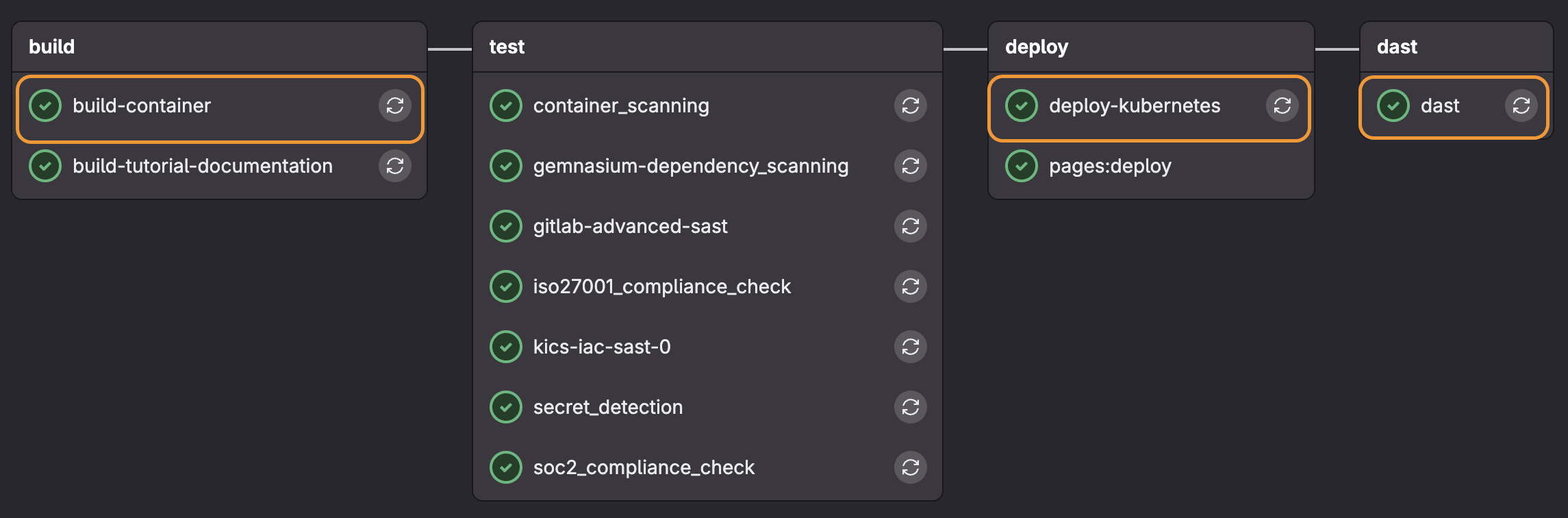
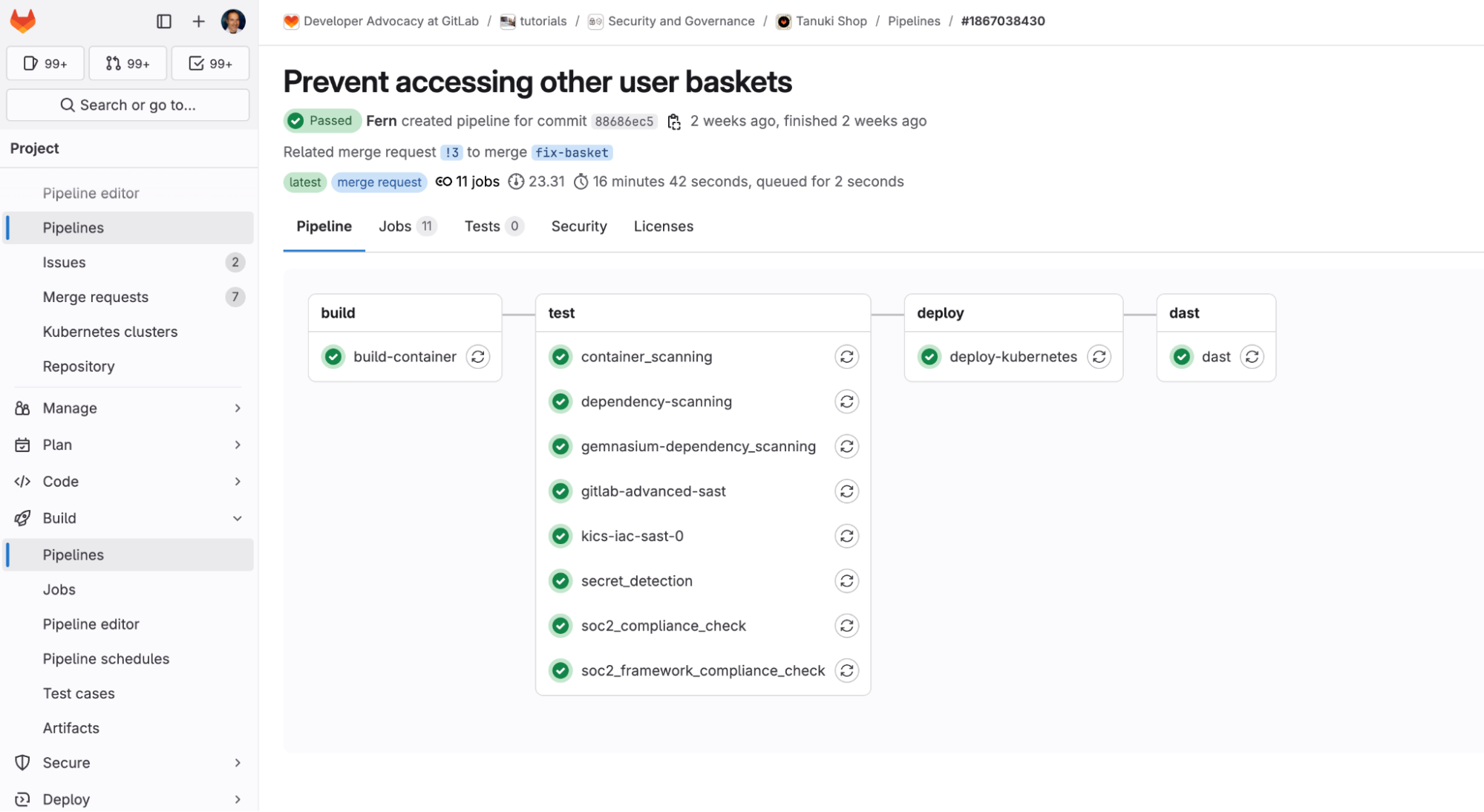
<p>You can learn from an example by seeing the <a href="https://gitlab.com/gitlab-da/tutorials/security-and-governance/tanuki-shop">Tanuki Shop</a> demo application, which generates the
following pipeline:</p>
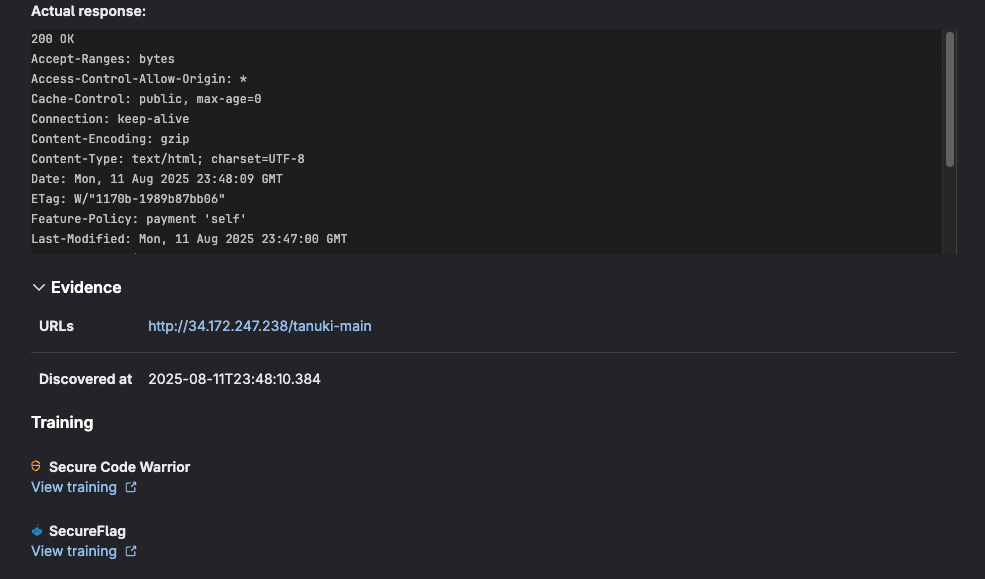
<p><img src="https://res.cloudinary.com/about-gitlab-com/image/upload/v1758118303/rr3cyxjwyecxbmrdxon6.png" alt="Standard DAST Pipeline"></p>
<h3>Understanding passive vs. active scans</h3>
<p>In the example above we enabled active scanning for non-default branches:</p>
<pre><code class="language-yaml">- if: $CI_COMMIT_REF_NAME != $CI_DEFAULT_BRANCH
  variables:
    DAST_FULL_SCAN: &quot;true&quot;
</code></pre>
<p>GitLab DAST employs two distinct scanning methodologies (passive and active), each serving
different security testing needs.</p>
<p><strong>Passive scans</strong> analyze application responses without sending potentially harmful requests. This approach:</p>
<ul>
<li>Examines HTTP headers, cookies, and response content for security misconfigurations</li>
<li>Identifies information disclosure vulnerabilities like exposed server versions or stack traces</li>
<li>Detects missing security headers (CSP, HSTS, X-Frame-options)</li>
<li>Analyzes SSL/TLS configuration and certificate issues</li>
</ul>
<p><strong>Active scans</strong> send crafted requests designed to trigger vulnerabilities. This approach:</p>
<ul>
<li>Tests for injection vulnerabilities (SQL injection, XSS, command injection)</li>
<li>Attempts to exploit authentication and authorization flaws</li>
<li>Validates input sanitization and output encoding</li>
<li>Tests for business logic vulnerabilities</li>
</ul>
<p><strong>Note:</strong> The DAST scanner is set to passive by default.</p>
<p>DAST has several configuration options that can be applied via environment variables.
For a list of all the possible configuration options for DAST, see the <a href="https://docs.gitlab.com/user/application_security/dast/browser/configuration/customize_settings/">DAST documentation</a>.</p>
<h3>Authentication configuration</h3>
<p>DAST requires authentication configuration in CI/CD jobs to achieve complete security coverage. Authentication enables DAST to simulate real attacks and test user-specific features only accessible after login. The DAST job typically authenticates by submitting login forms in a browser, then verifies success before continuing to crawl the application with saved credentials. Failed authentication stops the job.</p>
<p>Supported authentication methods:</p>
<ul>
<li>Single-step login form</li>
<li>Multi-step login form</li>
<li>Authentication to URLs outside the target scope</li>
</ul>
<p>Here is an example for a single-step login form in a <a href="https://gitlab.com/gitlab-da/tutorials/security-and-governance/tanuki-shop/-/merge_requests/20">Tanuki Shop MR</a> which adds
admin authentication to non-default branches.</p>
<pre><code class="language-yaml">dast:
  stage: dast
  before_script:
    - echo &quot;DAST_TARGET_URL set to '$DAST_TARGET_URL'&quot; # Dynamically loaded from deploy job
    - echo &quot;DAST_AUTH_URL set to '$DAST_TARGET_URL'&quot; # Dynamically loaded from deploy jobs
  rules:
    - if: $CI_COMMIT_REF_NAME == $CI_DEFAULT_BRANCH
      variables:
        DAST_FULL_SCAN: &quot;false&quot;
    - if: $CI_COMMIT_REF_NAME != $CI_DEFAULT_BRANCH
      variables:
        DAST_FULL_SCAN: &quot;true&quot; # run both passive and active checks
        DAST_AUTH_USERNAME: &quot;admin@tanuki.local&quot; # The username to authenticate to in the website
        DAST_AUTH_PASSWORD: &quot;admin123&quot; # The password to authenticate to in the website
        DAST_AUTH_USERNAME_FIELD: &quot;css:input[id=email]&quot; # A selector describing the element used to enter the username on the login form
        DAST_AUTH_PASSWORD_FIELD: &quot;css:input[id=password]&quot; # A selector describing the element used to enter the password on the login form
        DAST_AUTH_SUBMIT_FIELD: &quot;css:button[id=loginButton]&quot; # A selector describing the element clicked on to submit the login form
        DAST_SCOPE_EXCLUDE_ELEMENTS: &quot;css:[id=navbarLogoutButton]&quot; # Comma-separated list of selectors that are ignored when scanning
        DAST_AUTH_REPORT: &quot;true&quot; # generate a report detailing steps taken during the authentication process
        DAST_REQUEST_COOKIES: &quot;welcomebanner_status:dismiss,cookieconsent_status:dismiss&quot; # A cookie name and value to be added to every request
        DAST_CRAWL_GRAPH: &quot;true&quot; # generate an SVG graph of navigation paths visited during crawl phase of the scan
  dependencies:
    - deploy-kubernetes
</code></pre>
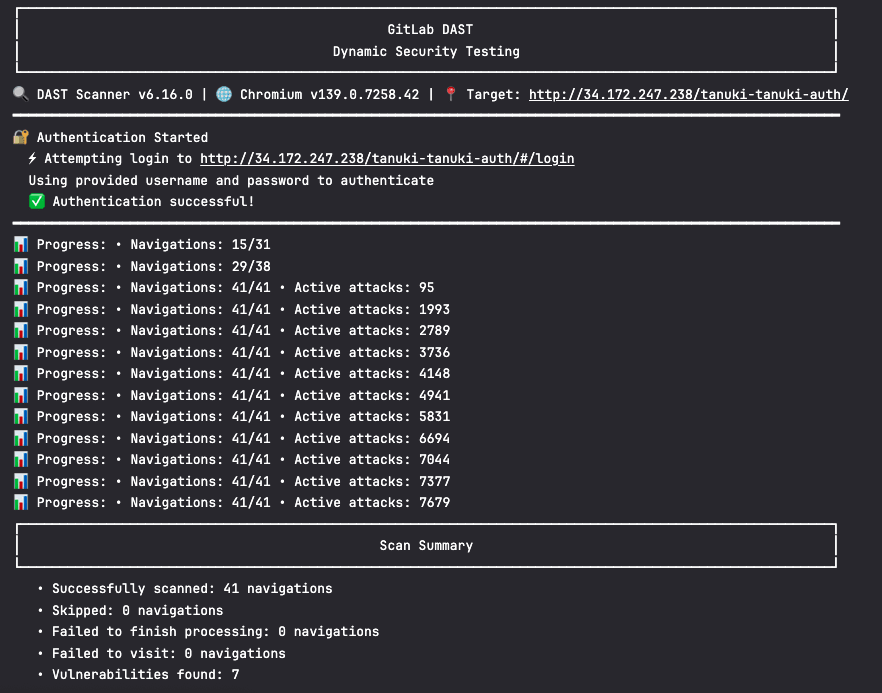
<p>You can see if the authentication was successful by viewing the job logs:</p>
<p><img src="https://res.cloudinary.com/about-gitlab-com/image/upload/v1758118293/zdxgwb6jmseyzwcjscrz.png" alt="Auth logs"></p>
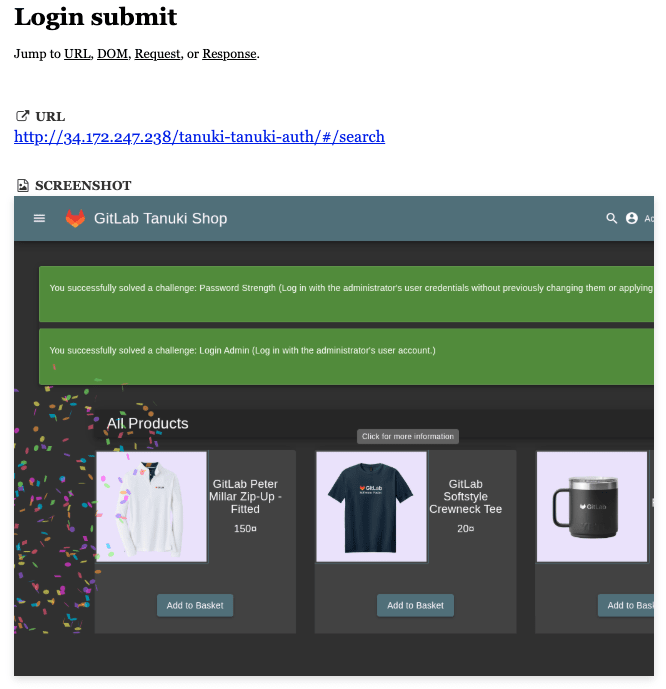
<p>Once this job completes it provides an authentication report which includes screenshots of the login page:</p>
<p><img src="https://res.cloudinary.com/about-gitlab-com/image/upload/v1758118292/idm62deg3ezeehcubmc1.png" alt="Auth report"></p>
<p>You can also see more examples on DAST with authentication in our <a href="https://gitlab.com/gitlab-org/security-products/demos/dast/">DAST demos</a> group.
To learn more about how to perform DAST with authentication with your specific requirements, see the <a href="https://docs.gitlab.com/user/application_security/dast/browser/configuration/authentication/">DAST authentication documentation</a>.</p>
<h2>Viewing results in MR</h2>
<p>GitLab's DAST seamlessly integrates security scanning into your development workflow
by displaying results directly within merge requests:</p>
<p><img src="https://res.cloudinary.com/about-gitlab-com/image/upload/v1758118293/rrx4n3pgxi9vmzlas8vp.png" alt="DAST MR 1"><br>
<img src="https://res.cloudinary.com/about-gitlab-com/image/upload/v1758118294/rh9vwv6ohoaenpvicujm.png" alt="DAST MR 2"><br>
<img src="https://res.cloudinary.com/about-gitlab-com/image/upload/v1758118294/ficelmulsc0r7bijf24m.png" alt="DAST MR 3"></p>
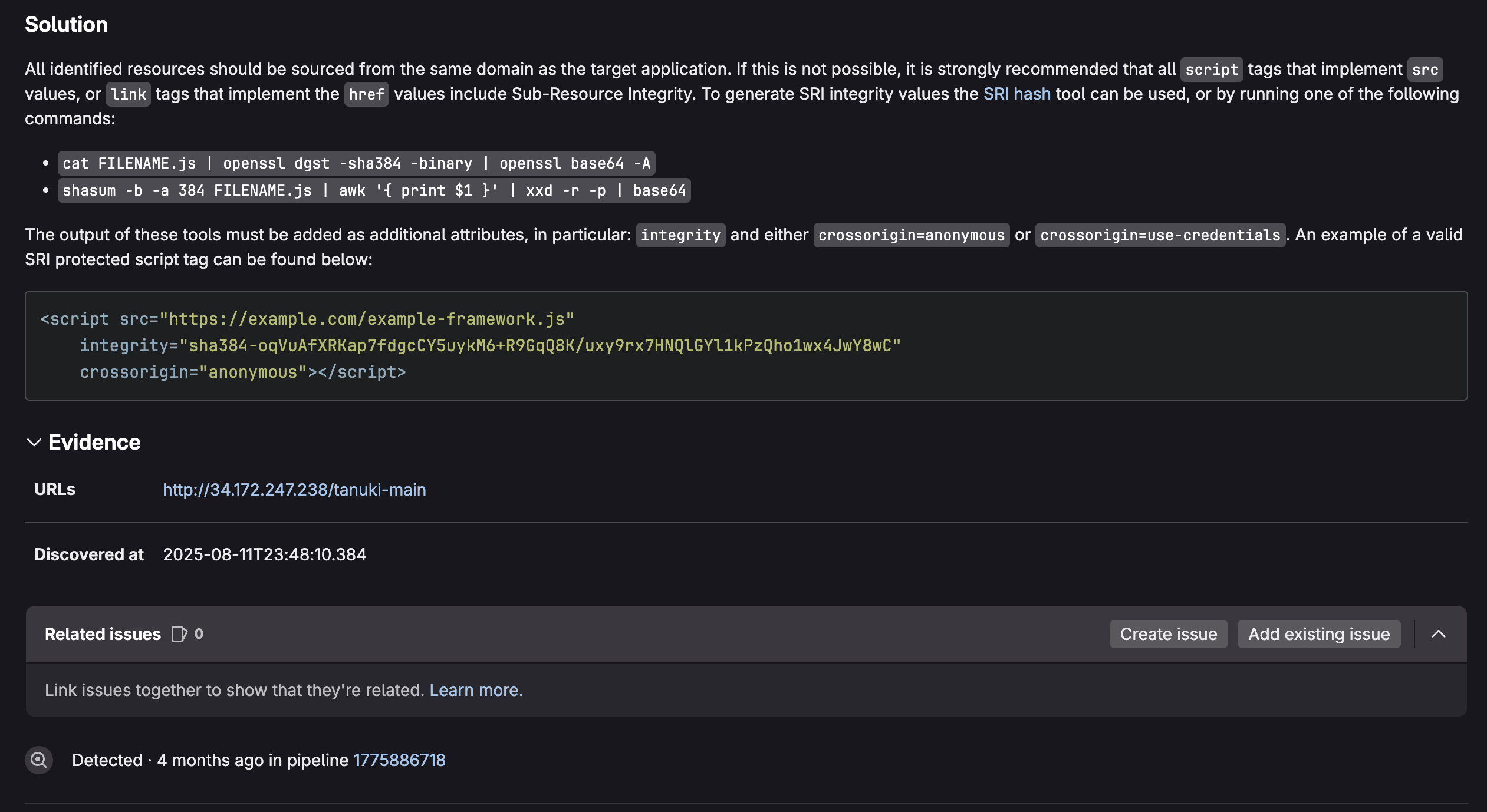
<p>These results include comprehensive vulnerability data within MRs to help developers identify and address
security issues before code is merged. Here's what DAST typically reports:</p>
<h3>Vulnerability details</h3>
<ul>
<li>Vulnerability name and type (e.g., SQL injection, XSS, CSRF)</li>
<li>Severity level (Critical, High, Medium, Low, Info)</li>
<li>CVSS score when applicable</li>
<li>Common Weakness Enumeration (CWE) identifier</li>
<li>Confidence level of the finding</li>
</ul>
<h3>Location information</h3>
<ul>
<li>URL/endpoint where the vulnerability was detected</li>
<li>HTTP method used (GET, POST, etc.)</li>
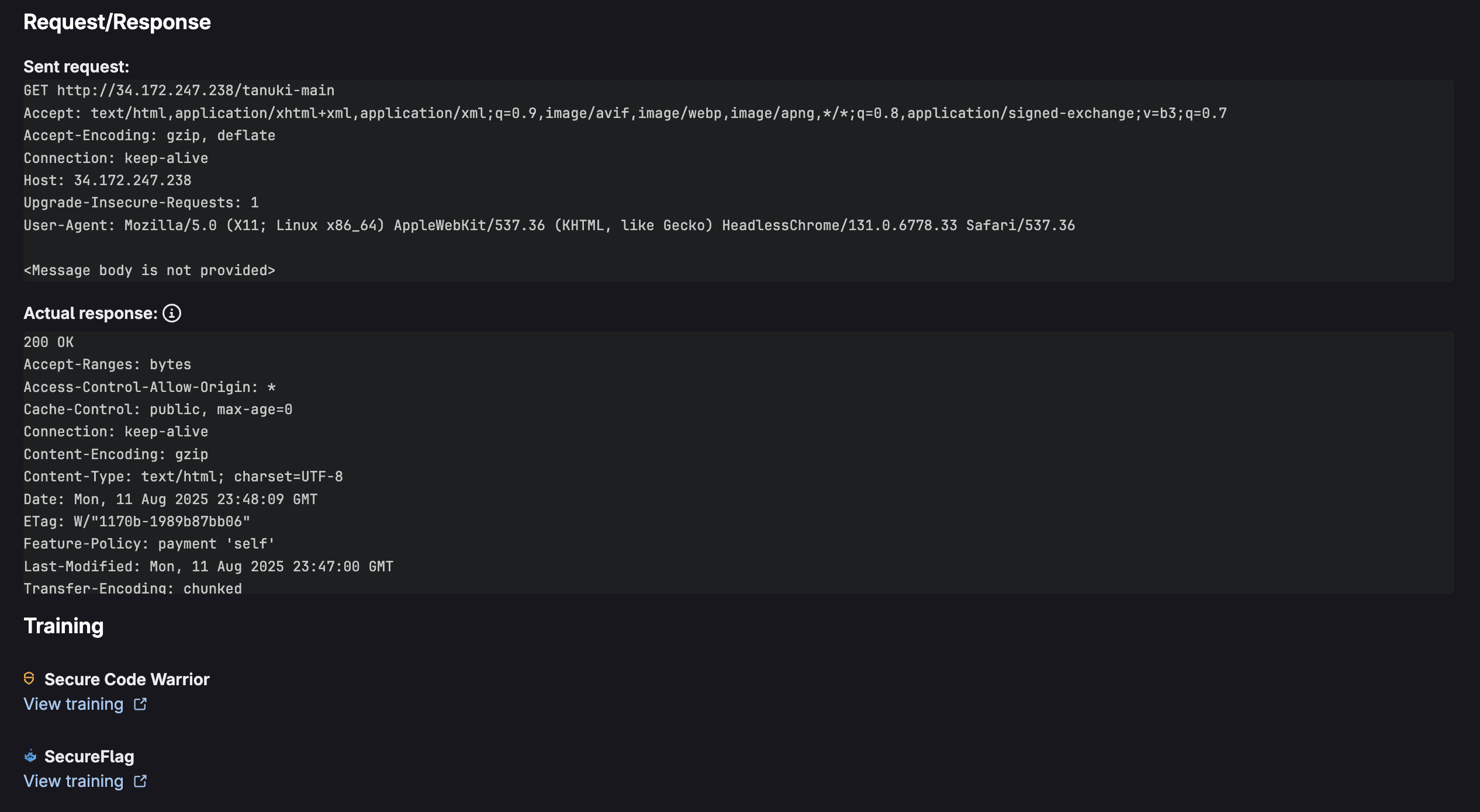
<li>Request/response details showing the vulnerable interaction</li>
<li>Parameter names that are vulnerable</li>
<li>Evidence demonstrating the vulnerability</li>
</ul>
<h4>Technical context</h4>
<ul>
<li>Description of the vulnerability and potential impact</li>
<li>Proof of concept showing how the vulnerability can be exploited</li>
<li>Request/response pairs that triggered the finding</li>
<li>Scanner details (which DAST tool detected it)</li>
</ul>
<h3>Remediation guidance</h3>
<ul>
<li>Solution recommendations for fixing the vulnerability</li>
<li>References to security standards (OWASP, etc.)</li>
<li>Links to documentation for remediation steps</li>
</ul>
<h2>Viewing results in GitLab Vulnerability Report</h2>
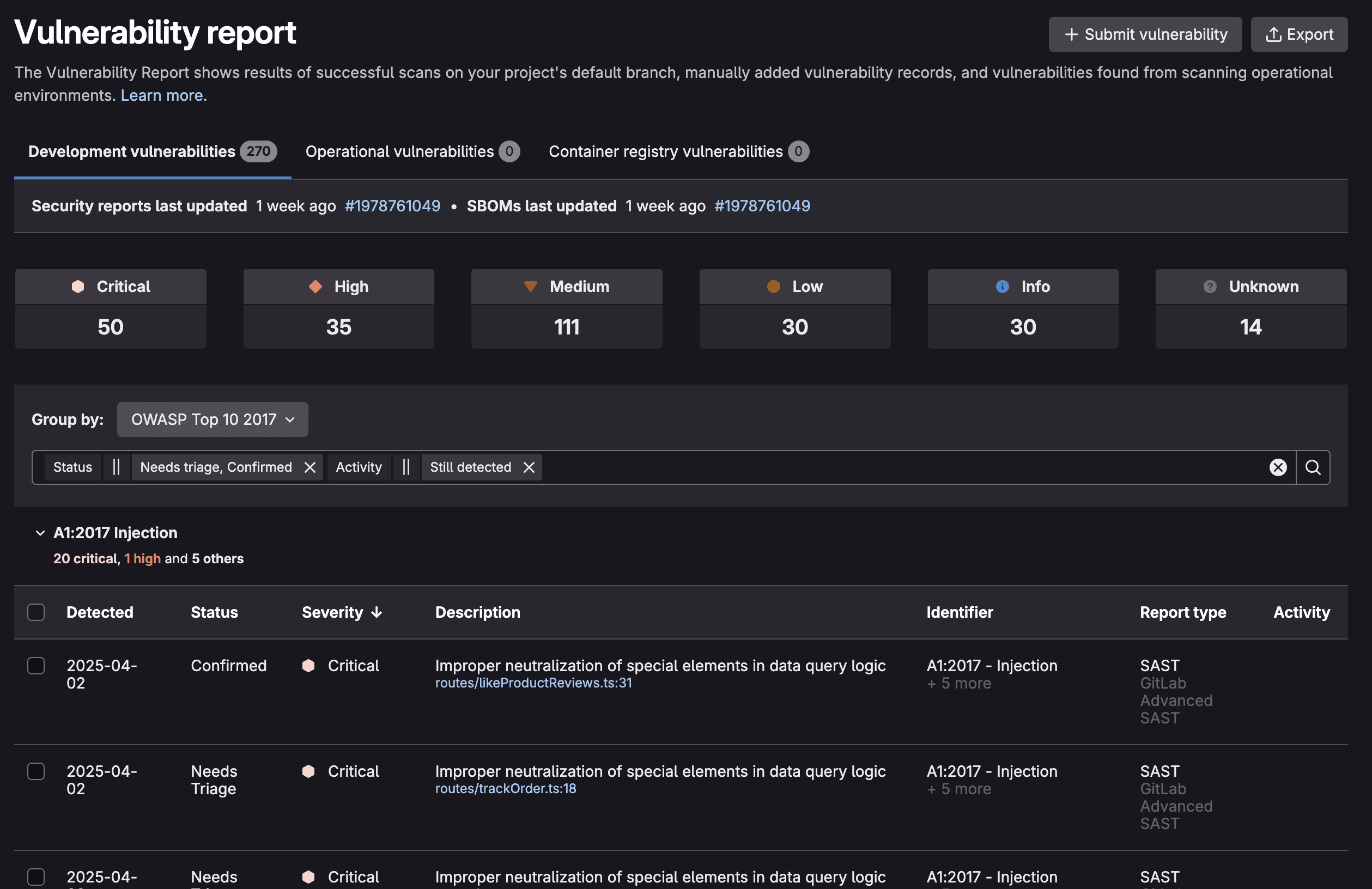
<p>For managing vulnerabilities located in the default (or production) branch, the GitLab Vulnerability Report provides a centralized dashboard for monitoring all security findings (in the default branch) across your entire project or organization. This comprehensive view aggregates all security scan results, offering filtering and sorting capabilities to help security teams prioritize remediation efforts.</p>
<p><img src="https://res.cloudinary.com/about-gitlab-com/image/upload/v1758118304/o8jjgngtxqplcgux9h5p.png" alt="Vulnerability Report"></p>
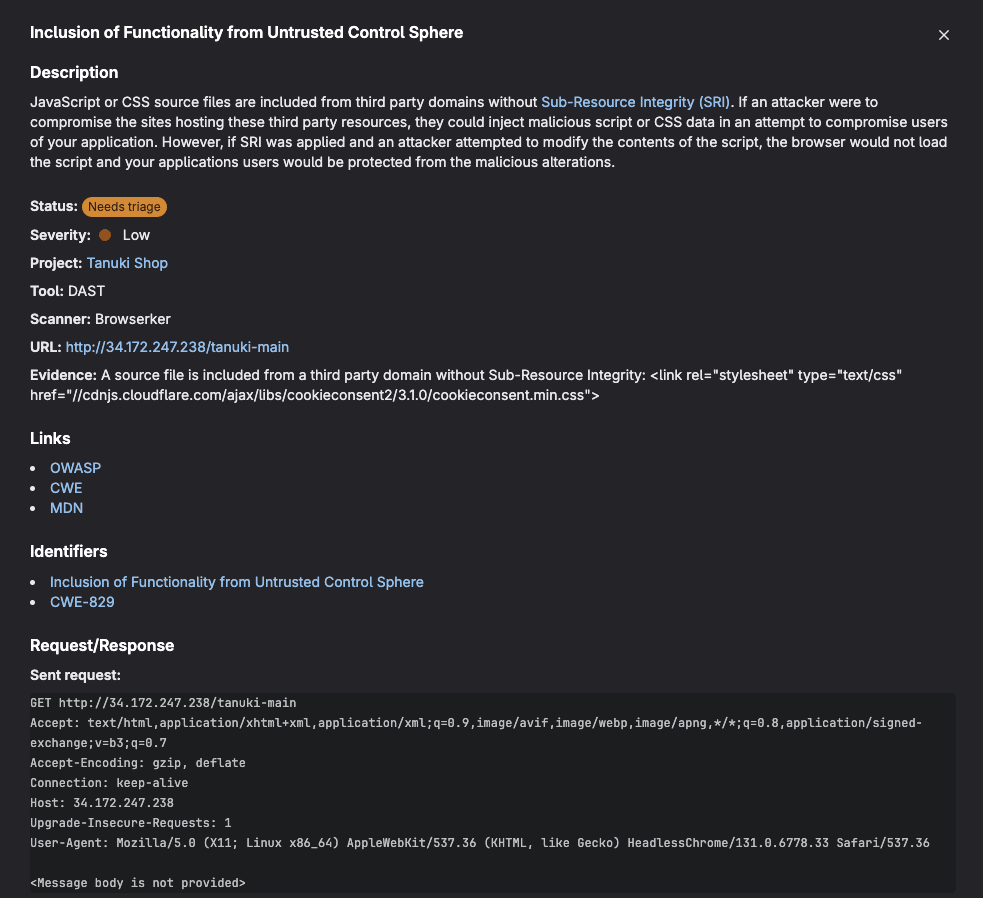
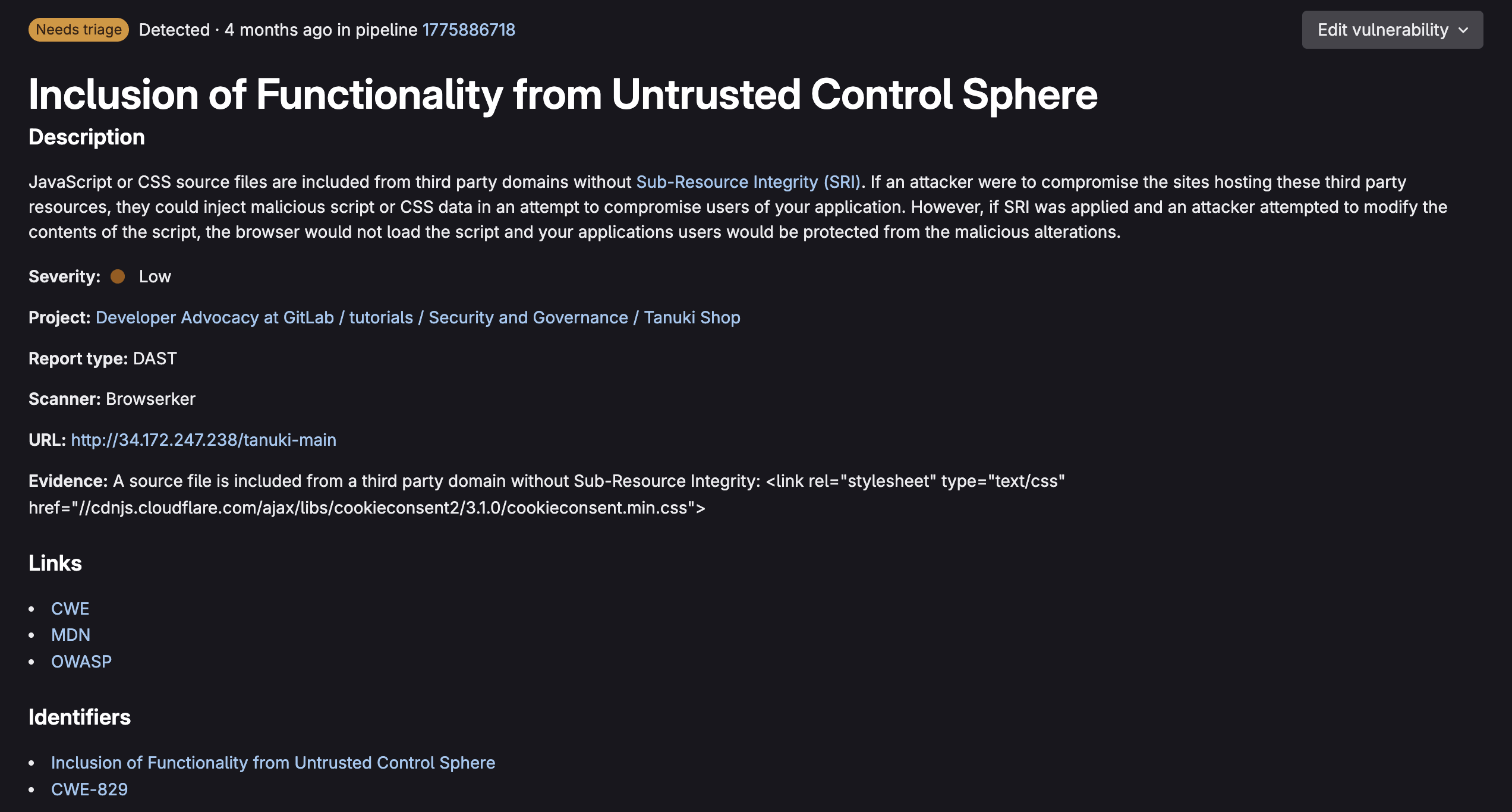
<p>When selecting a vulnerability, you are taken to its vulnerability page:</p>
<p><img src="https://res.cloudinary.com/about-gitlab-com/image/upload/v1758118303/rolcgxhe0lh2s54zz2kc.png" alt="Vulnerability Page 1"><br>
<img src="https://res.cloudinary.com/about-gitlab-com/image/upload/v1758118303/dubic3yacd5n11ine1vi.png" alt="Vulnerability Page 2"><br>
<img src="https://res.cloudinary.com/about-gitlab-com/image/upload/v1758118303/iojrm3zasqxljuybbqcs.png" alt="Vulnerability Page 3"></p>
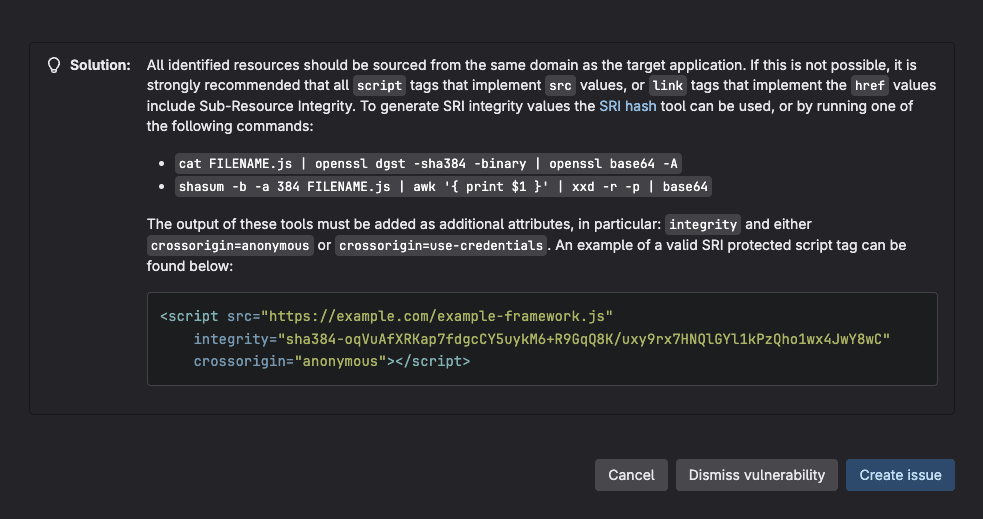
<p>Just like in merge requests, the vulnerability page provides comprehensive vulnerability data, as seen above. From here you can triage vulnerabilities by assigning them with a status:</p>
<ul>
<li>Needs triage (Default)</li>
<li>Confirmed</li>
<li>Dismissed (Acceptable risk, False positive, Mitigating control, Used in tests, Not applicable)</li>
<li>Resolved</li>
</ul>
<p>When a vulnerability status is changed, the audit log includes a note of who changed it, when it was changed, and the reason it was changed. This comprehensive system allows security teams to efficiently prioritize, track, and manage vulnerabilities throughout their lifecycle with clear accountability and detailed risk context.</p>
<h2>On-demand and scheduled DAST</h2>
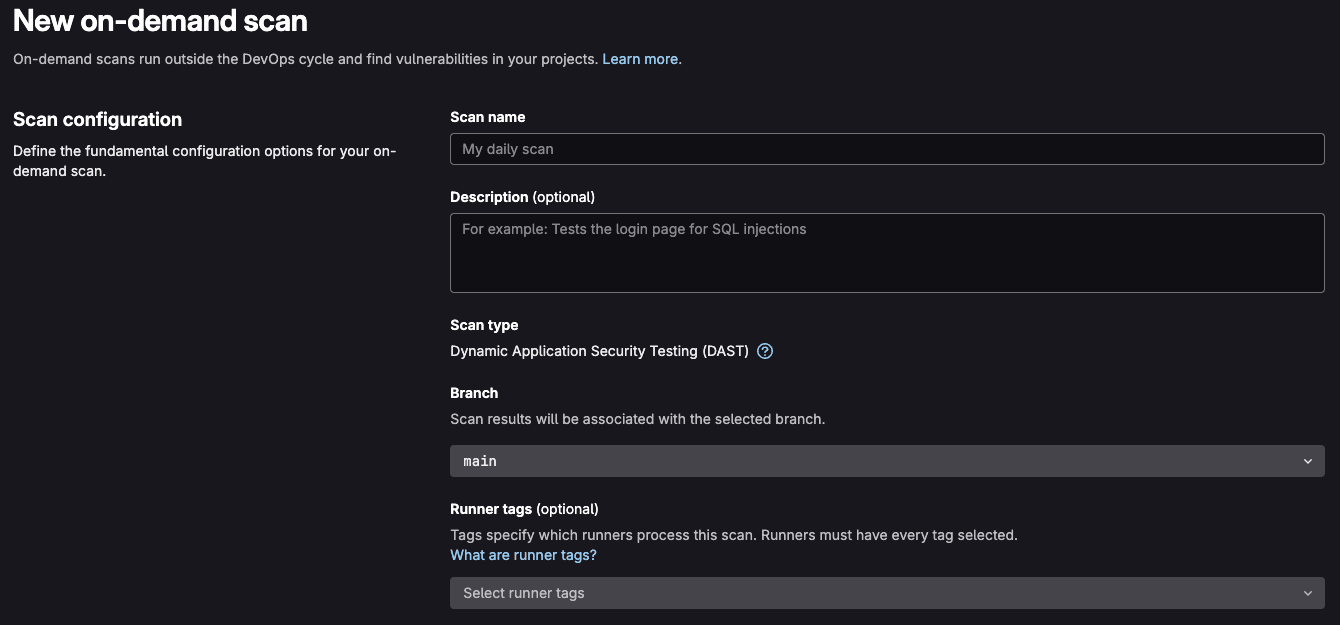
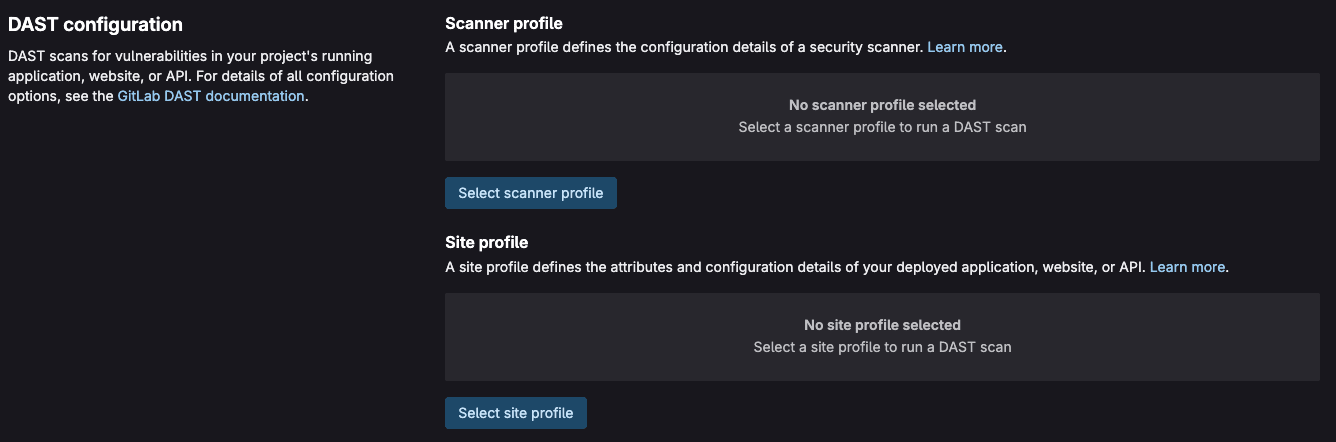
<p>GitLab provides flexible scanning options beyond standard CI/CD pipeline integration through
on-demand and scheduled DAST scans. On-demand scans allow security teams and developers to
initiate DAST testing manually whenever needed, without waiting for code commits or pipeline triggers.
This capability is particularly valuable for ad-hoc security assessments, incident response scenarios,
or when testing specific application features that may not be covered in regular pipeline scans.</p>
<p><img src="https://res.cloudinary.com/about-gitlab-com/image/upload/v1758118296/hs3fhn42ceycmd94oaua.png" alt="On-demand 1"><br>
<img src="https://res.cloudinary.com/about-gitlab-com/image/upload/v1758118298/wiptmr948xey6rrodosg.png" alt="On-demand 2"></p>
<p>On-demand scans can be configured with custom parameters, target URLs, and scanning profiles, making
them ideal for focused security testing of particular application components or newly-deployed features.
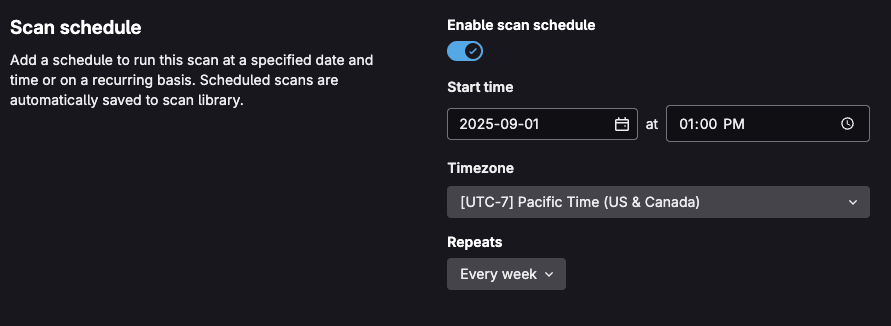
Scheduled DAST scans provide automated, time-based security testing that operates independently of
the development workflow. These scans can be configured to run daily, weekly, or at custom intervals,
ensuring continuous security monitoring of production applications.</p>
<p><img src="https://res.cloudinary.com/about-gitlab-com/image/upload/v1758118300/dbxgkeahij4fklkpcpck.png" alt="Scheduling DAST"></p>
<p>To learn how to implement on-demand or scheduled scans within your project, see the
<a href="https://docs.gitlab.com/user/application_security/dast/on-demand_scan/">DAST on-demand scan documentation</a></p>
<h2>DAST in compliance workflows</h2>
<p>GitLab's security policies framework allows organizations to enforce consistent security
standards across all projects, while maintaining flexibility for different teams and environments.
Security policies enable centralized governance of DAST scanning requirements, ensuring that
critical applications receive appropriate security testing without requiring individual project
configuration. By defining security policies at the group or instance level, security teams can
mandate DAST scans for specific project types, deployment environments, or risk classifications.</p>
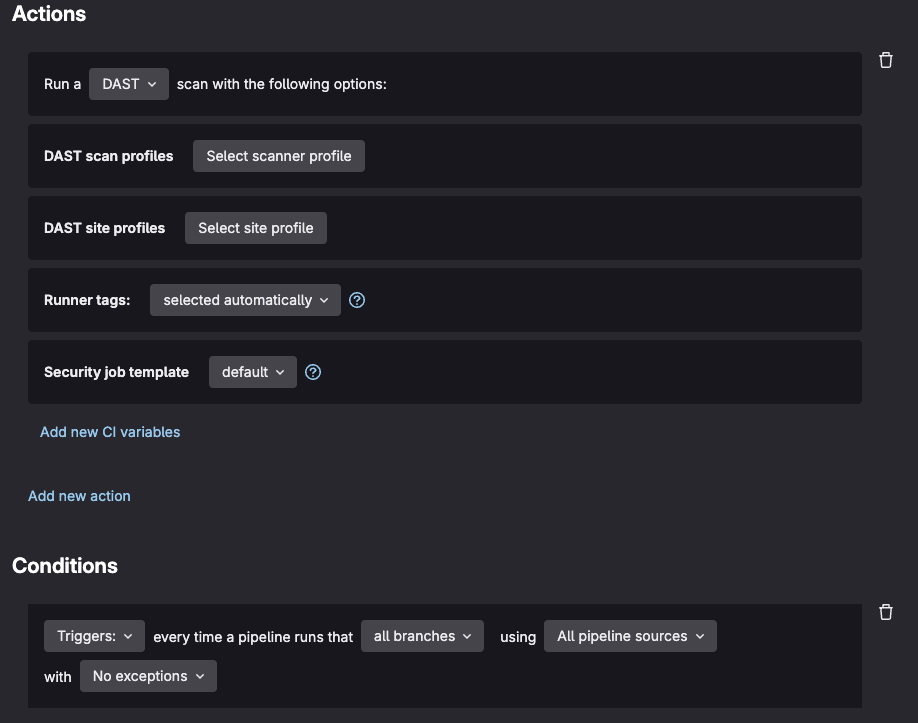
<p><strong>Scan/Pipeline Execution Policies</strong> can be configured to automatically trigger DAST scans based on
specific conditions such as merge requests to protected branches, scheduled intervals, or deployment events.
For example, a policy might require full active DAST scans for all applications before production deployment,
while allowing passive scans only for development branches. These policies can include custom variables,
authentication configurations, and exclusion rules that are automatically applied to all covered projects,
reducing the burden on development teams and ensuring security compliance.</p>
<p><img src="https://res.cloudinary.com/about-gitlab-com/image/upload/v1758118299/twe0967sayasvassimf3.png" alt="Scan Execution Policy"></p>
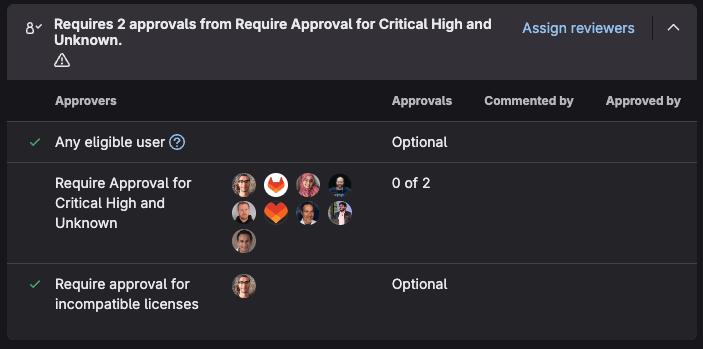
<p><strong>Merge Request Approval Policies</strong> provide an additional layer of security governance by enforcing human
review for code changes that may impact security. These policies can be configured to require security team
approval when DAST scans detect new vulnerabilities, when security findings exceed defined thresholds, or
when changes affect security-critical components. For example, a policy might automatically require approval
from a designated security engineer when DAST findings include high-severity vulnerabilities, while allowing
lower-risk findings to proceed with standard code review processes.</p>
<p><img src="https://res.cloudinary.com/about-gitlab-com/image/upload/v1758118295/w0odyhf3gnkxis3f61ma.png" alt="MR Approval Policy"></p>
<p>To learn more about GitLab security policies, see the <a href="https://docs.gitlab.com/user/application_security/policies/">policy documentation</a>.
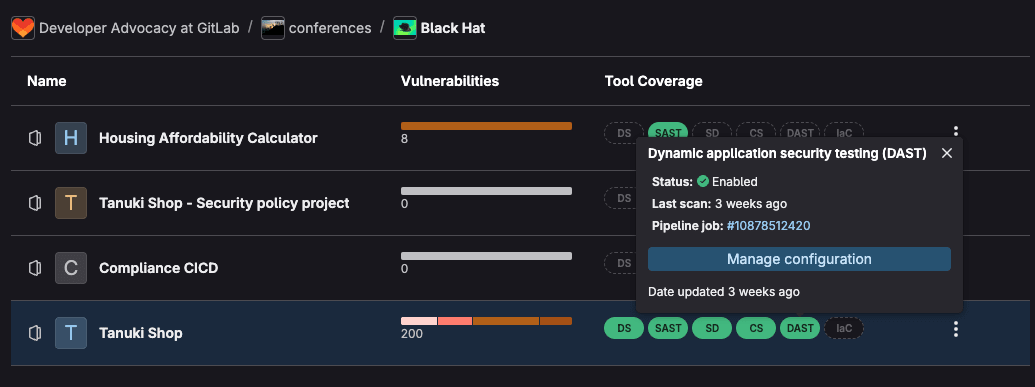
Additionally, for compliance, GitLab provides <a href="https://docs.gitlab.com/user/application_security/security_inventory/">Security Inventory</a>
and <a href="https://docs.gitlab.com/user/compliance/compliance_center/">Compliance center</a>, which can allow you to oversee
if DAST is running in your environment and where it is required.</p>
<p><img src="https://res.cloudinary.com/about-gitlab-com/image/upload/v1758118300/hro6gykf7igpnnczmpyg.png" alt="Security Inventory"></p>
<p>To learn more about these features, visit our <a href="https://about.gitlab.com/solutions/software-compliance/">software compliance solutions page</a>.</p>
<h2>Summary</h2>
<p>GitLab DAST represents a powerful solution for integrating dynamic security testing into modern development workflows. By implementing DAST in your CI/CD pipeline, your team gains the ability to automatically detect runtime vulnerabilities, maintain compliance with security standards, and build more secure applications without sacrificing development velocity.</p>
<p>The key to successful DAST implementation lies in starting with basic configuration and gradually expanding to more sophisticated scanning profiles as your security maturity grows. Begin with simple website scanning, then progressively add authentication, custom exclusions, and advanced reporting to match your specific security requirements.</p>
<p>Remember that DAST is most effective when combined with other security testing approaches. Use it alongside static analysis, dependency scanning, and manual security reviews to create a comprehensive security testing strategy. The automated nature of GitLab DAST ensures that security testing becomes a consistent, repeatable part of your development process rather than an afterthought.</p>
<blockquote>
<p>To learn more about GitLab security, check out our <a href="https://about.gitlab.com/solutions/application-security-testing/">security testing solutions page</a>. To get started with GitLab DAST, <a href="https://about.gitlab.com/free-trial/devsecops/">sign up for a free trial of GitLab Ultimate today</a>.</p>
</blockquote>
]]></content>
        <author>
            <name>Fernando Diaz</name>
            <uri>https://about.gitlab.com/blog/authors/fernando-diaz</uri>
        </author>
        <published>2025-09-17T00:00:00.000Z</published>
    </entry>
    <entry>
        <title type="html"><![CDATA[GitLab named a Leader in the 2025 Gartner Magic Quadrant for AI Code Assistants]]></title>
        <id>https://about.gitlab.com/blog/gitlab-named-a-leader-in-the-2025-gartner-magic-quadrant-for-ai-code-assistants/</id>
        <link href="https://about.gitlab.com/blog/gitlab-named-a-leader-in-the-2025-gartner-magic-quadrant-for-ai-code-assistants/"/>
        <updated>2025-09-17T00:00:00.000Z</updated>
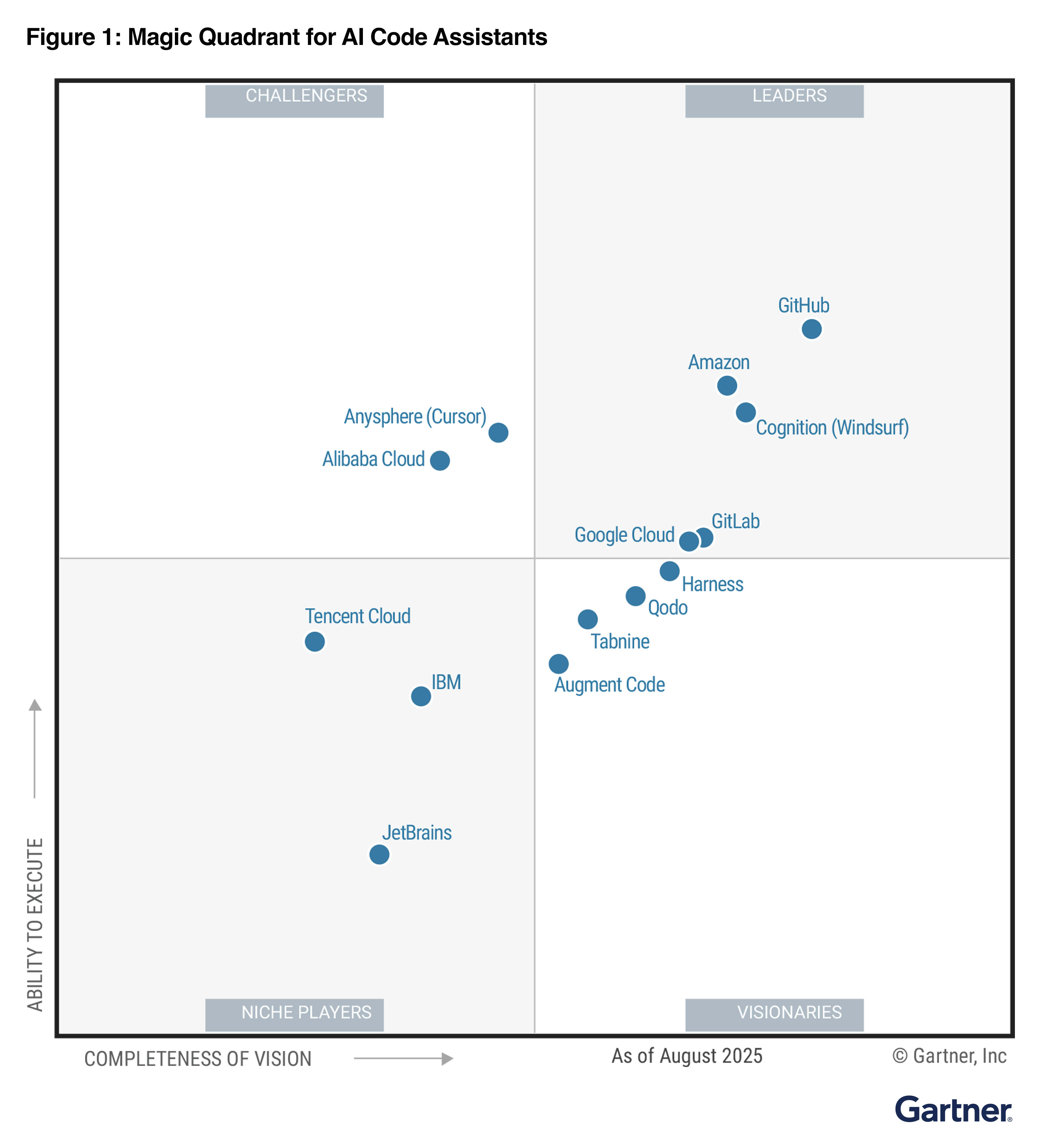
        <content type="html"><![CDATA[<p>GitLab has been recognized for the second time as a Leader in the 2025 Gartner® Magic Quadrant™ for AI Code Assistants. We see this recognition as validation of a key pillar in our broader AI strategy, where intelligent code assistance evolves into comprehensive AI that transforms how entire teams plan, build, secure, and deploy software.
<img src="https://res.cloudinary.com/about-gitlab-com/image/upload/v1758121248/jfkmhddve6qvlg79xico.png" alt="2025 Gartner® Magic Quadrant™ for AI Code Assistants"></p>
<blockquote>
<p><a href="https://about.gitlab.com/gartner-mq-ai-code-assistants/">Download the report.</a></p>
</blockquote>
<h2>From AI features to intelligent collaboration</h2>
<p>The Gartner evaluation, we feel, focused on GitLab Duo's generative AI code assistance capabilities. While GitLab Duo began as an AI add-on to the GitLab DevSecOps platform, it laid the groundwork for where we are going today with agentic AI built natively into the GitLab DevSecOps platform.</p>
<p>GitLab Duo Agent Platform enables developers to work alongside multiple AI agents that automate tasks across the software lifecycle. Agents collaborate with each other and with humans, using GitLab’s Knowledge Graph to act with full project context. This empowers teams to move faster while keeping visibility and control.</p>
<ul>
<li>
<p><strong>Specialized agents</strong> handle tasks such as code generation, security analysis, and research in parallel.</p>
</li>
<li>
<p><strong>Knowledge Graph</strong> connects agents to a unified system of record across code, issues, pipelines, and compliance data.</p>
</li>
<li>
<p><strong>Human + agent collaboration</strong> happens through natural-language chat and customizable flows, with review and oversight built in.</p>
</li>
<li>
<p><strong>Interoperability with external tools and systems</strong> is supported through Model Context Protocol (MCP) and agent-to-agent frameworks.</p>
</li>
</ul>
<p>With agents handling routine work under human guidance, teams can move faster, focus on higher-value tasks, and keep projects secure and compliant.</p>
<h2>Secure by design, flexible in practice</h2>
<p>The GitLab Duo Agent Platform is designed to keep security and compliance front and center. Agents run inside GitLab’s trusted DevSecOps environment, with every action visible and reviewable before changes are made. Secure integrations help ensure credentials and sensitive data are handled safely, while interoperability through open standards connects agents to external tools without exposing an organization to risk.</p>
<p>The platform gives teams confidence that AI is enhancing productivity without compromising governance. Here's how:</p>
<ul>
<li>
<p><strong>Developers</strong> can stay focused on complex, high-impact work, while handing off routine tasks to agents for faster results and more granular context delivered through their existing workflows.</p>
</li>
<li>
<p><strong>Engineering leaders</strong> gain visibility into how work moves across the lifecycle, with agents operating within clear guardrails. They also can ensure their teams stay aligned to priorities and simplify onboarding with guided support through agent-driven context and workflows.</p>
</li>
<li>
<p><strong>IT organizations</strong> maintain control over agent activity with governance features that enforce coding and security policies, offer model selection flexibility, and ensure secure interoperability — all while keeping humans in the loop.</p>
</li>
</ul>
<h2>Leading the move to AI-native development</h2>
<p>GitLab continues to build on the vision that began with Duo, and will continue to expand GitLab Duo Agent Platform with new agents, advanced workflows, and more orchestration capabilities. This commitment to innovation ensures you can amplify team productivity on the platform you know and trust. Stay tuned for exciting updates on our roadmap as we continue to revolutionize AI-native DevSecOps.</p>
<blockquote>
<p><a href="https://about.gitlab.com/gartner-mq-ai-code-assistants/">Download the 2025 Gartner® Magic Quadrant™ for AI Code Assistants</a> and <a href="https://about.gitlab.com/gitlab-duo/agent-platform/">try GitLab Duo Agent Platform today</a>.</p>
</blockquote>
<p><em>Source: Gartner, Magic Quadrant for AI Code Assistants, Philip Walsh, Haritha Khandabattu, Matt Brasier, Keith Holloway, Arun Batchu, 15 September 2025</em></p>
<p><em>GARTNER is a registered trademark and service mark of Gartner, Inc. and/or its affiliates in the U.S. and internationally, and MAGIC QUADRANT is a registered trademark of Gartner, Inc. and/or its affiliates and are used herein with permission. All rights reserved.</em></p>
<p><em>Gartner does not endorse any vendor, product or service depicted in its research publications, and does not advise technology users to select only those vendors with the highest ratings or other designation. Gartner research publications consist of the opinions of Gartner’s research organization and should not be construed as statements of fact. Gartner disclaims all warranties, expressed or implied, with respect to this research, including any warranties of merchantability or fitness for a particular purpose.</em></p>
<p><em>This graphic was published by Gartner Inc. as part of a larger report and should be evaluated in the context of the entire document. The Gartner document is available upon request from Gartner B.V.</em></p>
]]></content>
        <author>
            <name>Manav Khurana</name>
            <uri>https://about.gitlab.com/blog/authors/manav-khurana</uri>
        </author>
        <published>2025-09-17T00:00:00.000Z</published>
    </entry>
    <entry>
        <title type="html"><![CDATA[How GitLab Duo Agent Platform transforms DataOps]]></title>
        <id>https://about.gitlab.com/blog/how-gitlab-duo-agent-platform-transforms-dataops/</id>
        <link href="https://about.gitlab.com/blog/how-gitlab-duo-agent-platform-transforms-dataops/"/>
        <updated>2025-09-16T00:00:00.000Z</updated>
        <content type="html"><![CDATA[<p>Creating dbt models manually is a tedious process that can consume hours of a data engineer's time. Especially when no (big) business transformations are made, it is not the most attractive part of an engineer's work with data.</p>
<p>But what if you could automate this entire process? In this walkthrough, I'll show you exactly how <a href="https://about.gitlab.com/gitlab-duo/agent-platform/">GitLab Duo Agent Platform</a> can generate comprehensive dbt models in just minutes, complete with proper structure, tests, and documentation.</p>
<h2>What we're building</h2>
<p>Our marketing team wants to effectively manage and optimize advertising investments. One of the advertising platforms is Reddit, so, therefore, we are extracting data from the Reddit Ads API to our enterprise <a href="https://handbook.gitlab.com/handbook/enterprise-data/platform/">Data Platform</a> Snowflake. At GitLab, we have three layers of storage:</p>
<ol>
<li><code>raw</code> layer - first landing point for unprocessed data from external sources; not ready for business use</li>
<li><code>prep</code> layer - first transformation layer with source models; still not ready for general business use</li>
<li><code>prod</code> layer - final transformed data ready for business use and Tableau reporting</li>
</ol>
<p><img src="https://res.cloudinary.com/about-gitlab-com/image/upload/v1758030995/zo7vespktzfdtdtiauz7.png" alt="Chart of storage layers"></p>
<p>For this walkthrough, data has already landed in the raw layer by our extraction solution Fivetran, and we'll generate dbt models that handle the data through the <code>prep</code> layer to the <code>prod</code> layer.</p>
<p>Without having to write a single line of dbt code ourselves, by the end of the walkthrough we will have:</p>
<ul>
<li><strong>Source models</strong> in the prep layer</li>
<li><strong>Workspace models</strong> in the prod layer</li>
<li><strong>Complete dbt configurations</strong> for all 13 tables (which includes 112 columns) in the Reddit Ads dataset</li>
<li><strong>Test queries</strong> to validate the outcomes</li>
</ul>
<p>The entire process will take less than 10 minutes, compared to the hours it would typically require manually. Here are the steps to follow:</p>
<h2>1. Prepare the data structure</h2>
<p>Before GitLab Duo can generate our models, it needs to understand the complete table structure. The key is running a query against Snowflake's information schema, because we are currently investigating how to connect GitLab Duo via Model Context Protocol (<a href="https://about.gitlab.com/topics/ai/model-context-protocol/">MCP</a>) to our Snowflake instance:</p>
<pre><code class="language-sql">SELECT 
    table_name,
    column_name,
    data_type,
    is_nullable,
    CASE 
        WHEN is_nullable = 'NO' THEN 'PRIMARY_KEY'
        ELSE NULL 
    END as key_type
FROM raw.information_schema.columns
WHERE table_schema = 'REDDIT_ADS'
ORDER BY table_name, ordinal_position;
</code></pre>
<p>This query captures:</p>
<ul>
<li>All table and column names</li>
<li>Data types for proper model structure</li>
<li>Nullable constraints</li>
<li>Primary key identification (non-nullable columns in this dataset)</li>
</ul>
<p><strong>Pro tip:</strong> In the Reddit Ads dataset, all non-nullable columns serve as primary keys — a pattern. I validated by checking tables like <code>ad_group</code>, which has two non-nullable columns (<code>account_id</code> and <code>id</code>) that are both marked as primary keys. Running this query returned 112 rows of metadata that I exported as a CSV file for model generation. While this manual step works well today, we're investigating a direct GitLab Duo integration with our Data Platform via MCP to automate this process entirely.</p>
<h2>2. Set up GitLab Duo</h2>
<p>There are two ways to interact with <a href="https://docs.gitlab.com/user/get_started/getting_started_gitlab_duo/">GitLab Duo</a>:</p>
<ol>
<li><strong>Web UI chat function</strong></li>
<li><strong>Visual Studio Code plugin</strong></li>
</ol>
<p>I chose the VS Code plugin because I can run the dbt models locally to test them.</p>
<h2>3. Enter the 'magic' prompt</h2>
<p>Here's the exact prompt I used to generate all the dbt code:</p>
<pre><code class="language-yaml">Create dbt models for all the tables in the file structure.csv.

I want to have the source models created, with a filter that dedupes the data based on the primary key. Create these in a new folder reddit_ads.
I want to have workspace models created and store these in the workspace_marketing schema.

Take this MR as example: [I've referenced to previous source implementation]. Here is the same done for Source A, but now it needs to be done for Reddit Ads. 

Please check the dbt style guide when creating the code: https://handbook.gitlab.com/handbook/enterprise-data/platform/dbt-guide/
</code></pre>
<p>Key elements that made this prompt effective:</p>
<ul>
<li><strong>Clear specifications</strong> for both source and workspace models.</li>
<li><strong>Reference example</strong> from a previous similar merge request.</li>
<li><strong>Style guide reference</strong> to ensure code quality and consistency.</li>
<li><strong>Specific schema targeting</strong> for proper organization.</li>
</ul>
<h2>4. GitLab Duo's process</h2>
<p>After submitting the prompt, GitLab Duo got to work. The entire generation process took a few minutes, during which GitLab Duo:</p>
<ol>
<li><strong>Read and analyzed</strong> the CSV input file.</li>
<li><strong>Examined table structures</strong> from the metadata.</li>
<li><strong>Referenced our dbt style guide</strong> for coding standards.</li>
<li><strong>Took similar merge request into account</strong> to properly structure.</li>
<li><strong>Generated source models</strong> for all 13 tables.</li>
<li><strong>Created workspace models</strong> for all 13 tables.</li>
<li><strong>Generated supporting dbt files</strong>:
<ul>
<li><code>sources.yml</code> configuration.</li>
<li><code>schema.yml</code> files with tests and documentation.</li>
<li>Updated <code>dbt_project.yml</code> with schema references.</li>
</ul>
</li>
</ol>
<h2>The results</h2>
<p>The output was remarkable:</p>
<ul>
<li><strong>1 modified file:</strong> dbt_project.yml (added reddit_ads schema configuration)</li>
<li><strong>29 new files:</strong>
<ul>
<li><strong>26 dbt models</strong> (13 source + 13 workspace)</li>
<li><strong>3 YAML files</strong></li>
</ul>
</li>
<li><strong>Nearly 900 lines of code</strong> generated automatically</li>
<li><strong>Built-in data tests,</strong> including unique constraints on primary key columns</li>
<li><strong>Generic descriptions</strong> for all models and columns</li>
<li><strong>Proper deduplication logic</strong> in source models</li>
<li><strong>Clean, consistent code structure</strong> following the GitLab dbt style guide</li>
</ul>
<pre><code class="language-yaml">transform/snowflake-dbt/
├── dbt_project.yml                                                    [MODIFIED]
└── models/
    ├── sources/
    │   └── reddit_ads/
    │       ├── reddit_ads_ad_group_source.sql                        [NEW]
    │       ├── reddit_ads_ad_source.sql                              [NEW]
    │       ├── reddit_ads_business_account_source.sql                [NEW]
    │       ├── reddit_ads_campaign_source.sql                        [NEW]
    │       ├── reddit_ads_custom_audience_history_source.sql         [NEW]
    │       ├── reddit_ads_geolocation_source.sql                     [NEW]
    │       ├── reddit_ads_interest_source.sql                        [NEW]
    │       ├── reddit_ads_targeting_community_source.sql             [NEW]
    │       ├── reddit_ads_targeting_custom_audience_source.sql       [NEW]
    │       ├── reddit_ads_targeting_device_source.sql                [NEW]
    │       ├── reddit_ads_targeting_geolocation_source.sql           [NEW]
    │       ├── reddit_ads_targeting_interest_source.sql              [NEW]
    │       ├── reddit_ads_time_zone_source.sql                       [NEW]
    │       ├── schema.yml                                            [NEW]
    │       └── sources.yml                                           [NEW]
    └── workspaces/
        └── workspace_marketing/
            └── reddit_ads/
                ├── schema.yml                                        [NEW]
                ├── wk_reddit_ads_ad.sql                              [NEW]
                ├── wk_reddit_ads_ad_group.sql                        [NEW]
                ├── wk_reddit_ads_business_account.sql                [NEW]
                ├── wk_reddit_ads_campaign.sql                        [NEW]
                ├── wk_reddit_ads_custom_audience_history.sql         [NEW]
                ├── wk_reddit_ads_geolocation.sql                     [NEW]
                ├── wk_reddit_ads_interest.sql                        [NEW]
                ├── wk_reddit_ads_targeting_community.sql             [NEW]
                ├── wk_reddit_ads_targeting_custom_audience.sql       [NEW]
                ├── wk_reddit_ads_targeting_device.sql                [NEW]
                ├── wk_reddit_ads_targeting_geolocation.sql           [NEW]
                ├── wk_reddit_ads_targeting_interest.sql              [NEW]
                └── wk_reddit_ads_time_zone.sql                       [NEW]
</code></pre>
<h3>Sample generated code</h3>
<p>Here's an example of the generated code quality. For the <code>time_zone</code> table, GitLab Duo created:</p>
<p><strong>Prep Layer Source Model</strong></p>
<pre><code class="language-sql">WITH source AS (
  SELECT *
  FROM {{ source('reddit_ads','time_zone') }}
  QUALIFY ROW_NUMBER() OVER (PARTITION BY id ORDER BY _fivetran_synced DESC) = 1
),

renamed AS (
  SELECT
    id::VARCHAR                               AS time_zone_id,
    code::VARCHAR                             AS time_zone_code,
    dst_offset::NUMBER                        AS time_zone_dst_offset,
    is_dst_active::BOOLEAN                    AS is_time_zone_dst_active,
    name::VARCHAR                             AS time_zone_name,
    offset::NUMBER                            AS time_zone_offset,
    _fivetran_synced::TIMESTAMP               AS fivetran_synced_at
  FROM source
)

SELECT * FROM renamed
</code></pre>
<p><strong>Schema.yml</strong></p>
<pre><code class="language-yaml">models:
  - name: reddit_ads_time_zone_source
    description: Time zone data from Reddit Ads system
    columns:
      - name: time_zone_id
        description: Unique identifier for time zone records
        data_tests:
          - unique
          - not_null
      - name: time_zone_code
        description: Code for the time zone
      - name: time_zone_dst_offset
        description: Daylight saving time offset for the time zone
      - name: is_time_zone_dst_active
        description: Flag indicating if daylight saving time is active
      - name: time_zone_name
        description: Name of the time zone
      - name: time_zone_offset
        description: Offset for the time zone
      - name: fivetran_synced_at
        description: Timestamp when the record was last synced by Fivetran
</code></pre>
<p><strong>Source.yml</strong></p>
<pre><code class="language-yaml">sources:
  - name: reddit_ads
    database: RAW
    schema: reddit_ads
    loaded_at_field: _fivetran_synced
    loader: fivetran
    description: Reddit Ads data

    quoting:
      database: true
      schema: false
      identifier: false

    tables:
      - name: time_zone
</code></pre>
<p><strong>Workspace Model</strong></p>
<pre><code class="language-sql">WITH source AS (
  SELECT *
  FROM {{ ref('reddit_ads_time_zone_source') }}
)

SELECT * FROM source
</code></pre>
<h2>5. Quality validation</h2>
<p>Now that the code looks good, I pushed it to the MR and executed <a href="https://handbook.gitlab.com/handbook/enterprise-data/platform/ci-jobs/#build_changes">CI test pipeline</a> to test the code and validate the outcome. I asked GitLab Duo to create a validation query:</p>
<pre><code class="language-yaml">Create a test query to test the row counts between the raw layer and the workspace layer. Keep in mind that we do deduplication, so we can compare both using distinct on the primary keys.
</code></pre>
<p>The AI generated a comprehensive validation query that:</p>
<ul>
<li>Compared row counts between raw and workspace layers.</li>
<li>Accounted for deduplication logic.</li>
<li>Tested all 13 tables.</li>
<li>Calculated data retention percentages.</li>
</ul>
<p>&lt;details&gt;
&lt;summary&gt;Generated SQL Test query&lt;/summary&gt;</p>
<pre><code class="language-sql">-- Reddit Ads Row Count Validation Test
-- Compares distinct counts between RAW layer and WORKSPACE_MARKETING layer
-- Accounts for deduplication logic in source models

WITH raw_counts AS (
  -- Single primary key tables
  SELECT 'ad' AS table_name, COUNT(DISTINCT id) AS raw_count
  FROM RAW.REDDIT_ADS.AD
  
  UNION ALL
  
  SELECT 'business_account' AS table_name, COUNT(DISTINCT id) AS raw_count
  FROM RAW.REDDIT_ADS.BUSINESS_ACCOUNT
  
  UNION ALL
  
  SELECT 'campaign' AS table_name, COUNT(DISTINCT id) AS raw_count
  FROM RAW.REDDIT_ADS.CAMPAIGN
  
  UNION ALL
  
  SELECT 'custom_audience_history' AS table_name, COUNT(DISTINCT id) AS raw_count
  FROM RAW.REDDIT_ADS.CUSTOM_AUDIENCE_HISTORY
  
  UNION ALL
  
  SELECT 'geolocation' AS table_name, COUNT(DISTINCT id) AS raw_count
  FROM RAW.REDDIT_ADS.GEOLOCATION
  
  UNION ALL
  
  SELECT 'interest' AS table_name, COUNT(DISTINCT id) AS raw_count
  FROM RAW.REDDIT_ADS.INTEREST
  
  UNION ALL
  
  SELECT 'time_zone' AS table_name, COUNT(DISTINCT id) AS raw_count
  FROM RAW.REDDIT_ADS.TIME_ZONE
  
  -- Composite primary key tables
  UNION ALL
  
  SELECT 'ad_group' AS table_name, COUNT(DISTINCT CONCAT(account_id, '|', id)) AS raw_count
  FROM RAW.REDDIT_ADS.AD_GROUP
  
  UNION ALL
  
  SELECT 'targeting_community' AS table_name, COUNT(DISTINCT CONCAT(ad_group_id, '|', community_id)) AS raw_count
  FROM RAW.REDDIT_ADS.TARGETING_COMMUNITY
  
  UNION ALL
  
  SELECT 'targeting_custom_audience' AS table_name, COUNT(DISTINCT CONCAT(ad_group_id, '|', custom_audience_id)) AS raw_count
  FROM RAW.REDDIT_ADS.TARGETING_CUSTOM_AUDIENCE
  
  UNION ALL
  
  SELECT 'targeting_device' AS table_name, COUNT(DISTINCT _fivetran_id) AS raw_count
  FROM RAW.REDDIT_ADS.TARGETING_DEVICE
  
  UNION ALL
  
  SELECT 'targeting_geolocation' AS table_name, COUNT(DISTINCT CONCAT(ad_group_id, '|', geolocation_id)) AS raw_count
  FROM RAW.REDDIT_ADS.TARGETING_GEOLOCATION
  
  UNION ALL
  
  SELECT 'targeting_interest' AS table_name, COUNT(DISTINCT CONCAT(ad_group_id, '|', interest_id)) AS raw_count
  FROM RAW.REDDIT_ADS.TARGETING_INTEREST
),

workspace_counts AS (
  -- Workspace layer counts using primary keys from schema.yml
  SELECT 'ad' AS table_name, COUNT(DISTINCT ad_id) AS workspace_count
  FROM REDDIT_DBT_MODEL_GENERATION_PROD.WORKSPACE_MARKETING.WK_REDDIT_ADS_AD
  
  UNION ALL
  
  SELECT 'business_account' AS table_name, COUNT(DISTINCT business_account_id) AS workspace_count
  FROM REDDIT_DBT_MODEL_GENERATION_PROD.WORKSPACE_MARKETING.WK_REDDIT_ADS_BUSINESS_ACCOUNT
  
  UNION ALL
  
  SELECT 'campaign' AS table_name, COUNT(DISTINCT campaign_id) AS workspace_count
  FROM REDDIT_DBT_MODEL_GENERATION_PROD.WORKSPACE_MARKETING.WK_REDDIT_ADS_CAMPAIGN
  
  UNION ALL
  
  SELECT 'custom_audience_history' AS table_name, COUNT(DISTINCT custom_audience_id) AS workspace_count
  FROM REDDIT_DBT_MODEL_GENERATION_PROD.WORKSPACE_MARKETING.WK_REDDIT_ADS_CUSTOM_AUDIENCE_HISTORY
  
  UNION ALL
  
  SELECT 'geolocation' AS table_name, COUNT(DISTINCT geolocation_id) AS workspace_count
  FROM REDDIT_DBT_MODEL_GENERATION_PROD.WORKSPACE_MARKETING.WK_REDDIT_ADS_GEOLOCATION
  
  UNION ALL
  
  SELECT 'interest' AS table_name, COUNT(DISTINCT interest_id) AS workspace_count
  FROM REDDIT_DBT_MODEL_GENERATION_PROD.WORKSPACE_MARKETING.WK_REDDIT_ADS_INTEREST
  
  UNION ALL
  
  SELECT 'time_zone' AS table_name, COUNT(DISTINCT time_zone_id) AS workspace_count
  FROM REDDIT_DBT_MODEL_GENERATION_PROD.WORKSPACE_MARKETING.WK_REDDIT_ADS_TIME_ZONE
  
  -- Composite primary key tables
  UNION ALL
  
  SELECT 'ad_group' AS table_name, COUNT(DISTINCT CONCAT(ad_group_account_id, '|', ad_group_id)) AS workspace_count
  FROM REDDIT_DBT_MODEL_GENERATION_PROD.WORKSPACE_MARKETING.WK_REDDIT_ADS_AD_GROUP
  
  UNION ALL
  
  SELECT 'targeting_community' AS table_name, COUNT(DISTINCT CONCAT(targeting_community_ad_group_id, '|', targeting_community_id)) AS workspace_count
  FROM REDDIT_DBT_MODEL_GENERATION_PROD.WORKSPACE_MARKETING.WK_REDDIT_ADS_TARGETING_COMMUNITY
  
  UNION ALL
  
  SELECT 'targeting_custom_audience' AS table_name, COUNT(DISTINCT CONCAT(targeting_custom_audience_ad_group_id, '|', targeting_custom_audience_id)) AS workspace_count
  FROM REDDIT_DBT_MODEL_GENERATION_PROD.WORKSPACE_MARKETING.WK_REDDIT_ADS_TARGETING_CUSTOM_AUDIENCE
  
  UNION ALL
  
  SELECT 'targeting_device' AS table_name, COUNT(DISTINCT targeting_device_fivetran_id) AS workspace_count
  FROM REDDIT_DBT_MODEL_GENERATION_PROD.WORKSPACE_MARKETING.WK_REDDIT_ADS_TARGETING_DEVICE
  
  UNION ALL
  
  SELECT 'targeting_geolocation' AS table_name, COUNT(DISTINCT CONCAT(targeting_geolocation_ad_group_id, '|', targeting_geolocation_id)) AS workspace_count
  FROM REDDIT_DBT_MODEL_GENERATION_PROD.WORKSPACE_MARKETING.WK_REDDIT_ADS_TARGETING_GEOLOCATION
  
  UNION ALL
  
  SELECT 'targeting_interest' AS table_name, COUNT(DISTINCT CONCAT(targeting_interest_ad_group_id, '|', targeting_interest_id)) AS workspace_count
  FROM REDDIT_DBT_MODEL_GENERATION_PROD.WORKSPACE_MARKETING.WK_REDDIT_ADS_TARGETING_INTEREST
)

-- Final comparison with validation results
SELECT 
  r.table_name,
  r.raw_count,
  w.workspace_count,
  r.raw_count - w.workspace_count AS count_difference,
  CASE 
    WHEN r.raw_count = w.workspace_count THEN '✅ PASS'
    WHEN r.raw_count &gt; w.workspace_count THEN '⚠️ RAW &gt; WORKSPACE (Expected due to deduplication)'
    ELSE '❌ FAIL - WORKSPACE &gt; RAW (Unexpected)'
  END AS validation_status,
  ROUND((w.workspace_count::FLOAT / r.raw_count::FLOAT) * 100, 2) AS data_retention_percentage
FROM raw_counts r
JOIN workspace_counts w ON r.table_name = w.table_name
ORDER BY r.table_name;
</code></pre>
<p>&lt;/details&gt;</p>
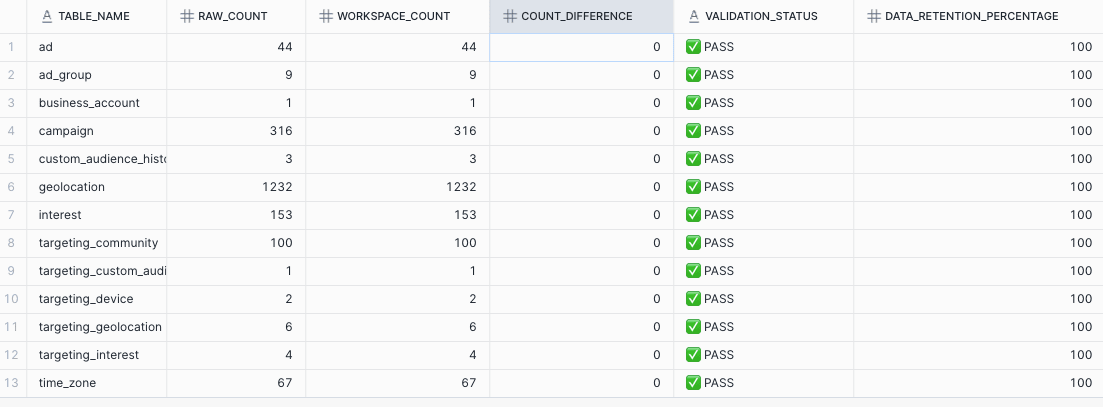
<p><img src="https://res.cloudinary.com/about-gitlab-com/image/upload/v1758030995/guicjhzwvrz3czwjs3xo.png" alt="query results table"></p>
<p>Running this query showed:</p>
<ul>
<li><strong>Zero differences</strong> in row counts after deduplication</li>
<li><strong>100% data retention</strong> across all tables</li>
<li><strong>All tests passed</strong> successfully</li>
</ul>
<h2>The bottom line: Massive time savings</h2>
<ul>
<li>
<p><strong>Traditional approach:</strong> 6-8 hours of manual coding, testing, and debugging</p>
</li>
<li>
<p><strong>GitLab Duo approach:</strong> 6-8 minutes of generation + review time</p>
</li>
</ul>
<p>This represents a 60x improvement in developer efficiency (from 6-8 hours to 6-8 minutes), while maintaining high code quality.</p>
<h2>Best practices for success</h2>
<p>Based on this experience, here are key recommendations:</p>
<h3>Prepare your metadata</h3>
<ul>
<li>Extract complete table structures including data types and constraints.</li>
<li>Identify primary keys and relationships upfront.</li>
<li>Export clean, well-formatted CSV input files.</li>
</ul>
<p><strong>Note:</strong> By connecting GitLab Duo via MCP to your (meta)data, you could exclude this manual step.</p>
<h3>Provide clear context</h3>
<ul>
<li>Reference existing example MRs when possible.</li>
<li>Specify your coding standards and style guides.</li>
<li>Be explicit about folder structure and naming conventions.</li>
</ul>
<h3>Validate thoroughly</h3>
<ul>
<li>Always create validation queries for data integrity.</li>
<li>Test locally before merging.</li>
<li>Run your CI/CD pipeline to catch any issues.</li>
</ul>
<h3>Leverage AI for follow-up tasks</h3>
<ul>
<li>Generate test queries automatically.</li>
<li>Create documentation templates.</li>
<li>Build validation scripts.</li>
</ul>
<h2>What's next</h2>
<p>This demonstration shows how AI-powered development tools like GitLab Duo are also transforming data engineering workflows. The ability to generate hundreds of lines of production-ready code in minutes —  complete with tests, documentation, and proper structure — represents a fundamental shift in how we approach repetitive development tasks.</p>
<p>By leveraging AI to handle the repetitive aspects of dbt model creation, data engineers can focus on higher-value activities like data modeling strategy, performance optimization, and business logic implementation.</p>
<p><strong>Ready to try this yourself?</strong> Start with a small dataset, prepare your metadata carefully, and watch as GitLab Duo transforms hours of work into minutes of automated generation.</p>
<blockquote>
<p><a href="https://about.gitlab.com/gitlab-duo/agent-platform/">Trial GitLab Duo Agent Platform today.</a></p>
</blockquote>
<h2>Read more</h2>
<ul>
<li><a href="https://about.gitlab.com/blog/gitlab-18-3-expanding-ai-orchestration-in-software-engineering/">GitLab 18.3: Expanding AI orchestration in software engineering</a></li>
<li><a href="https://about.gitlab.com/blog/gitlab-duo-agent-platform-public-beta/">GitLab Duo Agent Platform Public Beta: Next-gen AI orchestration and more</a></li>
</ul>
]]></content>
        <author>
            <name>Dennis van Rooijen</name>
            <uri>https://about.gitlab.com/blog/authors/dennis-van rooijen</uri>
        </author>
        <published>2025-09-16T00:00:00.000Z</published>
    </entry>
    <entry>
        <title type="html"><![CDATA[GitLab and Accenture announce Global Reseller Agreement]]></title>
        <id>https://about.gitlab.com/blog/gitlab-and-accenture-announce-global-reseller-agreement/</id>
        <link href="https://about.gitlab.com/blog/gitlab-and-accenture-announce-global-reseller-agreement/"/>
        <updated>2025-09-15T00:00:00.000Z</updated>
        <content type="html"><![CDATA[<p>We're excited to announce that GitLab and Accenture have signed a global reseller agreement, establishing Accenture as an authorized GitLab reseller and Professional Services Provider. This agreement enables Accenture to provide GitLab's complete DevSecOps platform directly to customers through multiple fulfillment channels, including the AWS Marketplace.</p>
<h2>A milestone in collaboration</h2>
<p>This collaboration combines GitLab's comprehensive, intelligent DevSecOps platform with Accenture's extensive expertise in digital transformation and implementation services, enabling organizations to build and deliver secure software at scale. The global reseller agreement provides a global framework that can be easily adapted to local conditions.</p>
<p>The collaboration will initially focus on several key areas:</p>
<ol>
<li><strong>Enterprise-scale DevSecOps Transformation:</strong> Helping organizations modernize their development practices and streamline their software delivery lifecycle</li>
<li><strong>Mainframe Modernization:</strong> Assisting customers with migrating from legacy systems</li>
<li><strong>GitLab Duo with Amazon Q:</strong> Offering AI-driven software development to organizations looking to accelerate development velocity while maintaining end-to-end security and compliance</li>
</ol>
<h2>Looking ahead</h2>
<p>We’re looking forward to helping our joint customers accelerate innovation, streamline development processes, and strengthen their security posture to achieve their business objectives more effectively.</p>
<p>For more information about how GitLab and Accenture can help your organization, please <a href="https://about.gitlab.com/partners/channel-partners/#/2328213">visit our partner site</a> or contact your Accenture or GitLab representative.</p>
]]></content>
        <author>
            <name>GitLab</name>
            <uri>https://about.gitlab.com/blog/authors/gitlab</uri>
        </author>
        <published>2025-09-15T00:00:00.000Z</published>
    </entry>
    <entry>
        <title type="html"><![CDATA[How we supercharged GitLab CI statuses with WebSockets]]></title>
        <id>https://about.gitlab.com/blog/how-we-supercharged-gitlab-ci-statuses-with-websockets/</id>
        <link href="https://about.gitlab.com/blog/how-we-supercharged-gitlab-ci-statuses-with-websockets/"/>
        <updated>2025-09-15T00:00:00.000Z</updated>
        <content type="html"><![CDATA[<p>We just reduced API calls by 92.56% on GitLab's CI job status updates – from 45 million to 3.4 million calls per day. Instead of needing to wait up to half a minute, users now see job status changes instantly. Here's how we did it.</p>
<h2>The problem: Polling in 2025</h2>
<p>It's 2025, WebSockets are in and polling is out. Polling is more of a legacy method of getting &quot;real-time&quot; updates for software. It's time-driven, meaning clients make network calls to a server on an interval usually between 5 and 30 seconds. Even if the data hasn't changed, those network requests are made to try and get the most accurate data served to the client.
WebSockets are event-driven, so you only make network requests to the server when the data has actually changed, i.e., a status in a database column changes from <code>pending</code> to <code>running</code>. Unlike traditional HTTP requests where the client repeatedly asks the server for updates (polling), WebSockets establish a persistent, two-way connection between the client and server. This means the server can instantly push updates to the client the moment something changes, eliminating unnecessary network traffic and reducing latency. For monitoring job statuses or real-time data, this is far more efficient than having clients poll the server every few seconds just to check if anything is different.</p>
<h2>The transformation</h2>
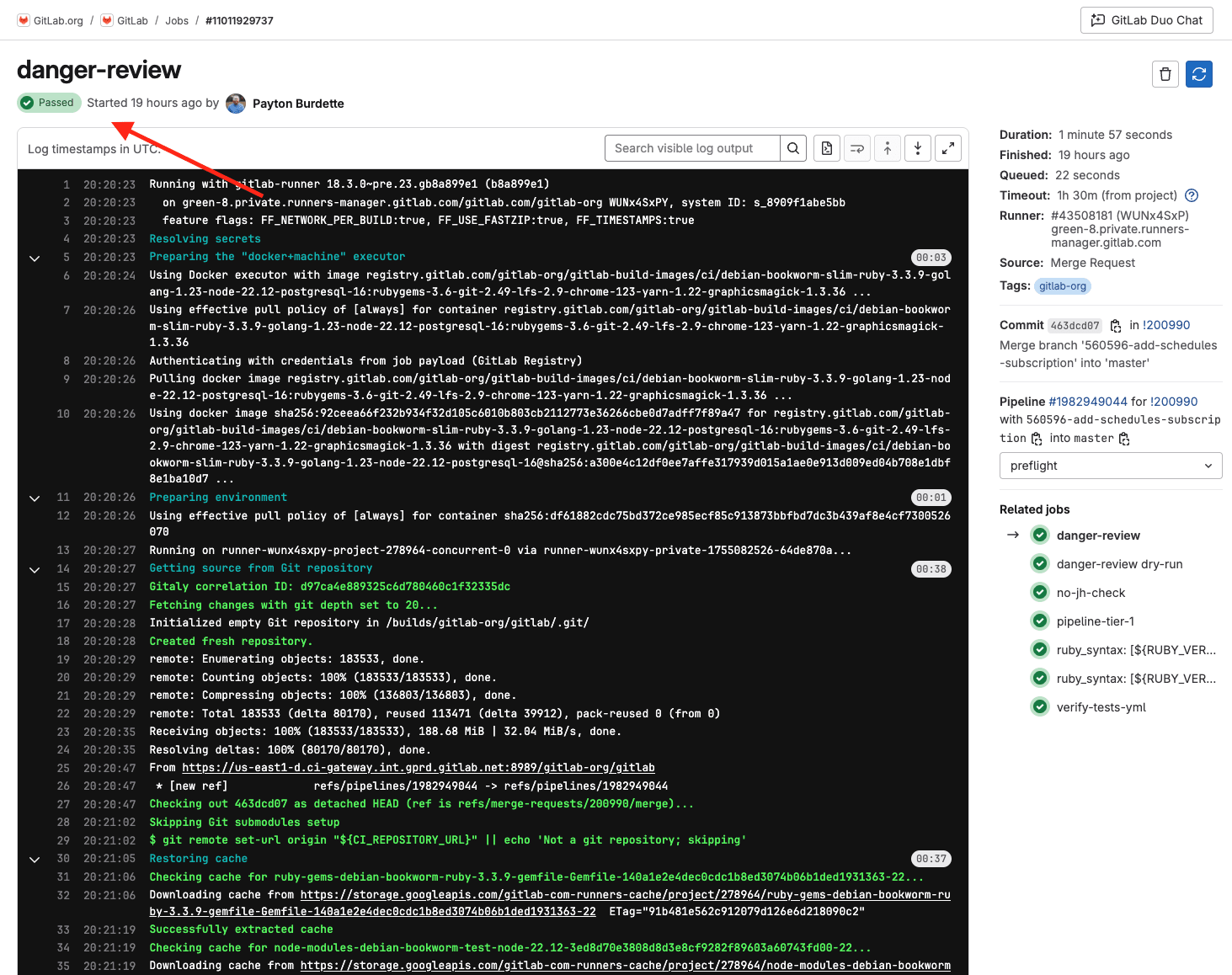
<p>Previously, the job header on the job log view was utilizing polling to get the most recent status for a single job. That component made a network request every 30 seconds no matter what to try and get the true state of the job.
<img src="https://res.cloudinary.com/about-gitlab-com/image/upload/v1757932872/b4zsw0zaasxnu5mm7szu.png" alt="Job header on job log view"></p>
<p>Our metrics showed that:</p>
<ul>
<li><strong>547,145</strong> network calls happened per 15 minutes</li>
<li><strong>45,729,530</strong> network calls happened per 24 hours
Users experienced frustrating delays seeing status updates, and we were hammering our database.</li>
</ul>
<h2>Enter GraphQL subscriptions</h2>
<p>In comes GraphQL subscriptions with WebSockets. GraphQL subscriptions are a feature that extends GraphQL beyond simple request-response queries and mutations, allowing clients to maintain a real-time connection to the server. While regular GraphQL queries fetch data once and return it, subscriptions let you say 'notify me whenever this specific data changes.' Under the hood, GraphQL subscriptions typically use WebSockets to maintain that persistent connection. Here's what we did:</p>
<ol>
<li>First, we refactored the job header component to use GraphQL for its data</li>
<li>Then we implemented a GraphQL subscription to serve real-time updates with ActionCable (Rails' WebSocket framework).</li>
</ol>
<h2>The results</h2>
<p>After this implementation, our users now get truly real-time accurate job status – updates appear instantly when jobs change state. The performance gains are remarkable:</p>
<ul>
<li><strong>92.56% reduction</strong> in API calls for this component</li>
<li>Now averaging <strong>39,670</strong> network calls per 15 minutes (down from 547,145)</li>
<li>Only <strong>3,403,395</strong> network calls per 24 hours (down from 45,729,530)
We also monitored CPU utilization and operation rate per command over the last week and have not seen any significant increase on our services. Win-win for the software and the team.</li>
</ul>
<h2>What's next</h2>
<p>This is just the beginning. We're working on making every CI status in the GitLab product real-time. Currently, many parts of GitLab's UI still rely on polling to check for updates. Our goal is to systematically replace these polling mechanisms with GraphQL subscriptions, giving users instant feedback across the entire CI/CD workflow.
Want to see this capability in action? Check out any job log view and watch those status updates fly. Not a GitLab user yet? <a href="https://about.gitlab.com/free-trial/devsecops/">Try GitLab Ultimate with GitLab Duo Enterprise</a> for free for 30 days.</p>
]]></content>
        <author>
            <name>Payton Burdette</name>
            <uri>https://about.gitlab.com/blog/authors/payton-burdette</uri>
        </author>
        <published>2025-09-15T00:00:00.000Z</published>
    </entry>
    <entry>
        <title type="html"><![CDATA[Supercharge your Git workflows]]></title>
        <id>https://about.gitlab.com/blog/supercharge-your-git-workflows/</id>
        <link href="https://about.gitlab.com/blog/supercharge-your-git-workflows/"/>
        <updated>2025-09-10T00:00:00.000Z</updated>
        <content type="html"><![CDATA[<p>Picture this: You're working on the Chromium project and you need to clone the repository. You run <code>git clone</code>, grab a coffee, check your email, maybe take a lunch break, and 95 minutes later, you finally have your working directory. This is the reality for developers working with large repositories containing 50GB+ of data.</p>
<p>The productivity impact is staggering. CI/CD pipelines grind to a halt waiting for repository clones. Infrastructure costs skyrocket as compute resources sit idle. Developer frustration mounts as context-switching becomes the norm.</p>
<p>But what if that 95-minute wait could be reduced to just 6 minutes? What if you could achieve a 93% reduction in clone times using proven techniques?</p>
<p>Enter <a href="https://gitlab.com/gitlab-accelerates-embedded/misc/git-much-faster">Git Much Faster</a> — a comprehensive benchmarking and optimization script that transforms how you work with large Git repositories. Built from real-world experience optimizing embedded development workflows, this script provides practical strategies delivering measurable performance improvements across standard git clones, optimized configurations, and Git's built-in Scalar tool.</p>
<p>You'll discover how to dramatically reduce git clone times using optimization strategies, explore real-world performance benchmarks from major repositories like the Linux kernel and Chromium, and understand how to implement these optimizations safely in both development and CI/CD environments.</p>
<h2>Project overview: What is Git Much Faster?</h2>
<p>Git Much Faster is a script I wrote as an enablement tool to allow you to benchmark multiple clone optimization approaches on the same client — whether that is a traditional developer workstation, CI, cloud-hosted development environments or specialized clones for GitOps. It also contains the curated configuration settings for the fastest clone optimization. You can use these settings as a starting point and adapt or remove configurations that create too lean of a clone for your client's intended use of the repository clone.</p>
<p>Git Much Faster addresses a fundamental challenge: Git's default clone behavior prioritizes safety over speed. While this works for small repositories, it becomes a significant bottleneck with large codebases, extensive binary assets, or complex monorepo structures.</p>
<p>The problem manifests across increasingly common scenarios. Embedded development teams inherit repositories filled with legacy firmware binaries, bootloaders, and vendor SDKs stored directly in version control. Web applications accumulate years of marketing assets and design files. Game development projects contain massive 3D models and audio files growing repository sizes into tens of gigabytes.</p>
<p>Enterprise CI/CD pipelines suffer particularly acute pain. Each job requires a fresh repository clone, and when operations take 20 to 90 minutes, entire development workflows grind to a halt. Infrastructure costs multiply as compute resources remain idle during lengthy clone operations.</p>
<p>Git Much Faster solves this through comprehensive benchmarking comparing four distinct strategies: standard git clone (baseline with full history), optimized git clone (custom configurations with compression disabled and sparse checkout), Git's Scalar clone (integrated partial cloning), and current directory assessment (analyzing existing repositories without re-cloning).</p>
<p>The tool provides measurable, repeatable benchmarking in controlled AWS environments, eliminating variables that make performance testing unreliable. The real power of Git Much Faster is to run all the benchmarks in whatever your target environment looks like — so if slow network connections are a reality for some developers, you can decipher the best clone optimization for their situation.</p>
<h2>Technical deep dive: The optimization strategies</h2>
<p>Understanding Git Much Faster's effectiveness requires examining specific configurations that address Git's performance bottlenecks through a layered approach tackling network transfer efficiency, CPU utilization, and storage patterns.</p>
<p>The most significant gains come from two key optimizations. The first, <code>core.compression=0</code>, eliminates CPU-intensive compression during network operations. CPU cycles spent compressing often exceed bandwidth savings on modern high-speed networks. This optimization alone reduces clone times by 40% to 60%.</p>
<p>The second major optimization, <code>http.postBuffer=1024M</code>, addresses Git's conservative HTTP buffer sizing. Large repositories benefit tremendously from increased buffer sizes, allowing Git to handle larger operations without breaking them into multiple requests, reducing protocol overhead.</p>
<p>Git Much Faster leverages shallow clones using <code>--depth=1</code> (fetching only the latest commit) and partial clones with <code>--filter=blob:none</code> (deferring file content downloads until checkout). Shallow clones reduce data by 70%-90% for mature repositories, while partial clones prove particularly effective for repositories with large binary assets.</p>
<p>Sparse checkout provides surgical precision in controlling checked-out files. Git Much Faster implements comprehensive exclusion covering 30+ binary file types — images, documents, archives, media files, and executables — reducing working directory size by up to 78% while maintaining full source code access.</p>
<p>Git's Scalar tool, integrated into Git since Version 2.38, combines partial clone, sparse checkout, and background maintenance. However, benchmarking reveals Scalar doesn't implement the aggressive compression and buffer optimizations providing the most significant performance gains. Testing shows the custom optimized approach typically outperforms Scalar by 48%-67% while achieving similar disk space savings.</p>
<h2>End-to-end load reduction</h2>
<p>An interesting thing about optimizing the clone operation is that it also reduces complete system loading because you are reducing the size of your request. GitLab has a specialized, horizontal scaling layer known as <a href="https://docs.gitlab.com/administration/gitaly/praefect/">Gitaly Cluster</a>. When full history clones and large monorepos are the norm, the sizing of Gitaly Cluster is driven higher. This is because all git clone requests are serviced by a server-side binary to create “pack files” to be sent over the wire. Since these server-side git operations involve running compression utilities, it drives all three of memory, CPU, and I/O requirements at once.</p>
<p>When git clone operations are optimized to reduce the size of the total content ask, it reduces load on the end-to-end stack: Client, Network, Gitaly Service and Storage. All layers speed up and become cheaper at the same time.</p>
<h2>Real-world performance results</h2>
<p>Git Much Faster's effectiveness is demonstrated through rigorous benchmarking across diverse, real-world repositories using consistent AWS infrastructure with Arm instances and controlled network conditions.</p>
<p><strong>Linux kernel repository (7.5GB total):</strong> Standard clone took 6 minutes 29 seconds. Optimized clone achieved 46.28 seconds — an 88.1% improvement, reducing the .git directory from 5.9GB to 284MB. Scalar took 2 minutes 21 seconds (63.7% improvement), completing 67.3% slower than the optimized approach.</p>
<p><strong>Chromium repository (60.9GB total):</strong> Standard clone required 95 minutes 12 seconds. Optimized clone achieved 6 minutes 41 seconds — a dramatic 93% improvement, compressing the .git directory from 55.7GB to 850MB. Scalar took 13 minutes 3 seconds (86.3% improvement) but remained 48.8% slower than the optimized approach.</p>
<p><strong>GitLab website repository (8.9GB total):</strong> Standard clone took 6 minutes 23 seconds. Optimized clone achieved 6.49 seconds — a remarkable 98.3% improvement, reducing the .git directory to 37MB. Scalar took 33.60 seconds (91.2% improvement) while remaining 80.7% slower.</p>
<p>The benchmarking reveals clear patterns: Larger repositories show more dramatic improvements, binary-heavy repositories benefit most from sparse checkout filtering, and the custom optimization approach consistently outperforms both standard Git and Scalar across all repository types.</p>
<h2>Practical implementation guide</h2>
<p>Implementation requires understanding when to apply each technique based on use case and risk tolerance. For development requiring full repository access, use standard Git cloning. For read-heavy workflows needing rapid access to current code, deploy optimized cloning. For CI/CD pipelines where speed is paramount, optimized cloning provides maximum benefit.</p>
<p>Getting started requires only simple download and execution:</p>
<pre><code class="language-bash">curl -L https://gitlab.com/gitlab-accelerates-embedded/misc/git-much-faster/-/raw/master/git-much-faster.sh -o ./git-much-faster.sh

# For benchmarking
bash ./git-much-faster.sh --methods=optimized,standard --repo=https://github.com/your-org/your-repo.git
</code></pre>
<p>For production-grade testing, Git Much Faster project includes complete Terraform infrastructure for AWS deployment, eliminating variables that skew local testing results.</p>
<p>Optimized clones require careful consideration of limitations. Shallow clones prevent access to historical commits, limiting operations like <code>git log</code> across file history. For teams adopting optimizations it is best to create specific optimizations for high volume usage. For instance, developers can perform an optimized clone, and if and when needed, convert to full clones when needed via <code>git fetch --unshallow</code>. If a given CI job accesses commit history (e.g. using GitVersion), then you may need the full history, but not a checkout.</p>
<h2>Use cases and industry applications</h2>
<p>Embedded development presents unique challenges where projects historically stored compiled firmware and hardware design files directly in version control. These repositories often contain FPGA bitstreams, PCB layouts, and vendor SDK distributions ballooning sizes into tens of gigabytes. Build processes frequently require cloning dozens of external repositories, multiplying performance impact.</p>
<p>Enterprise monorepos encounter Git performance challenges as repositories grow encompassing multiple projects and accumulated historical data. Media and asset-heavy projects compound challenges, as mentioned above — web applications accumulate marketing assets over years, while game development faces severe challenges with 3D models and audio files pushing repositories beyond 100GB. <a href="https://gitlab.com/gitlab-accelerates-embedded/misc/git-much-faster/-/tree/master?ref_type=heads#common-use-cases">More use cases</a> can be found in the project.</p>
<p>CI/CD pipelines represent the most impactful application. Each container-based CI job requires a fresh repository clone, and when operations consume 20 to 90 minutes, entire development workflows become unviable.</p>
<p>Geographically spread out development teams may have team members whose network performance to their primary development workstation is extremely limited or varies dramatically. Optimizing the Git clone can help by reducing over the wire sizes dramatically.</p>
<h2>Next steps</h2>
<p>Git clone optimization represents a transformative opportunity delivering measurable improvements — up to 93% reduction in clone times and 98% reduction in disk space usage — that fundamentally change how teams interact with codebases.</p>
<p>The key insight is that Git's default conservative approach leaves substantial performance opportunities untapped. By understanding specific bottlenecks — network transfer inefficiency, CPU-intensive compression, unnecessary data downloads — teams can implement targeted optimizations delivering transformative results.</p>
<p><strong>Ready to revolutionize your Git workflows?</strong></p>
<p><a href="https://gitlab.com/gitlab-accelerates-embedded/misc/git-much-faster">Read the docs in the Git Much Faster repository</a> and get started running benchmarks against your largest repositories. Begin with read-only optimization in CI/CD pipelines where benefits are immediate and risks minimal. As your team gains confidence, gradually expand optimization to development workflows based on measured results.</p>
<p>The future of Git performance optimization continues evolving, but fundamental principles — eliminating unnecessary work, optimizing for actual bottlenecks, measuring results rigorously — remain valuable regardless of future tooling evolution. Teams mastering these concepts today position themselves to leverage whatever improvements tomorrow's Git ecosystem provides.</p>
]]></content>
        <author>
            <name>Darwin Sanoy</name>
            <uri>https://about.gitlab.com/blog/authors/darwin-sanoy</uri>
        </author>
        <published>2025-09-10T00:00:00.000Z</published>
    </entry>
    <entry>
        <title type="html"><![CDATA[A developer's guide to building secure retail apps with GitLab]]></title>
        <id>https://about.gitlab.com/blog/a-developers-guide-to-building-secure-retail-apps-with-gitlab/</id>
        <link href="https://about.gitlab.com/blog/a-developers-guide-to-building-secure-retail-apps-with-gitlab/"/>
        <updated>2025-09-04T00:00:00.000Z</updated>
        <content type="html"><![CDATA[<p>Retailers often find application security challenging — in large part because the <strong>attack surface is broader than ever</strong> due to the complexity of modern commerce. From mobile apps and AI-powered personalization to omni-channel platforms and in-store IoT, every touchpoint increases the number of systems that must be secured and monitored. A single vulnerability doesn’t just affect one component, it can cascade across payment processors, inventory systems, customer data, and ultimately, brand trust.</p>
<p>Traditional security approaches that once worked in simpler retail environments now struggle to keep up. Security processes are often bolted on as an afterthought, slowing teams down and increasing risk. But it doesn’t have to be this way.</p>
<p><strong>Modern platforms embed security throughout the development lifecycle,</strong> making protection a seamless part of the developer workflow, not a barrier to delivery. This approach turns security into a strategic advantage, enabling innovation without compromising resilience.</p>
<p>In this article, you'll discover how an integrated DevSecOps platform helps retail teams meet rising security demands <strong>without slowing down delivery or compromising customer experience</strong>.</p>
<h2>Why retail security demands a different approach</h2>
<p>In retail, security is about more than protecting data — it’s about protecting the customer experience that drives revenue. Any slowdown, outage, or vulnerability can lead to lost sales and broken trust. Retail platforms must stay online, meet compliance standards, and defend against nonstop attacks from the open internet. Unlike enterprise systems, they’re fully public-facing, with a much broader attack surface. Add in third-party integrations, APIs, and legacy systems, and it’s clear: traditional security approaches aren’t enough.</p>
<p>Adding to the complexity, retailers face a unique set of challenges that further increase their security risks, including:</p>
<h3>Supply chain fragility and API sprawl</h3>
<p>Shipping delays, global instability, and interconnected systems disrupt logistics. Nearly half of retailers report product availability issues, and 25% lack real-time inventory visibility, according to a <a href="https://premierconstructionnews.com/2024/05/25/retails-revival-fluent-commerce-study-finds-93-of-uk-retailers-expect-business-growth-over-next-year-despite-economic-challenges-and-supply-chain-disruption/">2024 Fluent Commerce survey</a>. While AI-powered forecasting helps, insecure APIs and fragile integrations across the digital supply chain create attack vectors.</p>
<h3>Legacy systems meet modern demands</h3>
<p>Many retailers operate on monolithic, outdated systems that struggle to support mobile apps, IoT devices, and real-time analytics securely. Without secure, agile foundations, each new digital touchpoint becomes a potential vulnerability.</p>
<h3>AI and compliance complexity</h3>
<p>AI reshapes retail experiences through personalized recommendations and advanced customer tracking technologies like beacon sensors, facial recognition, and mobile app location services that monitor movement and behavior within physical stores. These AI-powered systems enhance both customer experiences and demand forecasting capabilities for retailers. However, <a href="https://gdpr.eu/what-is-gdpr/">GDPR</a> (the European Union's General Data Protection Regulation) and similar global privacy laws require secure data handling and transparent AI logic. Security missteps can result in significant fines and lasting reputational damage.</p>
<h3>Customer-facing automation risks</h3>
<p>Self-checkouts, kiosks, and chatbots promise convenience and cost savings but often lack security hardening. These touchpoints become entry points for cyber attackers and enable traditional theft through weak fraud detection, limited monitoring, and easily manipulated systems that make shoplifting harder to detect.</p>
<h3>Disparate threat surfaces</h3>
<p>Retailers are in a unique position where they must secure across multiple vectors, often maintained by globally distributed teams (depending on the size of the organization). E-commerce platforms, mobile applications, point-of-sale (POS) systems, and in-store IoT devices all provide an entry point for threat actors with unique characteristics requiring different security solutions to ensure resiliency.</p>
<p>This creates a unique paradox: Retailers must innovate faster than ever while maintaining higher security standards than most industries, all while delivering seamless customer experiences across every channel.</p>
<h2>Why traditional AppSec falls short in retail</h2>
<p>Most retailers rely on disconnected security tools such as static application security testing (SAST) scanners, license checkers, and vulnerability assessments that work in isolation. This fragmented approach creates critical gaps:</p>
<ul>
<li>
<p><strong>Limited lifecycle coverage:</strong> Tools focus on narrow development phases, missing supply chain and runtime risks.</p>
</li>
<li>
<p><strong>Integration challenges:</strong> Legacy system gaps and poor tool connectivity create security blind spots between teams and solutions.</p>
</li>
<li>
<p><strong>Manual processes:</strong> Security handoffs create bottlenecks, and issues are often discovered late, when they’re more costly to fix.</p>
</li>
<li>
<p><strong>Team silos:</strong> Security remains isolated from daily development workflows and separate from compliance and IT teams.</p>
</li>
</ul>
<h3>The path forward</h3>
<p>In today’s fast-paced retail landscape, security can’t slow down innovation. Embedding it directly into the development lifecycle and bringing every team together on a single unified DevSecOps platform makes security a strategic advantage rather than a bottleneck.</p>
<h3>A DevSecOps platform enables secure innovation at scale</h3>
<p>GitLab provides the most comprehensive set of security scanners to maximize application coverage, including:</p>
<ul>
<li><a href="https://docs.gitlab.com/user/application_security/sast/">SAST</a></li>
<li><a href="https://docs.gitlab.com/user/application_security/dast/">DAST</a></li>
<li><a href="https://docs.gitlab.com/user/application_security/dependency_scanning/dependency_scanning_sbom/">Dependency scanning</a></li>
<li><a href="https://docs.gitlab.com/user/application_security/container_scanning/">Container scanning</a></li>
<li><a href="https://docs.gitlab.com/user/application_security/secret_detection/">Secret detection</a></li>
<li><a href="https://docs.gitlab.com/user/application_security/iac_scanning/">Infrastructure-as-code scanning</a></li>
<li><a href="https://docs.gitlab.com/user/application_security/api_fuzzing/">Fuzz testing</a></li>
</ul>
<p>But security isn’t just about scanning. It's about <a href="https://docs.gitlab.com/user/compliance/compliance_frameworks/">enforcing the right policies</a> to ensure vulnerabilities are identified and remediated consistently. With GitLab, security teams get full control to ensure the right scan is run on the right application, at the right time, and that the findings are addressed before they reach production.</p>
<p><img src="https://res.cloudinary.com/about-gitlab-com/image/upload/v1756988740/x2dteagn1z8tjfahmobv.png" alt="Security scans in pipeline"></p>
<p>&lt;center&gt;&lt;i&gt;Security scans run in the CI/CD pipeline, ensuring immediate feedback on potential vulnerabilities.&lt;/i&gt;&lt;/center&gt;
&lt;p&gt;&lt;/p&gt;</p>
<p><img src="https://res.cloudinary.com/about-gitlab-com/image/upload/v1756988740/npsgvu5e0sd2kpoxug7f.png" alt="Vulnerability Report shows all vulnerabilities for a specific project or group."></p>
<p>&lt;center&gt;&lt;i&gt;Vulnerability Report shows all vulnerabilities for a specific project or group.&lt;/i&gt;&lt;/center&gt;</p>
<h3>One platform for Dev, Sec, and Ops</h3>
<p>Retail teams waste countless hours switching between tools, manually transferring data, losing information between systems due to fragile integrations, and reconciling conflicting reports. A unified platform eliminates this friction:</p>
<ul>
<li><strong>Single source of truth</strong> for source code, pipelines, vulnerabilities, and compliance</li>
<li><strong>No integration overhead</strong> or tool compatibility issues</li>
<li><strong>Consistent workflows</strong> across all teams and projects</li>
</ul>
<p>The result? Teams spend time solving problems instead of managing tools.</p>
<p><img src="https://res.cloudinary.com/about-gitlab-com/image/upload/v1756988739/d2nzltd1a2gypywzhv5f.png" alt="Compliance center where you can enforce compliance frameworks for your projects."></p>
<p>&lt;center&gt;&lt;i&gt;The compliance center is where you can enforce compliance frameworks for your projects.&lt;/i&gt;&lt;/center&gt;
&lt;p&gt;&lt;/p&gt;</p>
<p><img src="https://res.cloudinary.com/about-gitlab-com/image/upload/v1756988740/szoocztazaup2avkaxhu.png" alt="In the merge request, developers require approval if risks are detected before merging code, according to defined policies."></p>
<p>&lt;center&gt;&lt;i&gt;In the merge request, developers require approval if risks are detected before merging code, according to defined policies.&lt;/i&gt;&lt;/center&gt;</p>
<h3>Shared security responsibility, not silos</h3>
<p>The most successful retail security programs make security everyone's responsibility, not just the security team's burden.</p>
<p><strong>Developer empowerment</strong></p>
<p>Security and compliance guidance appears directly in merge requests, making it impossible to miss critical issues. Developers get immediate feedback on each commit, with clear explanations of risks and remediation steps. For example,  AI-powered vulnerability explanation and vulnerability resolution help developers understand and fix security issues independently, reducing bottlenecks and building security expertise across the team.</p>
<p><img src="https://res.cloudinary.com/about-gitlab-com/image/upload/v1756988741/uenrjye3arfg9wjtwss1.png" alt="Vulnerability page with a button for explaining or resolving issues with AI. Helps to bridge the knowledge gap with AI."></p>
<p>&lt;center&gt;&lt;i&gt;Vulnerability page with a button for explaining or resolving issues with AI. Helps to bridge the knowledge gap with AI.&lt;/i&gt;&lt;/center&gt;</p>
<p>&lt;p&gt;&lt;/p&gt;</p>
<p><strong>Automated compliance</strong></p>
<p>Generate audit reports, track license usage, and maintain a software bill of materials (SBOM) without manual effort.</p>
<p><img src="https://res.cloudinary.com/about-gitlab-com/image/upload/v1756988739/gpakhdvkegloqxhaeje8.png" alt="GitLab's automated dependency report provides a comprehensive SBOM, displaying all project dependencies with their vulnerability status, license details, and security findings for complete transparency and compliance."></p>
<p>&lt;center&gt;&lt;i&gt;GitLab's automated dependency report provides a comprehensive SBOM, displaying all project dependencies with their vulnerability status, license details, and security findings for complete transparency and compliance.&lt;/i&gt;&lt;/center&gt;
&lt;p&gt;&lt;/p&gt;</p>
<p>This approach transforms security from a gate that slows delivery into a foundation that enables confident, rapid innovation.</p>
<h2>Platform vs. point tools: What retailers need to know</h2>
<table>
<thead>
<tr>
<th>Capability</th>
<th>Point Tools</th>
<th>GitLab DevSecOps Platform</th>
</tr>
</thead>
<tbody>
<tr>
<td>SAST/DAST/API/Fuzz</td>
<td>Separate &amp; limited</td>
<td>Fully integrated</td>
</tr>
<tr>
<td>License &amp; dependency scanning</td>
<td>Often external tools</td>
<td>Built-in</td>
</tr>
<tr>
<td>Compliance &amp; audit reporting</td>
<td>Manual or disconnected</td>
<td>Automated with traceability</td>
</tr>
<tr>
<td>Collaboration across teams</td>
<td>Fragmented</td>
<td>Unified environment</td>
</tr>
<tr>
<td>End-to-end visibility</td>
<td>Tool-specific</td>
<td>Full lifecycle + value stream view</td>
</tr>
</tbody>
</table>
<h2>The bottom line: Security excellence drives retail success</h2>
<p>In retail, security isn't just about protecting data, it's about protecting the customer experience that drives revenue. When security slows down releases or creates vulnerabilities, it directly impacts sales. Your customers expect secure, seamless experiences every time.</p>
<p>GitLab's integrated DevSecOps platform helps retailers:</p>
<ul>
<li><strong>Deploy faster without compromising security</strong> with automated scans that catch issues before customers do.</li>
<li><strong>Meet compliance requirements effortlessly</strong> through built-in reporting for GDPR, PCI-DSS, and industry standards.</li>
<li><strong>Significantly reduce security tool costs</strong> by replacing multiple point solutions with one platform.</li>
<li><strong>Turn developers into security advocates</strong> with guidance and automation, not roadblocks.</li>
</ul>
<p>Take a tour of some of GitLab's security capabilities:</p>
<ul>
<li><a href="https://gitlab.navattic.com/ve-vr-short">Resolving vulnerabilities with GitLab Duo</a></li>
<li><a href="https://gitlab.navattic.com/gitlab-scans">Adding scans to pipeline</a></li>
<li><a href="https://gitlab.navattic.com/compliance-short">Compliance frameworks</a></li>
<li><a href="https://gitlab.navattic.com/advanced-sast-short">Advanced SAST</a></li>
</ul>
<blockquote>
<p>Ready to get started? Discover how GitLab Ultimate with Duo Enterprise can streamline your retail security strategy with <a href="https://about.gitlab.com/free-trial/">a free trial</a>.</p>
</blockquote>
]]></content>
        <author>
            <name>Itzik Gan Baruch</name>
            <uri>https://about.gitlab.com/blog/authors/itzik-gan baruch</uri>
        </author>
        <author>
            <name>Rebeca Fenoy-Anthony</name>
            <uri>https://about.gitlab.com/blog/authors/rebeca-fenoy-anthony</uri>
        </author>
        <published>2025-09-04T00:00:00.000Z</published>
    </entry>
    <entry>
        <title type="html"><![CDATA[Vibe coding with GitLab Duo Agent Platform: Issue to MR Flow]]></title>
        <id>https://about.gitlab.com/blog/vibe-coding-with-gitlab-duo-agent-platform-issue-to-mr-flow/</id>
        <link href="https://about.gitlab.com/blog/vibe-coding-with-gitlab-duo-agent-platform-issue-to-mr-flow/"/>
        <updated>2025-09-03T00:00:00.000Z</updated>
        <content type="html"><![CDATA[<p><a href="https://about.gitlab.com/gitlab-duo/agent-platform/">GitLab Duo Agent Platform</a> (available now in Beta) provides a framework for AI agents to interact with GitLab resources like issues and merge requests, enabling complex, multistep tasks from concept to completion. Agent Platform offers conversational (<a href="https://about.gitlab.com/blog/gitlab-duo-chat-gets-agentic-ai-makeover/">agentic chat</a>) and automated (<a href="https://about.gitlab.com/blog/gitlab-18-3-expanding-ai-orchestration-in-software-engineering/">agent Flows</a>) experiences to assist with code generation, modernization, security vulnerability resolution, and project analysis — all while providing enterprise-grade security and customizable controls.</p>
<p>&quot;Issue to MR&quot; is an agent Flow that streamlines turning a well-scoped issue into a draft merge request (MR). The Flow analyzes an issue’s description and requirements, opens a draft MR linked to the issue, creates a development plan, and proposes an implementation — right from the GitLab UI.</p>
<h2>The developer challenge</h2>
<p>Product tweaks such as rearranging a UI layout, adjusting component sizing, or making a minor workflow change shouldn't require hours of setup work. Yet developers find themselves caught in a frustrating cycle: hunting through codebases to locate the right files, creating branches, piecing together scattered changes across multiple components, and navigating complex review processes. And this is all before they can even see if their solution works. Development overhead transforms what should be quick iterations into time-consuming tasks, slowing down feedback loops and making simple product improvements feel like major undertakings.</p>
<h2>How to use the Issue to MR Flow to accelerate an application update</h2>
<p>You first need to fulfill these prerequisites before using the Issue to MR Flow.</p>
<p>Prerequisites:</p>
<ul>
<li>An existing issue with clear requirements and acceptance criteria. This will help GitLab Duo Agent Platform better understand what you're trying to achieve and improve the quality of your output.</li>
<li>Project access at Developer or higher permissions as the Flow will be making edits to your project's source code.</li>
<li>GitLab Duo Agent Platform enabled for your group or project, with Flows allowed. For this, go to your project’s <strong>Settings &gt; General &gt; GitLab Duo &gt; Allow flow execution</strong> toggle and enable it. GitLab is committed to helping provide guardrails, so agentic AI features require turning on these toggles to protect sensitive projects and ensure only the projects you want are accessible to GitLab Duo Agent Platform.</li>
</ul>
<p>Once you have fulfilled all the prerequisites above, you can follow these steps to take advantage of the Issue to MR Flow:</p>
<ol>
<li>
<p>Create a project issue that describes what you’d like GitLab Duo Agent Platform to accomplish for you. Provide as much detail as possible in the issue description. If the issue already exists, open it by going to <strong>Plan &gt; Issues</strong> and clicking on the issue describing the update you want. Keep the issue well-scoped and specific.</p>
</li>
<li>
<p>Below the issue header, click on <strong>Generate MR with Duo</strong> to kick off the Flow.</p>
</li>
<li>
<p>If you’d like to track the progress of the agents working on implementing your issue, go to <strong>Automate &gt; Agent sessions</strong> to see the live session log as agents plan and propose changes.</p>
</li>
<li>
<p>When the pipeline completes, a link to the MR appears in the issue’s activity. Open it to review the summary and file-level changes.</p>
</li>
<li>
<p>If you’d like to validate the proposed updates by GitLab Duo Agent Platform locally, you can pull the branch on your laptop, build and run your app, and verify that the update behaves as expected. If needed, make edits in the MR and proceed with normal review.</p>
</li>
<li>
<p>If you’re happy with all the proposed application updates, merge the MR to the main branch.</p>
</li>
</ol>
<h2>Why the Issue to MR Flow works well for application changes</h2>
<p>The Issue to MR Flow proposes code changes and updates the MR directly, so you spend less time locating files and only have to evaluate and review the result. In addition, the MR is automatically linked to the originating issue, keeping context tight for reviewers and stakeholders. Finally, you can monitor the agent session to understand what’s happening at each step.</p>
<h2>Benefits of GitLab Duo Agent Platform</h2>
<p>GitLab Duo Agent Platform is <a href="https://about.gitlab.com/blog/gitlab-duo-agent-platform-public-beta/">an agentic orchestration layer</a> that brings <strong>full project context</strong>, including planning to coding, building, securing, deploying, and monitoring, so agents can help across the entire software development lifecycle (SDLC), not just code editing.</p>
<ul>
<li>
<p>Unified data model: GitLab Duo Agents operate on GitLab’s unified SDLC data, enabling higher-quality decisions and collaboration across tasks — including non-coding ones.</p>
</li>
<li>
<p>Security and compliance are built-in: GitLab Duo Agents run within enterprise guardrails and are usable even in highly-regulated or offline/air-gapped environments.</p>
</li>
<li>
<p>Interoperability and extensibility: Orchestrate flows across vendors and tools; connect external data via <a href="https://about.gitlab.com/topics/ai/model-context-protocol/">MCP</a>/A2A for richer context.</p>
</li>
<li>
<p>Scale collaboration: GitLab Duo Agents work in the GitLab UI and IDEs, enabling many-to-many human-agent collaboration.</p>
</li>
<li>
<p>Discoverable and shareable: Find and share agents and Flows in a centralized AI Catalog.</p>
</li>
</ul>
<h2>Try the Issue to MR Flow today</h2>
<p>For application updates, like a modest UI adjustment, the Issue to MR Flow helps you move from a clear issue to a reviewable MR quickly, with progress you can monitor and changes you can validate and merge through your standard workflow. It keeps context, reduces handoffs, and lets your team focus on quality rather than busywork.</p>
<p>Watch the Issue to MR Flow in action:</p>
<p>&lt;!-- blank line --&gt;
&lt;figure class=&quot;video_container&quot;&gt;
&lt;iframe src=&quot;https://www.youtube.com/embed/BrrMHN4gXF4?si=J7beTgWOLxvS4hOw&quot; frameborder=&quot;0&quot; allowfullscreen=&quot;true&quot;&gt; &lt;/iframe&gt;
&lt;/figure&gt;
&lt;!-- blank line --&gt;</p>
<blockquote>
<p>Try the Issue to MR Flow on GitLab Duo Agent Platform now with a <a href="https://about.gitlab.com/free-trial/">free trial of GitLab Ultimate with Duo Enterprise</a>.</p>
</blockquote>
]]></content>
        <author>
            <name>Cesar Saavedra</name>
            <uri>https://about.gitlab.com/blog/authors/cesar-saavedra</uri>
        </author>
        <published>2025-09-03T00:00:00.000Z</published>
    </entry>
    <entry>
        <title type="html"><![CDATA[GitLab achieves ISO/IEC 42001 certification for AI governance]]></title>
        <id>https://about.gitlab.com/blog/gitlab-achieves-iso-iec-42001-certification-for-ai-governance/</id>
        <link href="https://about.gitlab.com/blog/gitlab-achieves-iso-iec-42001-certification-for-ai-governance/"/>
        <updated>2025-09-02T00:00:00.000Z</updated>
        <content type="html"><![CDATA[<p>Artificial intelligence (AI) is transforming how we work and solve problems across every industry. As AI becomes more integrated into business processes and decision-making, the need for robust AI governance frameworks has never been more critical. Organizations must balance the potential opportunity of AI with ensuring AI systems are built safely, ethically, and with accountability.</p>
<p>As part of our commitment to responsible AI management, we're excited to announce that GitLab has achieved the ISO/IEC 42001 certification, the first internationally recognized standard for establishing, implementing, maintaining, and continually improving an Artificial Intelligence Management System (AIMS) within organizations.</p>
<p>The scope of the certification includes our comprehensive AI offering, GitLab Duo, as well as GitLab Duo Agent Platform and its components. As a leader in DevSecOps, GitLab provides AI-powered features across the development lifecycle, including capabilities such as:</p>
<ul>
<li>
<p><a href="https://about.gitlab.com/blog/gitlab-duo-agent-platform-public-beta/">GitLab Duo Agent Platform</a> (now in public beta, general availability planned for later this year): Enables asynchronous collaboration between developers and specialized AI agents throughout the software development lifecycle, helping transform linear development processes into dynamic, parallel workflows while providing agents with access to all of the software engineering context stored within GitLab's unified platform.</p>
</li>
<li>
<p><a href="https://docs.gitlab.com/user/project/repository/code_suggestions/">Code Suggestions</a> (generally available): Allows developers to stay in flow by predictively completing code blocks, defining function logic, generating tests, and proposing common code like regex patterns, all in the same environment where they already code.</p>
</li>
<li>
<p><a href="https://docs.gitlab.com/user/application_security/vulnerabilities/#explaining-a-vulnerability">Vulnerability Explanation</a> (generally available): Helps developers and security analysts understand vulnerabilities, how they might be exploited, and how to fix them.</p>
</li>
<li>
<p><a href="https://docs.gitlab.com/user/gitlab_duo/">Test Generation</a> (generally available): Creates tests automatically for selected code, improving coverage and reducing manual effort.</p>
</li>
</ul>
<h2>What this certification means for GitLab users</h2>
<p><strong>Enhanced trust and transparency:</strong> Our AI features are built and managed according to globally recognized best standards for AI governance, supporting reliability and ethical implementation.</p>
<p><strong>Strategic risk management:</strong> We've implemented risk assessment and risk treatment strategies for AI components within our platform, considering aspects such as operational business continuity risks, technical risks, security and privacy risks, and broader societal implications. This proactive approach enhances customer data protection and facilitates more reliable AI-powered features.</p>
<p><strong>Continuous improvement:</strong> Under the ISO/IEC 42001 framework, we will work to continuously evaluate and enhance our AI capabilities through annual external surveillance audits, regular internal assessments, and leadership AIMS review while maintaining standards of quality and responsibility.</p>
<p><strong>Regulatory alignment:</strong> As AI regulations continue to evolve globally, like the EU AI Act, this certification supports GitLab's alignment with emerging regulatory requirements.</p>
<p>This achievement validates GitLab's position as the trusted platform for AI-powered DevSecOps, and we are excited to continue leading the way in responsible AI innovation.</p>
<h2>Learn more</h2>
<ul>
<li>View the ISO/IEC 42001 certificate at the <a href="https://trust.gitlab.com/">GitLab Trust Center</a>.</li>
<li>Read about our <a href="https://handbook.gitlab.com/handbook/security/isms/">AIMS in our handbook</a>.</li>
<li>Check out the <a href="https://about.gitlab.com/ai-transparency-center/">GitLab AI Transparency Center</a>.</li>
<li>Explore all <a href="https://docs.gitlab.com/user/gitlab_duo/">GitLab Duo features and capabilities</a> in our documentation.</li>
</ul>
]]></content>
        <author>
            <name>Davoud Tu</name>
            <uri>https://about.gitlab.com/blog/authors/davoud-tu</uri>
        </author>
        <published>2025-09-02T00:00:00.000Z</published>
    </entry>
    <entry>
        <title type="html"><![CDATA[Secure Rust development with GitLab]]></title>
        <id>https://about.gitlab.com/blog/secure-rust-development-with-gitlab/</id>
        <link href="https://about.gitlab.com/blog/secure-rust-development-with-gitlab/"/>
        <updated>2025-09-02T00:00:00.000Z</updated>
        <content type="html"><![CDATA[<p>Rust has emerged as one of the most beloved programming languages due to its performance,
memory safety, and concurrency features. As Rust adoption continues to grow, many developers
are looking for robust CI/CD platforms to support their Rust projects.</p>
<p>GitLab's appeal to Rust developers extends beyond simple code hosting. The platform offers
robust <a href="https://about.gitlab.com/topics/ci-cd/">CI/CD</a> capabilities that align perfectly with Rust's emphasis on safety, performance, and reliability. GitLab makes it easy to create repositories and use off-the-shelf Docker
containers to put together custom CI jobs. Developers can easily set up automated testing,
cross-platform builds, and documentation generation. The platform's integrated approach to
DevSecOps resonates with Rust's philosophy of providing comprehensive tooling out of the box.</p>
<h2>About the demo application</h2>
<p>Being interested in how mortgage rates affect monthly payments and how hard it is to
to afford a house in the current times, I decided to write a <a href="https://gitlab.com/gitlab-da/tutorials/security-and-governance/devsecops/rust/mortgage-calculator">mortgage calculator</a> in Rust,
which I will use as an example throughout this tutorial. Feel free to <a href="https://docs.gitlab.com/user/project/import/repo_by_url/">import this project</a> and follow along.</p>
<p>The mortgage calculator will help users calculate monthly mortgage payments,
including principal, interest, property taxes, insurance, PMI, and HOA fees. It provides a
modern, intuitive GUI using the <a href="https://www.egui.rs/">egui</a> framework, as well as a CLI for running it in the terminal.</p>
<p><img src="https://res.cloudinary.com/about-gitlab-com/image/upload/v1756314538/l5bjnzqvpoyikuyxpx2a.png" alt="Mortgage calculator GUI"></p>
<p>This application contains a <a href="https://gitlab.com/gitlab-da/tutorials/security-and-governance/devsecops/rust/mortgage-calculator/-/blob/main/.gitlab-ci.yml?ref_type=heads"><code>.gitlab-ci.yml</code></a> that generates a pipeline, which will build, test,
package, scan, and deploy the software. We will go over this pipeline definition in detail in the
sections below.</p>
<p><img src="https://res.cloudinary.com/about-gitlab-com/image/upload/v1756314540/llmsfoaupedhkem0hjqp.png" alt="Mortgage Calculator Pipeline"></p>
<h2>Building and testing Rust applications</h2>
<p>GitLab's Docker-based CI/CD system excels at Rust development workflows, providing a robust
foundation for compilation, testing, and code quality checks. The platform's caching mechanisms
are particularly valuable for Rust projects, which can have lengthy compilation times due to the
language's thorough optimization and safety checking processes.</p>
<h3>Building</h3>
<p>Rust's excellent cross-compilation capabilities combined with GitLab's flexible CI/CD system
create a powerful solution for building applications across multiple platforms. This is particularly
valuable for Rust applications that need to run on various operating systems and architectures without
sacrificing performance or requiring platform-specific code.</p>
<p><strong>Note:</strong> You can learn more about the <code>.gitlab-ci.yml</code> by reading the <a href="https://docs.gitlab.com/ci/yaml/">CI/CD YAML syntax reference</a>.</p>
<pre><code class="language-yaml"># Cache configuration to speed up builds by reusing dependencies
cache:
  key: $CI_COMMIT_REF_SLUG                               # Use branch name as cache key
  paths:
    - .cargo/                                            # Cache Cargo registry and git dependencies
    - target/                                            # Cache compiled artifacts

# Base template for Rust jobs - shared configuration
.rust-template:
  image: rust:$RUST_VERSION-slim                         # Use slim Rust image for faster downloads
  before_script:
    # Install system dependencies required for building the Rust application
    - apt-get update &amp;&amp; apt-get install -y pkg-config libssl-dev libgtk-3-dev libxcb-shape0-dev libxcb-xfixes0-dev

# Template for cross-compilation build jobs
.build-template:
  extends: .rust-template                                # Inherit from rust-template
  stage: build                                           # Execute during build stage
  script:
    - rustup target add $TARGET                          # Add the target platform for cross-compilation
    - cargo build --release --target $TARGET             # Build optimized release binary for target platform

# Build for Linux x86_64 (primary target platform)
build-linux:
  extends: .build-template                               # Use build template configuration
  variables:
    TARGET: x86_64-unknown-linux-gnu                     # Linux 64-bit target
  artifacts:
    paths:
      - target/$TARGET/release/mortgage-calculator       # Save the compiled binary
    expire_in: 1 week                                    # Keep artifacts for 1 week
  allow_failure: false                                   # This build must succeed

# Build for Windows x86_64 (cross-compilation)
build-windows:
  extends: .build-template                               # Use build template configuration
  variables:
    TARGET: x86_64-pc-windows-gnu                        # Windows 64-bit target
  artifacts:
    paths:
      - target/$TARGET/release/mortgage-calculator       # Save the compiled binary
    expire_in: 1 week                                    # Keep artifacts for 1 week
  allow_failure: true                                    # Allow this build to fail (cross-compilation can be tricky)

# Build for macOS x86_64 (cross-compilation)
build-macos:
  extends: .build-template                               # Use build template configuration
  variables:
    TARGET: x86_64-apple-darwin                          # macOS 64-bit target
  artifacts:
    paths:
      - target/$TARGET/release/mortgage-calculator       # Save the compiled binary
    expire_in: 1 week                                    # Keep artifacts for 1 week
  allow_failure: true                                    # Allow this build to fail (cross-compilation can be tricky)
</code></pre>
<p>This GitLab CI configuration defines three build jobs that cross-compile a Rust mortgage calculator
application for different platforms:</p>
<ul>
<li><code>build-linux</code> creates a Linux x86_64 binary (required to pass)</li>
<li><code>build-windows</code> creates Windows binaries (allowed to fail)</li>
<li><code>build-macos</code> creates macOS x86_64 binaries (allowed to fail)</li>
</ul>
<p>All builds use shared templates for dependency caching and consistent build environments.</p>
<h3>Testing</h3>
<p>GitLab CI/CD streamlines code testing through its integrated pipeline system that automatically
triggers test suites whenever code is pushed to the repository. Developers can define multiple
types of tests — unit tests, integration tests, linting, and formatting checks — all within a single
<code>.gitlab-ci.yml</code> configuration file, with each test running in isolated Docker containers to ensure
consistent environments.</p>
<pre><code class="language-yaml"># Run unit tests
test:unit:
  extends: .rust-template                                # Use Rust template configuration
  stage: test                                            # Execute during test stage
  script:
    - cargo test --verbose                               # Run all unit tests with verbose output

# Run integration tests using the compiled binary
test:integration:
  extends: .rust-template                                # Use Rust template configuration
  stage: test                                            # Execute during test stage
  script:
    # Test the compiled binary with sample inputs and verify expected output
    - target/x86_64-unknown-linux-gnu/release/mortgage-calculator --cli calculate --property-value 350000 --down-payment 70000 --interest-rate 5.0 | grep -q &quot;TOTAL MONTHLY PAYMENT&quot;
  needs:
    - build-linux                                        # Depends on Linux build job completing

# Run Clippy linter for code quality checks
test:clippy:
  extends: .rust-template                                # Use Rust template configuration
  stage: test                                            # Execute during test stage
  script:
    - rustup component add clippy                        # Install Clippy linter
    - cargo clippy -- -D warnings                       # Run Clippy and treat warnings as errors
  allow_failure: true                                    # Allow linting failures (can be improved over time)

# Check code formatting
test:format:
  extends: .rust-template                                # Use Rust template configuration
  stage: test                                            # Execute during test stage
  script:
    - rustup component add rustfmt                       # Install Rust formatter
    - cargo fmt -- --check                              # Check if code is properly formatted
  allow_failure: true                                    # Allow formatting failures (can be improved over time)
</code></pre>
<p>This GitLab CI configuration creates four test jobs that validate a Rust mortgage calculator application:</p>
<ul>
<li><code>test:unit</code> runs unit tests</li>
<li><code>test:integration</code> executes the compiled Linux binary with sample inputs to verify functionality</li>
<li><code>test:clippy</code> performs code quality linting (allowed to fail)</li>
<li><code>test:format</code> checks code formatting compliance (allowed to fail)</li>
</ul>
<h2>Package and Container Registries</h2>
<p>GitLab's <a href="https://docs.gitlab.com/user/packages/package_registry/">Package Registry</a> provides a secure solution to the common challenge of sharing
internal libraries and proprietary code within organizations. This capability is essential
for enterprises and teams that need to maintain artifacts while leveraging the broader
Rust ecosystem.</p>
<p>The registry supports <a href="https://docs.gitlab.com/user/packages/generic_packages/">generic artifacts</a> with fine-grained access controls that
align with GitLab's project permissions. This means teams can share libraries securely across
projects while maintaining intellectual property protection and compliance requirements.</p>
<p>Additonally, we can containerize our application and store the container images in
GitLab's built-in <a href="https://docs.gitlab.com/user/packages/container_registry/">Container Registry</a>.</p>
<h3>Publishing to GitLab Package Registry</h3>
<p>This section of our <code>.gitlab-ci.yml</code> demonstrates how to package and publish Rust applications
as tar archives to GitLab's generic package registry using CI/CD automation.</p>
<pre><code class="language-yaml"># Package application as tar archive
package:tar:
  image: alpine/curl:8.12.1                             # Lightweight image with curl for uploading
  stage: package                                         # Execute during package stage
  variables:
    PACKAGE_NAME: mortgage-calculator.tar.gz             # Name of the archive file
  script:
    # Create tar archive of the Linux binary
    - tar -czvf $PACKAGE_NAME target/x86_64-unknown-linux-gnu/release/mortgage-calculator
    # Upload archive to GitLab Package Registry using API
    - |
      curl -v --location --header &quot;JOB-TOKEN: $CI_JOB_TOKEN&quot; \
      --upload-file $PACKAGE_NAME \
      &quot;$CI_API_V4_URL/projects/$CI_PROJECT_ID/packages/generic/tar/$CI_COMMIT_BRANCH/$PACKAGE_NAME&quot;
  artifacts:
    paths:
      - target/x86_64-unknown-linux-gnu/release/mortgage-calculator  # Save binary
      - mortgage-calculator.tar.gz                      # Save archive
    expire_in: 1 week                                    # Keep artifacts for 1 week
  needs:
    - build-linux                                        # Depends on Linux build completing
</code></pre>
<p>This GitLab CI configuration defines one packaging job <code>package:tar</code> that creates a compressed tar archive
of the Linux mortgage calculator binary and uploads it to GitLab's Package Registry, while also saving
both the binary and archive as pipeline artifacts.</p>
<p><img src="https://res.cloudinary.com/about-gitlab-com/image/upload/v1756314541/uqnejcipnge3r1dngotm.png" alt="Package Registry"></p>
<h3>Publishing to GitLab Container Registry</h3>
<p>The below shows the process of building Dockerfiles and publishing Docker images to GitLab's
Container Registry with proper tagging and authentication.</p>
<pre><code class="language-yaml"># Package application as Docker image
package:docker:
  image: docker:24.0                                     # Use Docker image for building containers
  stage: package                                         # Execute during package stage
  services:
    - docker:24.0-dind                                   # Docker-in-Docker service for building images
  before_script:
    # Login to GitLab Container Registry
    - docker login -u $CI_REGISTRY_USER -p $CI_REGISTRY_PASSWORD $CI_REGISTRY
  script:
    - docker build -t $DOCKER_IMAGE_NAME:$DOCKER_IMAGE_TAG .  # Build Docker image with commit SHA tag
    - docker tag $DOCKER_IMAGE_NAME:$DOCKER_IMAGE_TAG $DOCKER_IMAGE_NAME:latest  # Also tag as latest
    - docker push $DOCKER_IMAGE_NAME:$DOCKER_IMAGE_TAG  # Push tagged image to registry
    - docker push $DOCKER_IMAGE_NAME:latest             # Push latest image to registry
</code></pre>
<p>This GitLab CI configuration defines one Docker packaging job <code>package:docker</code> that builds a Docker
image of the mortgage calculator application, tags it with both the commit SHA and &quot;latest,&quot; and
then pushes both tagged versions to  GitLab's Container Registry.</p>
<p><img src="https://res.cloudinary.com/about-gitlab-com/image/upload/v1756314537/nlodhvdnpqccf0cryfqu.png" alt="Container Registry"></p>
<h2>Security scanning</h2>
<p>GitLab security scanning provides comprehensive protection that goes beyond Rust's built-in memory
safety guarantees. While Rust prevents many common security vulnerabilities at compile time,
applications still need protection against dependency vulnerabilities, unsafe code blocks, and
logical security issues.</p>
<p>The platform's Static Application Security Testing (SAST) integrates seamlessly with
Rust's toolchain, providing automated security analysis as part of the CI/CD pipeline
This proactive approach catches security issues before they reach production, supporting
both compliance requirements and secure development practices.</p>
<p>GitLab's comprehensive security features including SAST, dependency scanning, secret detection
and more can easily be implemented via templates, as seen below. <strong>Note:</strong> Additional configuration is
required to <a href="https://docs.gitlab.com/user/application_security/sast/#scan-a-rust-application">enable SAST for Rust</a>.</p>
<pre><code class="language-yaml"># Include GitLab's security scanning templates for DevSecOps
include:
  - template: Jobs/SAST.gitlab-ci.yml                    # Static Application Security Testing
  - template: Jobs/Dependency-Scanning.latest.gitlab-ci.yml  # Scan dependencies for vulnerabilities
  - template: Jobs/Container-Scanning.gitlab-ci.yml      # Scan Docker containers for vulnerabilities
  - template: Jobs/SAST-IaC.gitlab-ci.yml               # Infrastructure as Code security scanning
  - template: Jobs/Secret-Detection.gitlab-ci.yml        # Detect secrets in source code
</code></pre>
<p>Security scanners can be configured similar to how you would configure any GitLab job:</p>
<pre><code class="language-yaml"># Configure Semgrep SAST scanning for Rust files
semgrep-sast:
  rules:
    - if: $CI_COMMIT_BRANCH                              # Run on any branch
      exists:
        - &quot;**/*.rs&quot;                                      # Only if Rust files exist
  variables:
    SAST_EXCLUDED_PATHS: &quot;.cargo/**&quot;                     # Exclude Cargo cache from scanning

# Scan Docker container for security vulnerabilities
container_scanning:
  stage: container-security                              # Execute during container-security stage
  variables:
    CS_IMAGE: $DOCKER_IMAGE_NAME:$DOCKER_IMAGE_TAG      # Image to scan
    CS_DOCKERFILE_PATH: Dockerfile                       # Path to Dockerfile for context
  needs:
    - package:docker                                     # Depends on Docker image being built
</code></pre>
<p>When vulnerabilites are detected in a merge request (MR), you can see all the vulnerabilites detected
and use the provided information to either resolve or dismiss vulnerabilities.</p>
<p><img src="https://res.cloudinary.com/about-gitlab-com/image/upload/v1756314544/gcicke3ltvbcv57mr8zr.png" alt="Vulnerability MR view"></p>
<p>You also can add <a href="http://docs.gitlab.com/user/application_security/policies/">Security Policies</a> to require approval before vulnerable code can be merged, or to force scanners to run regardless of what is in the <code>.gitlab-ci.yml</code>.</p>
<p><img src="https://res.cloudinary.com/about-gitlab-com/image/upload/v1756314538/c95nwocol03lonrr6r4n.png" alt="Merge Request Approval Policy"></p>
<p>You can triage all the vulnerabilities found in your default branch by using the
<a href="https://docs.gitlab.com/user/application_security/vulnerability_report/">Vulnerability Report</a>:</p>
<p><img src="https://res.cloudinary.com/about-gitlab-com/image/upload/v1756314544/b0nctigbv1ddpzizkp9x.png" alt="Vulnerability Report"></p>
<h2>Documentation with GitLab Pages</h2>
<p><a href="https://docs.gitlab.com/user/project/pages/">GitLab Pages</a> provides an excellent platform for
hosting Rust documentation, integrating seamlessly with Cargo's built-in documentation generation.
This creates a powerful workflow where API documentation, project guides, and examples are automatically
generated and deployed with every code change.</p>
<p>The combination of <code>cargo doc</code> and GitLab Pages enables teams to maintain up-to-date documentation
without manual intervention, ensuring that documentation stays synchronized with code changes.
This is particularly valuable for Rust projects where comprehensive documentation is essential
to understand complex APIs and safety contracts.</p>
<h3>Automated documentation deployment</h3>
<p>The following code shows the CI/CD configuration for automatically generating and deploying Rust documentation using
<code>cargo doc</code> and GitLab Pages.</p>
<pre><code class="language-yaml"># Generate and publish documentation using GitLab Pages
build-documentation:
  extends: .rust-template                                # Use Rust template configuration
  stage: build                                           # Execute during build stage
  variables:
    GIT_SUBMODULE_STRATEGY: recursive                    # Clone submodules recursively if needed
  pages: true                                            # Enable GitLab Pages deployment
  script:
    - cargo doc --no-deps                                # Generate documentation without dependencies
    - mv target/doc public                               # Move docs to public directory for Pages
  artifacts:
    paths:
      - public                                           # GitLab Pages serves from public directory
  rules:
    - if: $CI_COMMIT_REF_NAME == $CI_DEFAULT_BRANCH     # Only run on default branch (main/master)
  environment:
    name: documentation                                  # Environment name for tracking
    url: $CI_PAGES_URL/mortgage_calculator/index.html   # Documentation URL
  allow_failure: true                                    # Allow documentation build to fail
</code></pre>
<p>Once the job is complete, you can see the deployed documentation by visiting the <a href="https://docs.gitlab.com/ci/environments/">GitLab Environment</a> it has been deployed to.</p>
<p><img src="https://res.cloudinary.com/about-gitlab-com/image/upload/v1756314541/aofa6wwjugeyeshuwg9r.png" alt="Pages environment"></p>
<p>This allows you to manage multiple versions of the documentation in different envrionments.
The documentation will be deployed consistent with the <code>cargo doc</code> output:</p>
<p><img src="https://res.cloudinary.com/about-gitlab-com/image/upload/v1756314541/go0tmljjzoxq5bujsdbv.png" alt="Pages build"></p>
<h2>Deploy anywhere</h2>
<p>One of GitLab's greatest strengths is its infrastructure-agnostic approach to deployment.
Whether your organization runs on traditional on-premises servers, modern cloud platforms,
hybrid environments, or edge computing infrastructure, GitLab's CI/CD system can deploy Rust
applications seamlessly across any target environment.</p>
<p>GitLab's deployment flexibility stems from its container-first approach and extensive integration
ecosystem. The platform supports deployment to virtually any infrastructure that can run
containers, virtual machines, or bare-metal applications. This versatility is particularly
valuable for Rust applications, which often need to run in diverse environments ranging from
resource-constrained embedded systems to high-performance cloud clusters.</p>
<h3>Kubernetes deployment</h3>
<p>GitLab simplifies Kubernetes deployments by providing built-in cluster integration and
pre-configured Docker images that include essential tools like Helm and kubectl, eliminating
the need for developers to set up complex deployment environments.</p>
<pre><code class="language-yaml"># Deploy application to Kubernetes cluster
deploy:kubernetes:
  stage: deploy                                          # Execute during deploy stage
  image: registry.gitlab.com/gitlab-org/cluster-integration/helm-install-image:helm-3.10.0-kube-1.24.6-alpine-3.15  # Image with Helm and kubectl
  variables:
    HELM_HOST: &quot;localhost:44134&quot;                         # Helm host configuration
    HELM_DEPLOY_NAME: mortgage-calc-$CI_COMMIT_REF_NAME  # Deployment name based on branch
    HELM_DEPLOY_NAMESPACE: calc-app                      # Kubernetes namespace for deployment
    KUBE_CONTEXT: $CI_PROJECT_PATH:rust-mortgage-calculator  # Kubernetes context to use
  script:
    - kubectl config use-context $KUBE_CONTEXT          # Set the kubectl context
    # Deploy using Helm with custom values and Docker image
    - helm upgrade --install $HELM_DEPLOY_NAME chart -f chart/values.yaml
      --namespace $HELM_DEPLOY_NAMESPACE
      --create-namespace
      --set image=$DOCKER_IMAGE_NAME:$DOCKER_IMAGE_TAG
      --set calc.name=$HELM_DEPLOY_NAME 
  needs:
    - package:docker                                     # Depends on Docker image being available
</code></pre>
<p>This GitLab CI configuration defines one deployment job <code>deploy:kubernetes</code> that uses Helm to deploy the
mortgage calculator application to a Kubernetes cluster, creating or upgrading the deployment in a
dedicated namespace while using the Docker image built in the previous packaging stage.</p>
<p><img src="https://res.cloudinary.com/about-gitlab-com/image/upload/v1756314538/bgmbh4qyfxcnnlqvsitc.png" alt="Kubernetes output"></p>
<h2>GitLab Duo AI features</h2>
<p><a href="https://about.gitlab.com/gitlab-duo/">GitLab Duo</a> AI features provide significant advantages for Rust development by offering intelligent code
suggestions and explanations specifically tailored to the language's unique syntax and patterns.</p>
<p>The GitLab platform supports Rust as one of its <a href="https://docs.gitlab.com/user/project/repository/code_suggestions/supported_extensions/#supported-languages-by-ide">directly-supported languages</a> for every IDE, ensuring high-quality code completion and generation
that understands Rust's ownership model, memory safety principles, and idiomatic patterns.</p>
<h3>GitLab Duo Code Suggestions</h3>
<p>GitLab Duo's ability to provide contextual code suggestions while typing helps developers navigate Rust's
sometimes complex syntax more efficiently, reducing the learning curve for newcomers and accelerating
productivity for experienced developers.</p>
<p><img src="https://res.cloudinary.com/about-gitlab-com/image/upload/v1756314538/uvy6hmzvyd0mnqeic9tq.png" alt="Code Suggestions"></p>
<h3>GitLab Duo Chat</h3>
<p><a href="https://about.gitlab.com/blog/gitlab-duo-chat-gets-agentic-ai-makeover/">GitLab Duo Chat</a> complements the code suggestions by offering conversational assistance for explaining
Rust code sections, debugging compiler errors, and providing guidance on best practices. This is
particularly valuable in Rust development where compiler error messages, while helpful, can
sometimes be overwhelming for developers transitioning from other languages. The AI can help interpret
Rust's detailed error messages and suggest fixes, making the development process more efficient by
reducing the time spent deciphering compilation issues.</p>
<p><img src="https://res.cloudinary.com/about-gitlab-com/image/upload/v1756314537/depxztu1h89bez3ylwk3.png" alt="GitLab Duo Chat"></p>
<p>GitLab Duo Chat can also be used directly from Vulnerability Report to explain a vulnerability. GitLab Duo <a href="https://about.gitlab.com/the-source/ai/understand-and-resolve-vulnerabilities-with-ai-powered-gitlab-duo/">Vulnerability Explanation</a> represents a
significant advancement in making application security more accessible and actionable for development teams. Rather than simply flagging potential issues with
cryptic error codes. or technical jargon, AI breaks down each vulnerability's nature, potential impact, and remediation steps in terms that developers at
all skill levels can quickly grasp. This democratization of security knowledge accelerates the remediation process, reduces the back-and-forth between security
and development teams, and ultimately helps organizations ship more secure code faster:</p>
<p><img src="https://res.cloudinary.com/about-gitlab-com/image/upload/v1756405091/rrcenbfazhhulmrp99yx.png" alt="Vulnerability Explain 1">
&lt;p&gt;&lt;/p&gt;</p>
<p><img src="https://res.cloudinary.com/about-gitlab-com/image/upload/v1756405094/b3o4lkexyn9lp41ib8ye.png" alt="Vulnerability Explain 2">
&lt;p&gt;&lt;/p&gt;</p>
<p><img src="https://res.cloudinary.com/about-gitlab-com/image/upload/v1756405095/y56wq8j5tg10t4dgbgfq.png" alt="Vulnerability Explain 3">
&lt;p&gt;&lt;/p&gt;</p>
<p><img src="https://res.cloudinary.com/about-gitlab-com/image/upload/v1756405090/mpc1mst4ydijpqdtlljm.png" alt="Vulnerability Explain 4">
&lt;p&gt;&lt;/p&gt;</p>
<p>GitLab Duo also provides <a href="https://docs.gitlab.com/user/gitlab_duo_chat/agentic_chat/">Agentic Chat</a>, which serves as an intelligent development companion for Rust
applications, offering context-aware assistance throughout the entire development lifecycle. Developers
can leverage its conversational interface to generate Rust code snippets, scaffold new Rust projects with
appropriate <code>Cargo.toml</code> configurations, and much more.</p>
<h3>GitLab Duo Vulnerability Resolution</h3>
<p>GitLab Duo <a href="https://docs.gitlab.com/user/application_security/vulnerabilities/#vulnerability-resolution">Vulnerability Resolution</a> uses AI to automatically generate specific code fixes for detected
security issues, dramatically reducing remediation time from hours to minutes. AI analyzes vulnerable code patterns
and proposes precise patches tailored to the project's context, language, and dependencies while maintaining code
functionality and style consistency. This automation is particularly effective for common vulnerabilities like SQL
injection and cross-site scripting, enabling development teams to maintain velocity while significantly improving their
security posture without disrupting the development workflow.</p>
<p><img src="https://res.cloudinary.com/about-gitlab-com/image/upload/v1756405090/blpwclp68igekkecbyna.png" alt="Duo Remediate Example 1">
&lt;p&gt;&lt;/p&gt;</p>
<p><img src="https://res.cloudinary.com/about-gitlab-com/image/upload/v1756405090/avvncsspwyirtk14jdbe.png" alt="Duo Remediate Example 2">
&lt;p&gt;&lt;/p&gt;</p>
<h3>GitLab Duo Code Review</h3>
<p>GitLab Duo's <a href="https://docs.gitlab.com/user/project/merge_requests/duo_in_merge_requests/#have-gitlab-duo-review-your-code">AI-powered code review</a> enhances the development process by providing intelligent, automated feedback on
MRs before human reviewers engage. AI analyzes code changes for potential bugs, security vulnerabilities,
performance issues, and adherence to coding standards, offering contextual suggestions and explanations that help developers
catch issues early. By augmenting traditional peer reviews with consistent, immediate AI insights, this feature reduces
the burden on senior developers, accelerates the review cycle, and ensures that basic quality checks are consistently
applied across all code contributions, ultimately improving code quality while allowing human reviewers to focus on
higher-level architectural and business logic concerns.</p>
<p><img src="https://res.cloudinary.com/about-gitlab-com/image/upload/v1756405090/hewxrp2f22mf2fe4daaa.png" alt="Duo Code Review 1">
&lt;p&gt;&lt;/p&gt;</p>
<p><img src="https://res.cloudinary.com/about-gitlab-com/image/upload/v1756405091/qbw1gi0l4ngysnyjwoy8.png" alt="Duo Code Review 2">
&lt;p&gt;&lt;/p&gt;</p>
<p>These are just some of the AI feautures that can be used to allow you to ship more secure Rust software faster than ever.
To learn about all the GitLab AI features provided, visit the <a href="https://about.gitlab.com/gitlab-duo/">GitLab Duo solution page</a>.</p>
<h2>The GitLab advantage for Rust</h2>
<p>GitLab provides a complete development platform that matches Rust's comprehensive approach:</p>
<p><strong>Integrated Workflow:</strong></p>
<ul>
<li><strong>Single Platform:</strong> Code, CI/CD, security, and deployment in one place</li>
<li><strong>Rust-optimized:</strong> Docker-based builds perfect for Rust's toolchain</li>
<li><strong>Security First:</strong> Built-in security scanning</li>
<li><strong>Enterprise-ready:</strong> Scalable infrastructure for large teams</li>
</ul>
<p><strong>Performance Benefits:</strong></p>
<ul>
<li><strong>Efficient Caching:</strong> Speeds up Rust's longer compilation times</li>
<li><strong>Parallel Builds:</strong> Maximizes GitLab Runner efficiency</li>
<li><strong>Artifact Management:</strong> Streamlined binary distribution</li>
</ul>
<p><strong>Developer Experience:</strong></p>
<ul>
<li><strong>Familiar Tools:</strong> Leverage standard Rust tooling (Cargo, Clippy, rustfmt)</li>
<li><strong>Visual Feedback:</strong> Comprehensive dashboards and reporting</li>
<li><strong>Automation:</strong> Reduces manual deployment and testing overhead</li>
<li><strong>GitLab Duo AI:</strong> Ship more secure software faster with AI throughout the entire software development lifecycle</li>
</ul>
<p>GitLab's platform capabilities perfectly complement Rust's strengths, creating an ecosystem
where safety, performance, and developer productivity converge. Rust applications on GitLab
represent the cutting edge of software development—powered by a platform that understands and
enhances the Rust development experience.</p>
<p>To learn more about the benefits of GitLab, sign up for a <a href="https://about.gitlab.com/free-trial/">free trial of GitLab Ultimate with Duo Enterprise</a>.</p>
]]></content>
        <author>
            <name>Fernando Diaz</name>
            <uri>https://about.gitlab.com/blog/authors/fernando-diaz</uri>
        </author>
        <published>2025-09-02T00:00:00.000Z</published>
    </entry>
    <entry>
        <title type="html"><![CDATA[Why enterprise independence matters more than ever in DevSecOps]]></title>
        <id>https://about.gitlab.com/blog/why-enterprise-independence-matters-more-than-ever-in-devsecops/</id>
        <link href="https://about.gitlab.com/blog/why-enterprise-independence-matters-more-than-ever-in-devsecops/"/>
        <updated>2025-09-02T00:00:00.000Z</updated>
        <content type="html"><![CDATA[<p>For over a decade, GitLab has been committed to transparency, independence, and putting developers first. Today, as the industry evolves, this matters more than ever. Enterprise leaders are asking critical questions: Who ultimately controls your development infrastructure? How is your code being used in AI systems? What happens when vendor priorities shift away from your critical requirements?</p>
<p>Last month, <a href="https://about.gitlab.com/blog/gitlab-18-3-expanding-ai-orchestration-in-software-engineering/">we announced GitLab 18.3</a>, the latest release of our AI-native DevSecOps platform. Agent Insights, part of GitLab Duo Agent Platform, provides visibility into agent decision-making processes. Expanded AI model support means no vendor lock-in. Enhanced governance controls help enable compliance across multiple jurisdictions.</p>
<p>These aren't just features. They're demonstrations of the transparency, independence, and developer-first approach that defines GitLab. Here's how this strategy translates into practice.</p>
<p>&lt;div style=&quot;padding:56.25% 0 0 0;position:relative;&quot;&gt;&lt;iframe src=&quot;https://player.vimeo.com/video/1115249475?badge=0&amp;autopause=0&amp;player_id=0&amp;app_id=58479&quot; frameborder=&quot;0&quot; allow=&quot;autoplay; fullscreen; picture-in-picture; clipboard-write; encrypted-media; web-share&quot; referrerpolicy=&quot;strict-origin-when-cross-origin&quot; style=&quot;position:absolute;top:0;left:0;width:100%;height:100%;&quot; title=&quot;Who is GitLab_Robin_090225_FINAL&quot;&gt;&lt;/iframe&gt;&lt;/div&gt;&lt;script src=&quot;https://player.vimeo.com/api/player.js&quot;&gt;&lt;/script&gt;</p>
<h2>AI transparency across the DevSecOps lifecycle</h2>
<p><strong>At GitLab, our decade-long commitment to transparency directly addresses these concerns.</strong> As artificial intelligence becomes increasingly integrated into development workflows, organizations are rightfully concerned about how their code and data are being used for AI training.</p>
<p>The GitLab <a href="https://about.gitlab.com/ai-transparency-center/">AI Transparency Center</a>, launched in April 2024, provides clear documentation of our data governance practices, privacy protections, and ethical AI principles. Unlike platforms that may operate AI features with unclear data usage policies, GitLab prioritizes transparency so that customers  can understand <a href="https://docs.gitlab.com/user/gitlab_duo/data_usage/">exactly how their data is processed</a>, stored, and protected — with no training on that data.</p>
<p>Our approach extends to model flexibility and vendor independence. While some platforms lock customers into single, large language model (LLM) providers, creating additional vendor dependencies and potential single points of failure, GitLab's AI features are powered by a variety of models. This approach enables us to support a wide range of use cases, providing customers with the flexibility to align with their strategic priorities.</p>
<p>As we further develop GitLab Duo Agent Platform, we remain focused on data control and maintaining comprehensive human-in-the-loop controls. And GitLab Duo Self-Hosted provides complete data sovereignty with air-gapped deployment options, zero-day data retention policies, and the ability to process all AI requests within your own infrastructure.</p>
<p>Since May 2024, we've also maintained an <a href="https://handbook.gitlab.com/handbook/product/ai/continuity-plan/">AI continuity plan</a> with an industry-leading commitment: the ability to evaluate and move to a new model within 30 days if a provider changes its practices regarding customer data. This proactive approach to AI vendor risk management reflects our dedication to customer control.</p>
<h2>Choice in deployment, choice in cloud provider</h2>
<p><strong>You should be able to choose how and where to deploy your DevSecOps environment.</strong> GitLab provides genuine deployment flexibility. Organizations can choose from on-premises installations, multi-tenant SaaS, or GitLab Dedicated, our fully managed single-tenant SaaS solution, without sacrificing functionality or facing artificial restrictions designed to drive ecosystem lock-in. GitLab is also cloud-neutral, allowing customers to use the cloud provider that best suits their business needs and environment.</p>
<p>This flexibility proves invaluable when navigating complex jurisdictional requirements and regulatory challenges. When new data localization laws emerge — as we've seen across the European Union and other regions — organizations using GitLab can rapidly adapt their deployment strategies without being constrained by ecosystem dependencies.</p>
<p>From a procurement and risk management perspective, platform independence also provides crucial leverage in contract negotiations. Organizations aren't forced into restrictive licensing agreements that prioritize vendor interests over customer needs. This independence becomes particularly critical as enterprises become more vigilant about who controls their AI stack.</p>
<h2>Security and compliance: Built-in and always a priority</h2>
<p><strong>Security and compliance are now equally important to development features and should be built into the platform, not retrofitted as an afterthought.</strong> GitLab's single platform approach provides significant advantages over fragmented platforms that rely on third-party add-ins to match basic security and governance features. This architectural difference has significant implications for possible legal risk, operational efficiency, and regulatory compliance. Each additional tool in the chain represents another potential point of failure, another set of terms and conditions to negotiate, and another source of risk.</p>
<p>GitLab provides comprehensive built-in security and compliance capabilities, including custom compliance frameworks, dynamic application security testing (DAST), API fuzz testing, coverage-guided fuzzing, and infrastructure-as-code testing. These capabilities are natively integrated into the platform, offering consistent policy enforcement and reducing the compliance complexity and additional costs that come with managing multiple third-party tools.</p>
<p>Our <a href="https://docs.gitlab.com/user/compliance/compliance_center/">compliance center</a> provides a central location for teams to manage their compliance standards, adherence reporting, violations reporting, and compliance frameworks for their group. This unified approach to compliance management is particularly valuable for organizations operating in highly-regulated industries where audit trails and compliance documentation are critical.</p>
<h2>Staying close to our open source community</h2>
<p><strong>The best tools are shaped by the people who use them.</strong> Our commitment to open source and engagement with our community has been core to GitLab since our founding. For instance, our <a href="https://about.gitlab.com/community/co-create/">Co-Create program</a> is a collaborative initiative that enables customers to work directly with GitLab engineers to contribute features, fixes, and enhancements to the GitLab platform.</p>
<p>Our transparency value remains fundamental to our business. An example of this is our <a href="https://gitlab.com/groups/gitlab-org/-/issues">open issue tracker</a>, where customers can follow our progress and engage directly with the GitLab team in discussions about ways we can improve our product. We recently launched our <a href="https://about.gitlab.com/blog/inside-gitlabs-healthy-backlog-initiative/">Healthy Backlog Initiative</a> to give customers even greater visibility into our planning and direct their feedback to places with the greatest impact.</p>
<p>Our approach enables organizations to contribute to and benefit from open source innovation while maintaining the governance, audit trails, and security controls required for regulated environments.</p>
<h2>Data governance: Your data, your control</h2>
<p><strong>You maintain complete control over your data and how it's processed.</strong> Data governance has become an increasingly critical factor in enterprise technology decisions, driven by a complex web of national and regional data protection laws and growing concern about control over sensitive intellectual property — like source code, customer insights, strategic initiatives, and competitive intelligence.</p>
<p>With GitLab, you can manage who has access to AI-powered capabilities within the platform, extending beyond simple access controls to encompass encryption standards and audit capabilities aligned to regulatory frameworks. Also, customers' code and data are never used to train AI models.</p>
<h2>The choice is clear</h2>
<p>GitLab continues to lead in AI-native DevSecOps platform innovation – our recent <a href="https://about.gitlab.com/blog/gitlab-18-3-expanding-ai-orchestration-in-software-engineering/">18.3 release</a> demonstrates this – while staying true to the independence and transparency commitments that have always guided us.</p>
<p>Customers have a choice and it's clear: retaining control vs. vendor lock-in; transparency vs. uncertainty; dedication to innovation vs. whims of the larger ecosystem.</p>
<p>GitLab provides the foundation for sustainable digital transformation that balances innovation with independence, helping you achieve business value for your customers.</p>
<p><a href="https://about.gitlab.com/free-trial/">Try GitLab Ultimate with GitLab Duo for free today.</a></p>
]]></content>
        <author>
            <name>Robin Schulman</name>
            <uri>https://about.gitlab.com/blog/authors/robin-schulman</uri>
        </author>
        <published>2025-09-02T00:00:00.000Z</published>
    </entry>
    <entry>
        <title type="html"><![CDATA[Fine-grained permissions for job tokens is now GA]]></title>
        <id>https://about.gitlab.com/blog/fine-grained-job-tokens-ga/</id>
        <link href="https://about.gitlab.com/blog/fine-grained-job-tokens-ga/"/>
        <updated>2025-08-26T00:00:00.000Z</updated>
        <content type="html"><![CDATA[<p><a href="https://about.gitlab.com/topics/ci-cd/">CI/CD</a> pipelines often inherit overprivileged permissions from user accounts, creating significant security risks if pipelines are compromised or tokens are leaked. <a href="https://about.gitlab.com/releases/2025/08/21/gitlab-18-3-released/">GitLab 18.3</a> introduces fine-grained permissions for job tokens to solve this problem, moving this security enhancement from Beta to GA.</p>
<p>This capability allows maintainers to implement granular permissions that control job token access to API resources. Following the <a href="https://about.gitlab.com/blog/the-ultimate-guide-to-least-privilege-access-with-gitlab/">principle of least privilege</a>, these job tokens have no ability to access any API resources until you explicitly grant them permissions.</p>
<p>This initial release includes fine-grained permissions for the following resources:</p>
<ul>
<li>Repositories</li>
<li>Deployments</li>
<li>Environments</li>
<li>Jobs</li>
<li>Packages</li>
<li>Pipelines</li>
<li>Releases</li>
<li>Secure Files</li>
<li>Terraform State</li>
</ul>
<p>Additional API endpoints are planned for future releases. For more information, see the <a href="https://gitlab.com/groups/gitlab-org/-/epics/6310">associated epic</a>.</p>
<p><img src="https://res.cloudinary.com/about-gitlab-com/image/upload/v1755633419/izgwpj45oxoof0frvhap.png" alt="fine-grained permissions example"></p>
<h2>The bigger picture</h2>
<p>This release represents a critical step in GitLab's broader mission to improve your software supply chain security. Historically, job tokens have been bound to the user running the pipeline, inheriting their privileges and creating security risks if pipelines are compromised.</p>
<p>Fine-grained permissions for job tokens provide a foundation for a more secure CI/CD ecosystem that:</p>
<ul>
<li><strong>Reduces attack surface</strong>: Implements the principle of least privilege by limiting access to only necessary resources</li>
<li><strong>Eliminates dependency on long-lived tokens</strong>: Provides a secure alternative that reduces the need for personal access tokens and other persistent credentials</li>
<li><strong>Prepares for machine-based identity</strong>: This opt-in approach lays the groundwork for eventually decoupling job tokens from user identities entirely, moving toward true machine-to-machine authentication</li>
<li><strong>Enables secure automation at scale</strong>: Supports complex deployment workflows and CI/CD components without compromising security</li>
</ul>
<h2>Getting started</h2>
<p>Security teams and DevOps engineers should evaluate this feature for any projects running automated deployments, package publishing, or infrastructure management. Since this is an opt-in capability, you can migrate gradually to minimize disruption to your existing pipelines.</p>
<p>Start by identifying your most critical pipelines and auditing their current permission requirements. Then enable fine-grained permissions and configure the minimal access needed for each project. For more information, see the <a href="https://docs.gitlab.com/ci/jobs/fine_grained_permissions/">documentation on fine-grained permissions for CI/CD job tokens</a>.</p>
]]></content>
        <author>
            <name>Alex Mark</name>
            <uri>https://about.gitlab.com/blog/authors/alex-mark</uri>
        </author>
        <author>
            <name>Joe Randazzo</name>
            <uri>https://about.gitlab.com/blog/authors/joe-randazzo</uri>
        </author>
        <published>2025-08-26T00:00:00.000Z</published>
    </entry>
    <entry>
        <title type="html"><![CDATA[Custom admin roles are now GA]]></title>
        <id>https://about.gitlab.com/blog/custom-admin-roles-now-ga/</id>
        <link href="https://about.gitlab.com/blog/custom-admin-roles-now-ga/"/>
        <updated>2025-08-25T00:00:00.000Z</updated>
        <content type="html"><![CDATA[<p>GitLab is introducing granular permissions for the Admin area in GitLab Self-Managed and GitLab Dedicated instances. These custom admin roles allow organizations to implement the <a href="https://about.gitlab.com/blog/the-ultimate-guide-to-least-privilege-access-with-gitlab/">principle of least privilege</a> for their instances while maintaining operational efficiency. Similar to custom roles for groups and projects, custom admin roles provide fine-grained permissions to control access to the Admin area.</p>
<p>These granular admin permissions allow organizations to create purpose-built administrative roles instead of granting complete administrator access to users. Potential use cases include:</p>
<ul>
<li><strong>Platform Team:</strong> Access to runner management, instance monitoring, and performance metrics</li>
<li><strong>Support Team:</strong> Access to user management and troubleshooting workflows</li>
<li><strong>Leadership Team:</strong> Access to dashboards, usage statistics, and licensing</li>
</ul>
<p><img src="https://res.cloudinary.com/about-gitlab-com/image/upload/v1756121189/xnnoyowwutlbxu9unho5.png" alt="Custom admin role"></p>
<h2>Features</h2>
<ul>
<li><strong>Granular permissions:</strong> Custom permissions let you build a role that fits your needs.</li>
<li><strong>Instance-level management:</strong> Custom admin roles are created and managed centrally.</li>
<li><strong>LDAP integration:</strong> Support for mapping large user sets to roles through directory servers.</li>
<li><strong>Audit integration:</strong> Works with existing <a href="https://docs.gitlab.com/administration/settings/sign_in_restrictions/#admin-mode">Admin mode</a> and audit events.</li>
</ul>
<p><img src="https://res.cloudinary.com/about-gitlab-com/image/upload/v1756121190/wedoc6gi4upivvjezyeu.png" alt="Custom admin role"></p>
<h2>Mission: Improve software supply chain security</h2>
<p>This feature represents a critical step in GitLab's broader mission to improve your software supply chain security. As part of this mission, GitLab has also added custom roles for projects and groups and <a href="https://docs.gitlab.com/ci/jobs/fine_grained_permissions/">granular permissions for CI/CD job tokens</a>.</p>
<p>For more information on custom admin roles, see <a href="https://docs.gitlab.com/user/custom_roles/">custom roles</a>. Additional permissions are planned for future releases. To share feedback, see the <a href="https://gitlab.com/gitlab-org/gitlab/-/issues/509376">custom roles issue</a>.</p>
]]></content>
        <author>
            <name>Joe Randazzo</name>
            <uri>https://about.gitlab.com/blog/authors/joe-randazzo</uri>
        </author>
        <published>2025-08-25T00:00:00.000Z</published>
    </entry>
    <entry>
        <title type="html"><![CDATA[Embedded views: The future of work tracking in GitLab]]></title>
        <id>https://about.gitlab.com/blog/embedded-views-the-future-of-work-tracking-in-gitlab/</id>
        <link href="https://about.gitlab.com/blog/embedded-views-the-future-of-work-tracking-in-gitlab/"/>
        <updated>2025-08-21T00:00:00.000Z</updated>
        <content type="html"><![CDATA[<p>Ever find yourself switching between tabs in GitLab just to keep track of
what’s happening in your project? Maybe you’re checking on an issue, then
jumping to a merge request, then over to an epic to see how everything
connects. Before you know it, you’ve got a browser full of tabs and you’ve
lost your train of thought.</p>
<p>If that sounds familiar, you’re definitely not alone. So many teams waste time and energy flipping through various items in their project management software, just trying to get a handle on their work.</p>
<p>That's why we created <a href="https://docs.gitlab.com/user/glql/#embedded-views">embedded views</a>, powered by <a href="https://docs.gitlab.com/user/glql/">GitLab Query Language (GLQL)</a>. With embedded views, <a href="https://about.gitlab.com/releases/2025/08/21/gitlab-18-3-released/">available in 18.3</a>, you get live, relevant information right where you’re already working in GitLab. No more endless context switching. No more outdated reports. Just the info you need, right when you need it.</p>
<h2>Why embedded views matter</h2>
<p>Embedded views are more than just a new feature, they're a fundamental shift in how teams understand and track their work within GitLab. With embedded views, teams can maintain context while accessing real-time information, creating shared understanding, and improving collaboration without ever leaving their current workflow. It’s about making work tracking feel natural and effortless, so you can focus on what matters.</p>
<h2>How it works: Real-time data right where you need it the most</h2>
<p>Embedded views let you insert live GLQL queries in Markdown code blocks throughout wiki pages, epics, issues, and merge requests. Here's what makes them so useful:</p>
<h3>Always up to date</h3>
<p>GLQL queries are dynamic, pulling fresh data each time the page loads, so your embedded views always reflect the current state of your work, not the state when you embedded the view. When changes happen to issues, merge requests, or milestones, a page refresh will show those updates in your embedded view.</p>
<h3>Contextual awareness</h3>
<p>Use functions like <code>currentUser()</code> and <code>today()</code> to make queries context-specific. Your embedded views automatically adapt to show relevant information for whoever is viewing them, creating personalized experiences without manual configuration.</p>
<h3>Powerful filtering</h3>
<p>Filter by fields like assignee, author, label, milestone, health status, creation date, and more. Use logical expressions to get exactly the data you want. We support more than 30 fields as of 18.3.</p>
<h3>Customizable display</h3>
<p>You can display your data as a table, a list, or a numbered list. Choose which fields to show, set a limit on the number of items, and specify the sort order to keep your view focused and actionable.</p>
<h3>Availability</h3>
<p>You can use embedded views in group and project wikis, epic and issue descriptions, merge requests, and comments. GLQL is available across all GitLab tiers: Free, Premium, and Ultimate, on GitLab.com, GitLab Self-Managed, and GitLab Dedicated. Certain functionality, such as displaying epics, status, custom fields, iterations, and weights, is available in the Premium and Ultimate tiers. Displaying health status is available only in Ultimate.</p>
<h2>See embedded views in action</h2>
<p>The syntax of an embedded view's source is a superset of YAML that consists of:</p>
<ul>
<li>The <code>query</code> parameter: Expressions joined together with a logical operator, such as <code>and</code>.</li>
<li>Parameters related to the presentation layer, like <code>display</code>, <code>limit</code>, or <code>fields</code>, <code>title</code>, and <code>description</code>
represented as YAML.</li>
</ul>
<p>A view is defined in Markdown as a code block, similar to other code blocks like Mermaid.</p>
<p>For example:</p>
<blockquote>
<p>Display a table of first 5 open issues assigned to the authenticated user in <code>gitlab-org/gitlab</code>.
Display columns <code>title</code>, <code>state</code>, <code>health</code>, <code>description</code>, <code>epic</code>, <code>milestone</code>, <code>weight</code>, and <code>updated</code>.</p>
</blockquote>
<pre><code class="language-yaml">```glql
display: table
title: GLQL table 🎉
description: This view lists my open issues
fields: title, state, health, epic, milestone, weight, updated
limit: 5
query: project = &quot;gitlab-org/gitlab&quot; AND assignee = currentUser() AND state = opened
```
</code></pre>
<p>This source should render a table like the one below:</p>
<p><img src="https://res.cloudinary.com/about-gitlab-com/image/upload/v1755193172/ibzfopvpztpglnccwrjj.png" alt=""></p>
<p>An easy way to create your first embedded view is to navigate to the <strong>More options</strong> dropdown in the rich text editor toolbar. Once in this toolbar, select <strong>Embedded view</strong>, which populates the following query in a Markdown code block:</p>
<pre><code class="language-yaml">```glql
query: assignee = currentUser()
fields: title, createdAt, milestone, assignee
title: Issues assigned to current user
```
</code></pre>
<p>Save your changes to the comment or description where the code block appears, and you're done! You've successfully created your first embedded view!</p>
<h2>How GitLab uses embedded views</h2>
<p>Whether tracking merge requests targeting security releases, triaging bugs to improve backlog hygiene, or managing team onboarding and milestone planning, we rely on embedded views for mission-critical processes every day. This isn't just a feature we built, it's a tool we depend on to run our business effectively. When you adopt embedded views, you're getting a tested solution that's already helping GitLab teams work more efficiently, make data-driven decisions, and maintain visibility across complex workflows. Simply stated, embedded views can transform how your team accesses and analyzes the work that matters most to your success.</p>
<p>To learn and see more about how GitLab is using embedded views internally, check out <a href="https://about.gitlab.com/blog/how-gitlab-measures-red-team-impact-the-adoption-rate-metric/">How GitLab measures Red Team impact: The adoption rate metric</a>, and Global Search Release Planning issues for the <a href="https://gitlab.com/gitlab-org/search-team/team-tasks/-/issues/239">18.1</a>, <a href="https://gitlab.com/gitlab-org/search-team/team-tasks/-/issues/241">18.2</a>, and <a href="https://gitlab.com/gitlab-org/search-team/team-tasks/-/issues/245">18.3</a> milestones.</p>
<h2>What's next</h2>
<p>Embedded views are just the start of <a href="https://about.gitlab.com/direction/plan/knowledge/">Knowledge Group's</a> vision for work tracking. Learn more about what we're focusing on next in the <a href="https://gitlab.com/groups/gitlab-org/-/epics/15249">embedded views post-GA epic</a>. As embedded views evolve we're committed to making them even more powerful and <a href="https://gitlab.com/gitlab-org/gitlab/-/issues/548722">accessible</a>.</p>
<h2>Share your experience</h2>
<p>Share your feedback in the <a href="https://gitlab.com/gitlab-org/gitlab/-/issues/509792">embedded views GA feedback issue</a> or via the <a href="https://gitlab.fra1.qualtrics.com/jfe/form/SV_6PFhgZMBA06kr7E">embedded views GA survey</a>. Whether you've discovered innovative use cases, encountered challenges, or have ideas for improvements, we want to hear from you.</p>
]]></content>
        <author>
            <name>Matthew Macfarlane</name>
            <uri>https://about.gitlab.com/blog/authors/matthew-macfarlane</uri>
        </author>
        <author>
            <name>Himanshu Kapoor</name>
            <uri>https://about.gitlab.com/blog/authors/himanshu-kapoor</uri>
        </author>
        <author>
            <name>Alex Fracazo</name>
            <uri>https://about.gitlab.com/blog/authors/alex-fracazo</uri>
        </author>
        <published>2025-08-21T00:00:00.000Z</published>
    </entry>
    <entry>
        <title type="html"><![CDATA[GitLab 18.3: Expanding AI orchestration in software engineering]]></title>
        <id>https://about.gitlab.com/blog/gitlab-18-3-expanding-ai-orchestration-in-software-engineering/</id>
        <link href="https://about.gitlab.com/blog/gitlab-18-3-expanding-ai-orchestration-in-software-engineering/"/>
        <updated>2025-08-21T00:00:00.000Z</updated>
        <content type="html"><![CDATA[<p>Today, GitLab is a comprehensive DevSecOps platform, unifying every stage of the software lifecycle. Building on that foundation, we're on a journey toward becoming the world's first AI-native platform for software engineering. At GitLab, we believe the future of software engineering is an inherently human and AI collaboration, and we want to bring the very best AI capabilities to every GitLab user.</p>
<p>This transformation is happening at three distinct layers that go beyond what other AI dev tools are doing:</p>
<p><img src="https://res.cloudinary.com/about-gitlab-com/image/upload/v1755762266/iwuugge3cxweiyvi0yjk.png" alt="AI-native transformation slide visualizing what's laid out below"></p>
<p><strong>First, we are a system of record.</strong> Our unified data platform holds your most valuable digital assets. This includes your source code and intellectual property, as well as a wealth of unstructured data spanning project plans, bug backlogs, CI/CD configurations, deployment histories, security reports, and compliance data. This creates a treasure trove of contextual data that remains securely within your GitLab environment, unavailable to generic agents or large language models.</p>
<p><strong>Second, we act as your software control plane.</strong> We orchestrate your most critical business processes through Git repositories, REST APIs, and webhook-based interfaces that power your end-to-end software delivery. Many of our customers consider this a tier-0 dependency that their critical business processes rely on daily.</p>
<p><strong>Third, we deliver a powerful user experience.</strong> We deliver an integrated interface that helps eliminate the costly context-switching that slows down most engineering teams. With complete lifecycle visibility and collaboration tools in one platform, over 50 million registered users and our vast community depend on GitLab to get their work done. This expertise positions GitLab uniquely to pioneer intuitive human-to-AI collaboration that amplifies team productivity while preserving the workflows that our users know and trust.</p>
<p><strong>Extending our platform with AI natively integrated at every layer</strong></p>
<p><a href="https://about.gitlab.com/gitlab-duo/agent-platform/">GitLab Duo Agent Platform</a> integrates and extends all three of these layers. It is designed for extensibility and interoperability, enabling customers and partners to build solutions that create even more value. Our open platform approach emphasizes seamless connectivity with external AI tools and systems while being deeply integrated into our existing stack at all three layers.</p>
<ul>
<li>First, we're extending our unified data platform with a <strong>Knowledge Graph,</strong> which indexes and stitches together code with all of the rest of your unstructured data, specifically optimized for agentic access. AI thrives on context, and we believe this will not only accelerate reasoning and inference by agents but also deliver lower-cost and higher-quality agentic outcomes.</li>
<li>Second, we're adding an important <strong>Orchestration Layer</strong> to our existing Control Plane in three distinct parts: enabling agents and flows to register as subscribers for GitLab SDLC events, building a new orchestration engine that allows for purpose-built, multi-agent flows, and exposing GitLab tools, agents, and flows via MCP and standard protocols for unparalleled interoperability.</li>
<li>Finally, we're extending the <strong>GitLab experience</strong> to deliver first-class agents and agent flows across the entire software development lifecycle. You'll be able to assign async tasks to agents, @ mention them in comments, and create custom agents with context specific to your workflows — but more importantly, GitLab is shipping native agents for every stage of development while unlocking a rich ecosystem of third-party agents. This creates true human-to-AI collaboration where agents become as natural to work with as your human teammates.</li>
</ul>
<p>Watch this video to see what's coming in 18.3 and beyond, or read on.</p>
<p>&lt;div style=&quot;padding:75% 0 0 0;position:relative;&quot;&gt;&lt;iframe src=&quot;https://player.vimeo.com/video/1111796316?badge=0&amp;autopause=0&amp;player_id=0&amp;app_id=58479&quot; frameborder=&quot;0&quot; allow=&quot;autoplay; fullscreen; picture-in-picture; clipboard-write; encrypted-media; web-share&quot; referrerpolicy=&quot;strict-origin-when-cross-origin&quot; style=&quot;position:absolute;top:0;left:0;width:100%;height:100%;&quot; title=&quot;GitLab_18.3 Release_081925_MP_v1&quot;&gt;&lt;/iframe&gt;&lt;/div&gt;&lt;script src=&quot;https://player.vimeo.com/api/player.js&quot;&gt;&lt;/script&gt;</p>
<h2>What's new in GitLab 18.3</h2>
<p>With 18.2, we introduced specialized <a href="https://about.gitlab.com/blog/gitlab-duo-agent-platform-public-beta/#agents-that-work-out-of-the-box:~:text=Agents%20that%20work%20out%20of%20the%20box">AI agents</a> that work alongside developers across the software development lifecycle, plus our <a href="https://about.gitlab.com/blog/gitlab-duo-agent-platform-public-beta/#agents-that-work-out-of-the-box:~:text=we%20are%20building%3A-,Software%20Development%20Flow,-(now%20in%20beta">Software Development Flow</a> — a powerful feature that gives users the ability to orchestrate multiple agents to plan, implement, and test code changes end-to-end.</p>
<p>GitLab 18.3 introduces expanded integrations and interoperability, more Flows, and enhanced context awareness across the entire software development lifecycle.</p>
<h3>Expanded integrations and interoperability</h3>
<p>We're delivering comprehensive AI extensibility through both first-party GitLab agents and a rich ecosystem of third-party agents, all with full access to project context and data. This approach maintains native GitLab workflows and governance while providing the flexibility to choose preferred tools through highly integrated orchestration between these agents and GitLab's core platform. Teams gain enhanced AI functionality while preserving key integration, oversight, and user experience benefits.</p>
<ul>
<li><strong>MCP server - Universal AI integration:</strong> GitLab's MCP (<a href="https://about.gitlab.com/topics/ai/model-context-protocol/">Model Context Protocol</a>) server enables AI systems to securely integrate directly with your GitLab projects and development processes. This standardized interface eliminates custom integration overhead and allows your AI tools — including <a href="https://docs.cursor.com/en/tools/mcp">Cursor</a> — to work intelligently within your existing GitLab environment. See our <a href="https://docs.gitlab.com/user/gitlab_duo/model_context_protocol/mcp_server/">docs</a> for a full list of tools included with 18.3. <strong>This is only the start; additional tools are planned for 18.4.</strong></li>
</ul>
<blockquote>
<p><em>“Bringing GitLab workflows directly into Cursor is a critical step in reducing friction for developers. By minimizing the need for context switching, teams can check issue status, review merge requests, and monitor pipeline results without ever leaving their coding environment. This integration is a natural fit for our shared customers, and we look forward to a long-term partnership with GitLab to continue enhancing developer productivity.”</em></p>
<p>- <strong>Ricky Doar, VP of Field Engineering at Cursor</strong></p>
<p><em>“GitLab's MCP server and CLI agent support create powerful new ways for Amazon Q to integrate with development workflows. Amazon Q Developer can now connect directly through GitLab's remote MCP interface, while teams can delegate development tasks by simply @ mentioning Amazon Q CLI in issues and merge requests. The robust security and governance capabilities built into these integrations give enterprises the confidence to leverage AI coding tools while preserving their development standards. Our partnership with GitLab demonstrates AWS' ongoing commitment to expanding our AI ecosystem and making intelligent development tools accessible wherever developers work.&quot;</em></p>
<p>- <strong>Deepak Singh, Vice President of Developer Agents and Experiences at AWS</strong></p>
</blockquote>
<ul>
<li>
<p><strong>CLI agent support for Claude Code, Codex, Amazon Q, Google Gemini, and opencode (Bring Your Own Key):</strong> 18.3 introduces integrations that enable teams to delegate routine development work by @ mentioning their agents directly in issues or merge requests. When developers mention these AI assistants, they automatically read the surrounding context and repository code, then respond to the user's comment with either ready-to-review code changes or inline comments. These integrations require you to bring your own API key for the respective AI providers and keep all interactions natively within GitLab's interface while maintaining proper permissions and audit trails.</p>
<p><strong>Note:</strong> Third-party agents is a GitLab Premium Beta feature and only available to GitLab Duo Enterprise customers for evaluation.</p>
</li>
</ul>
<p>&lt;div style=&quot;padding:56.25% 0 0 0;position:relative;&quot;&gt;&lt;iframe src=&quot;https://player.vimeo.com/video/1111784124?badge=0&amp;autopause=0&amp;player_id=0&amp;app_id=58479&quot; frameborder=&quot;0&quot; allow=&quot;autoplay; fullscreen; picture-in-picture; clipboard-write; encrypted-media; web-share&quot; referrerpolicy=&quot;strict-origin-when-cross-origin&quot; style=&quot;position:absolute;top:0;left:0;width:100%;height:100%;&quot; title=&quot;Third Party Agents Flows Claude Code&quot;&gt;&lt;/iframe&gt;&lt;/div&gt;&lt;script src=&quot;https://player.vimeo.com/api/player.js&quot;&gt;&lt;/script&gt;</p>
<blockquote>
<p><em>“Bringing Claude Code directly into GitLab puts AI assistance where millions of developers already collaborate and ship code daily. The ability to mention Claude directly in issues and merge requests removes friction while maintaining quality with human oversight and review processes. This update brings Claude Code's capabilities to more places where teams work, making AI a natural part of their developer workflow.”</em></p>
<p><strong>- Cat Wu, Claude Code Product Lead, Anthropic</strong></p>
<p><em>“With GitLab's new agent integration in 18.3 you can use opencode within your existing workflows. You can @mention opencode in an issue or merge request and it'll run your agent right in your CI pipeline. This ability to configure and run opencode the way you want is the type of integration we know the open source community really values.”</em></p>
<p><strong>- Jay V., CEO, opencode</strong></p>
</blockquote>
<ul>
<li><strong>Agentic Chat support for Visual Studio IDE and GitLab UI available to all Premium and Ultimate customers:</strong> With 18.3, you no longer need to context-switch between tools to access GitLab's full development lifecycle data. Our enhanced integrations bring the complete power of GitLab Duo into the GitLab UI as well as IDEs — expanding support from JetBrains and VS Code to now include Visual Studio. This helps developers stay in flow while accessing rich project context, deployment history, and team collaboration data directly within their preferred environment.</li>
<li><strong>Expanded AI model support:</strong> GitLab Duo Self-Hosted now supports additional AI models, giving teams more flexibility in their AI-supported development workflows. You can now deploy open source OpenAI GPT models (20B and 120B parameters) through vLLM on your datacenter hardware, or through cloud services like Azure OpenAI and AWS Bedrock in your private cloud. Additionally, Anthropic's Claude 4 is available on AWS Bedrock</li>
</ul>
<h3>New automated development flows</h3>
<p>GitLab Flows coordinate multiple AI agents with pre-built instructions to autonomously handle those time-consuming, mundane tasks so developers can focus on the work that matters most.</p>
<p>GitLab 18.3 comes with two new Flows:</p>
<ul>
<li><strong>Issue to MR Flow enabling automated code generation from concept to completion in minutes:</strong> This Flow automatically converts issues into actionable merge requests (MRs) by coordinating agents to analyze requirements, prepare comprehensive implementation plans, and generate production-grade code that's ready for review — helping you turn ideas into reviewable implementations in minutes, not hours.</li>
</ul>
<p>&lt;div style=&quot;padding:75% 0 0 0;position:relative;&quot;&gt;&lt;iframe src=&quot;https://player.vimeo.com/video/1111782058?badge=0&amp;autopause=0&amp;player_id=0&amp;app_id=58479&quot; frameborder=&quot;0&quot; allow=&quot;autoplay; fullscreen; picture-in-picture; clipboard-write; encrypted-media; web-share&quot; referrerpolicy=&quot;strict-origin-when-cross-origin&quot; style=&quot;position:absolute;top:0;left:0;width:100%;height:100%;&quot; title=&quot;Issue to MR&quot;&gt;&lt;/iframe&gt;&lt;/div&gt;&lt;script src=&quot;https://player.vimeo.com/api/player.js&quot;&gt;&lt;/script&gt;</p>
<ul>
<li><strong>Convert CI File Flow built for seamless migration intelligence:</strong> Our Convert CI File Flow streamlines migration workflows by having agents analyze existing CI/CD configurations and intelligently convert them to GitLab CI format with full pipeline compatibility. This helps eliminate the manual effort and potential errors of rewriting CI configurations from scratch, enabling teams to migrate entire deployment pipelines with confidence. 18.3 includes support for Jenkins migrations. Additional support is planned for future releases.</li>
</ul>
<p>&lt;div style=&quot;padding:56.25% 0 0 0;position:relative;&quot;&gt;&lt;iframe src=&quot;https://player.vimeo.com/video/1111783724?badge=0&amp;autopause=0&amp;player_id=0&amp;app_id=58479&quot; frameborder=&quot;0&quot; allow=&quot;autoplay; fullscreen; picture-in-picture; clipboard-write; encrypted-media; web-share&quot; referrerpolicy=&quot;strict-origin-when-cross-origin&quot; style=&quot;position:absolute;top:0;left:0;width:100%;height:100%;&quot; title=&quot;Convert to CI Flow&quot;&gt;&lt;/iframe&gt;&lt;/div&gt;&lt;script src=&quot;https://player.vimeo.com/api/player.js&quot;&gt;&lt;/script&gt;</p>
<h3>Intelligent code and search</h3>
<p>AI point solutions typically operate with limited visibility into isolated code snippets, but GitLab's Knowledge Graph provides agents with environment context to help inform faster and more intelligent responses.</p>
<ul>
<li><strong>Knowledge Graph for real-time code intelligence:</strong> With 18.3, GitLab's Knowledge Graph now delivers real-time code indexing to enable faster code searches, delivering more accurate and contextual results. By understanding the relationships between files, dependencies, and development patterns across your entire codebase, our agents are designed to provide insights that would take human developers hours to uncover — <strong>and this is just the first step in unlocking the powerful capabilities that are planned for Knowledge Graph.</strong></li>
</ul>
<h3>Enterprise governance</h3>
<p>AI transparency and organizational control are critical challenges that can hold teams back from fully adopting AI-powered development tools, with <a href="https://about.gitlab.com/software-innovation-report/">85% of executives agreeing that agentic AI will create unprecedented security challenges</a>.</p>
<p>These new features in 18.3 help address concerns around data governance, compliance requirements, and the need for visibility into AI decision-making processes so organizations can integrate AI within their existing security and policy frameworks.</p>
<ul>
<li><strong>Agent Insights for transparency through intelligence:</strong> Our built-in agent tracking provides visibility into agent decision-making processes. Users can optimize workflows and follow best practices through transparent activity tracking.</li>
</ul>
<p>&lt;div style=&quot;padding:56.25% 0 0 0;position:relative;&quot;&gt;&lt;iframe src=&quot;https://player.vimeo.com/video/1111783244?badge=0&amp;autopause=0&amp;player_id=0&amp;app_id=58479&quot; frameborder=&quot;0&quot; allow=&quot;autoplay; fullscreen; picture-in-picture; clipboard-write; encrypted-media; web-share&quot; referrerpolicy=&quot;strict-origin-when-cross-origin&quot; style=&quot;position:absolute;top:0;left:0;width:100%;height:100%;&quot; title=&quot;Agent Insights&quot;&gt;&lt;/iframe&gt;&lt;/div&gt;&lt;script src=&quot;https://player.vimeo.com/api/player.js&quot;&gt;&lt;/script&gt;
&lt;p&gt;&lt;/p&gt;</p>
<ul>
<li><strong>GitLab Duo Code Review for Self-Hosted:</strong> This brings the intelligence of GitLab Duo to organizations with strict data governance requirements by allowing teams to keep sensitive code in controlled environments.</li>
<li><strong>Hybrid model configurations for flexible AI deployment:</strong> GitLab Duo Self-Hosted customers can now use hybrid model configurations, combining self-hosted AI models via their local AI gateway with GitLab's cloud models through GitLab's AI gateway, enabling access to various features.</li>
</ul>
<p>&lt;div style=&quot;padding:56.25% 0 0 0;position:relative;&quot;&gt;&lt;iframe src=&quot;https://player.vimeo.com/video/1111783569?badge=0&amp;autopause=0&amp;player_id=0&amp;app_id=58479&quot; frameborder=&quot;0&quot; allow=&quot;autoplay; fullscreen; picture-in-picture; clipboard-write; encrypted-media; web-share&quot; referrerpolicy=&quot;strict-origin-when-cross-origin&quot; style=&quot;position:absolute;top:0;left:0;width:100%;height:100%;&quot; title=&quot;Self Hosted Models Code Review&quot;&gt;&lt;/iframe&gt;&lt;/div&gt;&lt;script src=&quot;https://player.vimeo.com/api/player.js&quot;&gt;&lt;/script&gt;
&lt;p&gt;&lt;/p&gt;</p>
<ul>
<li><strong>Enhanced security with OAuth support:</strong> Our MCP server now includes full OAuth 2.0 authentication support, enabling secure connections to protected resources and sensitive development environments. This implementation follows the draft OAuth specification for MCP, handling authorization flows, token management, and dynamic client registration.</li>
</ul>
<h3>Secure by Design platform: Governance that scales</h3>
<p>True platform security requires consistent application of governance principles across every layer of the development lifecycle. The same security fundamentals that make AI adoption safe — least-privilege access, centralized policy management, proactive monitoring, and granular permissions — must be embedded throughout the entire SDLC to create a cohesive, defense-in-depth approach.</p>
<p>GitLab 18.3 strengthens the foundational controls that help protect your entire software supply chain with these new updates:</p>
<ul>
<li><strong>Custom admin role:</strong> Provides granular, purpose-built administrative permissions, replacing blanket admin access with precise, least-privilege controls. Instead of granting blanket administrative privileges that create security risks, organizations can now create specialized roles tailored to specific functions — platform teams managing runners and monitoring, support teams handling user management, and leadership accessing dashboards and usage statistics. With complete role lifecycle management through UI and API, audit logging, and auto-generated documentation, this feature enables true least-privilege administration while helping maintain operational efficiency and improve overall instance security.</li>
<li><strong>Instance-level compliance framework and security policy management</strong>: Organizations can now designate a dedicated compliance group that has the authority to apply standardized frameworks and security policies directly to top-level groups, automatically cascading enforcement to all their subgroups and projects. This centralized approach eliminates the compliance adoption blocker of fragmented policy management while maintaining group autonomy for additional local policies.</li>
<li><strong>Enhanced violations reporting:</strong> Teams now receive immediate notifications when unauthorized changes are made to MR approval rules, framework policies lack proper approvals, or time-based compliance controls are violated. By directly linking violations to specific compliance framework controls, teams get actionable insights that tell them exactly which requirement was breached, turning compliance from a reactive checkbox exercise into a proactive, integrated part of the development and security workflow.</li>
<li><strong>Fine-grained permissions for CI/CD job tokens:</strong> Replaces broad token access with granular, explicit permissions that grant CI/CD jobs access only to specific API endpoints they actually need. Instead of allowing jobs blanket access to project resources, teams can now define precise permissions for deployments, packages, releases, environments, and other critical resources, reducing the attack surface and potential for privilege escalation.</li>
<li><strong>AWS Secrets Manager integration:</strong> Teams using AWS Secrets Manager can now retrieve secrets directly in GitLab CI/CD jobs, simplifying the build and deploy processes. Secrets are accessed by a GitLab Runner using OpenID Connect protocol-based authentication, masked to prevent exposure in job logs, and destroyed after use. This approach eliminates the need to store secrets in variables and integrates cleanly into existing GitLab and AWS-based workflows. Developed in close collaboration with Deutsche Bahn and the AWS Secrets Manager team, this integration reflects our commitment to building solutions alongside customers to solve real-world challenges.</li>
</ul>
<h3>Artifact management: Securing your software supply chain</h3>
<p>When artifacts aren't properly governed, small changes can have big consequences. Mutable packages, overwritten container images, and inconsistent rules across tools can trigger production outages, introduce vulnerabilities, and create compliance gaps. For enterprise DevSecOps, secure, centralized artifact management is essential for keeping the software supply chain intact.</p>
<h4>Enterprise-grade artifact protection in 18.3</h4>
<p>Building on our comprehensive package protection capabilities, GitLab 18.3 adds important new features:</p>
<ul>
<li><strong>Conan revisions support:</strong> New in 18.3, <a href="https://docs.gitlab.com/user/packages/conan_2_repository/#conan-revisions">Conan revisions</a> provide package immutability for C++ developers. When changes are made to a package without changing its version, Conan calculates unique identifiers to track these changes, enabling teams to maintain immutable packages while preserving version clarity.</li>
<li><strong>Enhanced Container Registry security:</strong> Following the successful launch of <a href="https://docs.gitlab.com/user/packages/container_registry/immutable_container_tags/">immutable container tags</a> in 18.2, we're seeing strong enterprise adoption. Once a tag is created that matches an immutable rule, no one — regardless of permission level — can modify that container image, preventing unintended changes to production dependencies.</li>
</ul>
<p>These enhancements complement our existing protection capabilities for npm, PyPI, Maven, NuGet, Helm charts, and generic packages, enabling platform teams to implement consistent governance across their entire software supply chain — a requirement for organizations building secure internal developer platforms.</p>
<p>Unlike standalone artifact solutions, GitLab's integrated approach eliminates context switching between tools while providing end-to-end traceability from code to deployment, enabling platform teams to implement consistent governance across their entire software delivery pipeline.</p>
<h3>Embedded views: Real-time visibility and reports</h3>
<p>As GitLab projects grow in complexity, teams find themselves navigating between issues, merge requests, epics, and milestones to maintain visibility into work status. The challenge lies in consolidating this information efficiently while ensuring teams have real-time access to project progress without context switching or breaking their flow.
<strong>Launching real-time work status visibility in 18.3</strong>
GitLab 18.3's <a href="https://docs.gitlab.com/user/glql/#embedded-views">embedded views, powered by our powerful GitLab Query Language</a> (GLQL), eliminate context switching by bringing live project data directly into your workflow:</p>
<ul>
<li><strong>Dynamic views:</strong> Insert live GLQL queries in Markdown code blocks throughout wiki pages, epics, issues, and merge requests that automatically refresh with current project states each time you load the page.</li>
<li><strong>Contextual personalization:</strong> Views automatically adapt using functions like <code>currentUser()</code> and <code>today()</code> to show relevant information for whoever is viewing, without manual configuration.</li>
<li><strong>Powerful filtering:</strong> Filter by 25+ fields, including assignee, author, label, milestone, health status, and creation date.</li>
<li><strong>Display flexibility:</strong> Present data as tables, lists, or numbered lists with customizable field selection, item limits, and sort orders to keep your views focused and actionable</li>
</ul>
<p>Unlike fragmented project management approaches, we've designed embedded views to maintain your workflow continuity while providing real-time visibility, enabling teams to make informed decisions without losing focus or switching between multiple tools and interfaces.</p>
<blockquote>
<p>Learn about the <a href="https://about.gitlab.com/releases/2025/08/21/gitlab-18-3-released/">newest features in GitLab 18.3</a>.</p>
</blockquote>
<h2>Get started today</h2>
<p>GitLab 18.3 is available now for GitLab Premium and Ultimate users on GitLab.com and self-managed environments.</p>
<p>GitLab Dedicated customers are now upgraded to 18.2 and will be able to use the features released with GitLab 18.3 next month.</p>
<p>Ready to experience the future of software engineering?<a href="https://docs.gitlab.com/user/gitlab_duo/turn_on_off/#turn-on-beta-and-experimental-features"> Enable beta and experimental features for GitLab Duo</a> and start collaborating with AI agents that understand your complete development context.</p>
<p>New to GitLab? <a href="https://gitlab.com/-/trials/new">Start your free trial</a> today and discover why the future of software engineering is human and AI collaboration, orchestrated through the world's most comprehensive DevSecOps platform.</p>
<p>&lt;p&gt;&lt;small&gt;&lt;em&gt;This blog post contains “forward-looking statements” within the meaning of Section 27A of the Securities Act of 1933, as amended, and Section 21E of the Securities Exchange Act of 1934. Although we believe that the expectations reflected in the forward-looking statements contained in this blog post are reasonable, they are subject to known and unknown risks, uncertainties, assumptions and other factors that may cause actual results or outcomes to be materially different from any future results or outcomes expressed or implied by the forward-looking statements.&lt;/em&gt;&lt;/p&gt;
&lt;p&gt;&lt;em&gt;Further information on risks, uncertainties, and other factors that could cause actual outcomes and results to differ materially from those included in or contemplated by the forward-looking statements contained in this blog post are included under the caption “Risk Factors” and elsewhere in the filings and reports we make with the Securities and Exchange Commission. We do not undertake any obligation to update or release any revisions to any forward-looking statement or to report any events or circumstances after the date of this blog post or to reflect the occurrence of unanticipated events, except as required by law.&lt;/em&gt;&lt;/small&gt;&lt;/p&gt;</p>
]]></content>
        <author>
            <name>Bill Staples</name>
            <uri>https://about.gitlab.com/blog/authors/bill-staples</uri>
        </author>
        <published>2025-08-21T00:00:00.000Z</published>
    </entry>
    <entry>
        <title type="html"><![CDATA[The GitLab documentation site gets a major design overhaul]]></title>
        <id>https://about.gitlab.com/blog/docs-site-design-overhaul/</id>
        <link href="https://about.gitlab.com/blog/docs-site-design-overhaul/"/>
        <updated>2025-08-20T00:00:00.000Z</updated>
        <content type="html"><![CDATA[<p>The GitLab documentation site now has a completely updated look-and-feel.
What started as a request for targeted design fixes grew into a comprehensive redesign that delivers five major improvements:</p>
<h2>Top five new features</h2>
<p><strong>Dark mode</strong>: The most requested feature is finally here. Toggle between light and dark themes in the upper-right corner
for improved readability and reduced eye strain.</p>
<p><strong>Brand alignment</strong>: Our docs now reflect the modern colors and design language of both the GitLab marketing site and product UI,
creating a cohesive experience across all GitLab properties.</p>
<p><strong>Simplified feedback</strong>: Users can now give thumbs up/down feedback and add comments directly on any documentation page.</p>
<p><strong>Redesigned navigation</strong>: We've moved primary navigation to the top and restructured our left sidebar to make our 2,300+ pages
feel less overwhelming and more discoverable.</p>
<p><strong>Addressed technical debt</strong>: Dozens of small but impactful fixes to typography, spacing, code blocks, and visual inconsistencies
that had accumulated over the years.</p>
<h2>Why now? The foundation for change</h2>
<p>Earlier this year, led by Sarah German, our documentation engineering team completed a critical replatforming project,
migrating from Nanoc to Hugo. While largely invisible to users, this change delivered dramatic performance improvements — 130x faster local builds
and 30x faster full builds — and provided the solid technical foundation needed for these improvements.</p>
<p>This replatforming was essential groundwork that enabled us to focus on user experience enhancements rather than wrestling with outdated infrastructure.</p>
<p>Let's look more closely at the changes.</p>
<h3>Dark mode</h3>
<p>Possibly the biggest news for this release: dark mode is now available across the entire documentation site.
Change the setting in the upper-right corner, and the site will remember your preference.
For many users, dark mode makes content easier to read and reduces eye strain.</p>
<p><img src="https://res.cloudinary.com/about-gitlab-com/image/upload/v1755617168/gz45eaygeb0nizf1kwyu.png" alt="image of dark mode"></p>
<h3>Brand alignment with marketing site</h3>
<p>The new design creates visual harmony between our documentation and the broader GitLab experience.
We've incorporated GitLab's modern color palette and design elements while maintaining the clean, functional feel users expect from technical documentation.</p>
<p><img src="https://res.cloudinary.com/about-gitlab-com/image/upload/v1755617230/ialfadj3i3theizk08p5.png" alt="image of new homepage"></p>
<p>The updated homepage focuses on our primary documentation areas, including tutorials and getting started guides that help new users learn GitLab.</p>
<h3>Simplified feedback mechanism</h3>
<p>We've eliminated friction in the feedback process. Instead of requiring users to leave the docs site and create GitLab issues,
they can now provide immediate feedback with thumbs up/down ratings and comments directly on any page.
Scroll down on any documentation page to see this new functionality in action.</p>
<p><img src="https://res.cloudinary.com/about-gitlab-com/image/upload/v1755617289/rjocpkmqumacaw7thjqi.png" alt="image of feedback area"></p>
<h3>Navigation redesign</h3>
<p>One of our biggest challenges was organizing over 2,300 pages in a way that doesn't overwhelm users.
Our previous single left navigation, while comprehensive, created a daunting experience:</p>
<p><img src="https://res.cloudinary.com/about-gitlab-com/image/upload/v1755617332/k75fwr3rhjxfjyxmc49d.png" alt="image of former navigation"></p>
<p>The new approach moves primary navigation to the top, creating shorter, more manageable table of contents sections that feel less overwhelming to traverse:</p>
<p><img src="https://res.cloudinary.com/about-gitlab-com/image/upload/v1755617366/wziabrijury9jl5j7ica.png" alt="image of new navigation"></p>
<p>This structure better reflects the relationships between features while making individual sections more digestible.</p>
<h3>Style updates and technical debt</h3>
<p>Over the years, small style inconsistencies had accumulated — inconsistent padding in lists, extra spacing around alerts, and various typography issues.
While these might seem minor, they created a subtly jarring experience for daily users.</p>
<p>Our tabs and code blocks received particular attention, becoming better-defined in the process.</p>
<p>Before, tabs with code looked like this:</p>
<p><img src="https://res.cloudinary.com/about-gitlab-com/image/upload/v1755617460/jsa2gz3b2slqu0udrg28.png" alt="image of old tabs with code block"></p>
<p>And now, with a few small tweaks, they look like this:</p>
<p><img src="https://res.cloudinary.com/about-gitlab-com/image/upload/v1755617493/jpxiybvnadsex39lyawu.png" alt="image of new tabs with code block"></p>
<p>These &quot;papercut&quot; fixes may be small individually, but collectively they create a much more polished, professional experience.</p>
<h2>What's next?</h2>
<p>This redesign represents how we iterate at GitLab — shipping meaningful improvements while building toward an even better future.
We expect to continue refining the structure and adding features that help users find what they need more easily.</p>
<p>User feedback will drive our next iterations, and with our new simplified feedback mechanism, we're better positioned than ever
to hear directly from our documentation users.</p>
<h2>The team</h2>
<p>This transformation was a true team effort. Kudos to UX Papercuts and Julia Miocene for taking what started as a simple request and turning
it into a comprehensive design vision. Thanks to the engineers in Technical Writing: Sarah German, Pearl Latteier,
and Hiru Fernando, who brought these designs to life.</p>
<p>The new design balances information density with visual clarity, modernizes our site while maintaining usability and accessibility standards,
and represents a significant step forward in both user experience and visual design.</p>
]]></content>
        <author>
            <name>Suzanne Selhorn</name>
            <uri>https://about.gitlab.com/blog/authors/suzanne-selhorn</uri>
        </author>
        <author>
            <name>Sarah German</name>
            <uri>https://about.gitlab.com/blog/authors/sarah-german</uri>
        </author>
        <author>
            <name>Julia Miocene</name>
            <uri>https://about.gitlab.com/blog/authors/julia-miocene</uri>
        </author>
        <published>2025-08-20T00:00:00.000Z</published>
    </entry>
    <entry>
        <title type="html"><![CDATA[What’s new in Git 2.51.0?]]></title>
        <id>https://about.gitlab.com/blog/what-s-new-in-git-2-51-0/</id>
        <link href="https://about.gitlab.com/blog/what-s-new-in-git-2-51-0/"/>
        <updated>2025-08-18T00:00:00.000Z</updated>
        <content type="html"><![CDATA[<p>The Git project recently released <a href="https://lore.kernel.org/git/xmqqikikk1hr.fsf@gitster.g/T/#u">Git 2.51</a>.
Due to summer in the Northern Hemisphere and slower progress, this
release cycle was on the shorter side of 8 weeks (typically a release cycle
lasts about 12 weeks). Let’s look at some notable changes in this release,
including contributions from the Git team at GitLab and also the wider Git
community.</p>
<h2>Performance optimizations for <code>git-push(1)</code> and <code>git-fetch(1)</code></h2>
<p>The <code>git-push(1)</code> and <code>git-fetch(1)</code> commands allow users to synchronize local and remote repositories. Part of the operation involves updating references in the repository. In repositories with many references, this can take significant time, especially for users who work with large development environments, monorepos, or repositories with extensive CI/CD pipelines.</p>
<p>Git reference transactions can include multiple reference updates, but they follow an all-or-nothing approach. If any single update within the transaction fails, the entire transaction fails and none of the reference updates are applied. But reference updates as part of <code>git-push(1)</code> and <code>git-fetch(1)</code> are allowed to fail, which allows repositories to synchronize a subset of references even in the case where a different subset has diverged. To facilitate this behavior, Git creates a separate transaction for each reference update, allowing some transactions to fail while the rest succeed.</p>
<p>Creating a separate transaction per update incurs significant overhead, as each transaction includes an initiation and teardown phase and also checks for whether there are conflicting reference names. The “reftable” backend also performs auto-compaction at the end of a transaction, so multiple transactions would trigger multiple auto-compactions, which would drastically increase the latency of the command.</p>
<p>In Git 2.51.0, these commands now use batched updates instead of separate transactions. Batched updates allow updating multiple references under a single transaction, while still allowing some updates to fail. This removes the overhead and scales better with the number of references to be updated, since only a single transaction is used. This significantly improves the performance of the “reftable” backend, which now outperforms the “files” backend. Users can reap these performance improvements without needing to make any changes.</p>
<p>For <code>git-fetch(1)</code> we see a <em>22x performance improvement for the “reftable” backend</em> and <em>1.25x improvement for the “files” backend</em> when used in a repository with 10,000 references.</p>
<pre><code>
Benchmark 1: fetch: many refs (refformat = reftable, refcount = 10000, revision = master)
  Time (mean ± σ):      3.403 s ±  0.775 s    [User: 1.875 s, System: 1.417 s]
  Range (min … max):    2.454 s …  4.529 s    10 runs

Benchmark 2: fetch: many refs (refformat = reftable, refcount = 10000, revision = HEAD)
  Time (mean ± σ):     154.3 ms ±  17.6 ms    [User: 102.5 ms, System: 56.1 ms]
  Range (min … max):   145.2 ms … 220.5 ms    18 runs

Summary
  fetch: many refs (refformat = reftable, refcount = 10000, revision = HEAD) ran
   22.06 ± 5.62 times faster than fetch: many refs (refformat = reftable, refcount = 10000, revision = master)

Benchmark 1: fetch: many refs (refformat = files, refcount = 10000, revision = master)
  Time (mean ± σ):     605.5 ms ±   9.4 ms    [User: 117.8 ms, System: 483.3 ms]
  Range (min … max):   595.6 ms … 621.5 ms    10 runs

Benchmark 2: fetch: many refs (refformat = files, refcount = 10000, revision = HEAD)
  Time (mean ± σ):     485.8 ms ±   4.3 ms    [User: 91.1 ms, System: 396.7 ms]
  Range (min … max):   477.6 ms … 494.3 ms    10 runs

Summary
  fetch: many refs (refformat = files, refcount = 10000, revision = HEAD) ran
    1.25 ± 0.02 times faster than fetch: many refs (refformat = files, refcount = 10000, revision = master)
</code></pre>
<p>For <code>git-push(1)</code> we see a <em>18x performance improvement for the reftable backend</em> and <em>1.21x improvement for the “files” backend</em> when used in a repository with 10,000 references.</p>
<pre><code>
Benchmark 1: push: many refs (refformat = reftable, refcount = 10000, revision = master)
  Time (mean ± σ):      4.276 s ±  0.078 s    [User: 0.796 s, System: 3.318 s]
  Range (min … max):    4.185 s …  4.430 s    10 runs

Benchmark 2: push: many refs (refformat = reftable, refcount = 10000, revision = HEAD)
  Time (mean ± σ):     235.4 ms ±   6.9 ms    [User: 75.4 ms, System: 157.3 ms]
  Range (min … max):   228.5 ms … 254.2 ms    11 runs

Summary
  push: many refs (refformat = reftable, refcount = 10000, revision = HEAD) ran
   18.16 ± 0.63 times faster than push: many refs (refformat = reftable, refcount = 10000, revision = master)

Benchmark 1: push: many refs (refformat = files, refcount = 10000, revision = master)
  Time (mean ± σ):      1.121 s ±  0.021 s    [User: 0.128 s, System: 0.975 s]
  Range (min … max):    1.097 s …  1.156 s    10 runs

Benchmark 2: push: many refs (refformat = files, refcount = 10000, revision = HEAD)
  Time (mean ± σ):     927.9 ms ±  22.6 ms    [User: 99.0 ms, System: 815.2 ms]
  Range (min … max):   903.1 ms … 978.0 ms    10 runs

Summary
  push: many refs (refformat = files, refcount = 10000, revision = HEAD) ran
    1.21 ± 0.04 times faster than push: many refs (refformat = files, refcount = 10000, revision = master)
</code></pre>
<p>This <a href="https://lore.kernel.org/git/20250514-501-update-git-fetch-1-to-use-partial-transactions-v1-0-7c65f46493d4@gmail.com/">project</a> was led by <a href="https://gitlab.com/knayakgl">Karthik Nayak</a>.</p>
<h2>Planning towards Git 3.0</h2>
<p>11 years ago, Git 2.0 was released, which was the last major version release of Git. While we don’t have a specific timeline for the next major Git release, this release includes decisions made towards Git 3.0.</p>
<p>The Git 3.0 release planning allows us to plan for and implement breaking changes and communicate them to the extended Git community. Next to documentation, Git can also be compiled with these breaking changes for those who want to experiment with these changes. More information can be found in the <a href="https://gitlab.com/gitlab-org/git/-/blob/master/Documentation/BreakingChanges.adoc">BreakingChanges document</a>.</p>
<p>The Git 2.51.0 release makes some significant changes towards Git 3.0.</p>
<h3>Reftable as the default reference backend</h3>
<p>In the <a href="https://gitlab.com/gitlab-org/git/-/blob/master/Documentation/RelNotes/2.45.0.adoc?ref_type=heads">Git 2.45.0</a> release, the “reftable” format was introduced as a new backend for storing references like branches or tags in Git, which fixes many of the issues with the existing &quot;files&quot; backend. Please read our <a href="https://about.gitlab.com/blog/a-beginners-guide-to-the-git-reftable-format/">beginner's guide to how reftables work</a> for more insight into the “reftable” backend.</p>
<p>The Git 2.51.0 release marks the switch to using the &quot;reftable&quot; format as default in Git 3.0 for newly created repositories and also wires up the change behind a feature flag. The “reftable” format provides the following improvements over the traditional “files” backend:</p>
<ul>
<li>
<p>It is impossible to store two references that only differ in casing on case-insensitive filesystems with the &quot;files&quot; format. This issue is common on Windows and macOS platforms. As the &quot;reftable&quot; backend does not use filesystem paths to encode reference names this problem goes away.</p>
</li>
<li>
<p>Similarly, macOS normalizes path names that contain unicode characters, which has the consequence that you cannot store two names with unicode characters that are encoded differently with the &quot;files&quot; backend. Again, this is not an issue with the &quot;reftable&quot; backend.</p>
</li>
<li>
<p>Deleting references with the &quot;files&quot; backend requires Git to rewrite the complete &quot;packed-refs&quot; file. In large repositories with many references this file can easily be dozens of megabytes in size; in extreme cases it may be gigabytes. The &quot;reftable&quot; backend uses tombstone markers for deleted references and thus does not have to rewrite all of its data.</p>
</li>
<li>
<p>Repository housekeeping with the &quot;files&quot; backend typically performs all-into-one repacks of references. This can be quite expensive, and consequently housekeeping is a tradeoff between the number of loose references that accumulate and slow down operations that read references, and compressing those loose references into the &quot;packed-refs&quot; file. The &quot;reftable&quot; backend uses geometric compaction after every write, which amortizes costs and ensures that the backend is always in a well-maintained state.</p>
</li>
<li>
<p>Operations that write multiple references at once are not atomic with the &quot;files&quot; backend. Consequently, Git may see in-between states when it reads references while a reference transaction is in the process of being committed to disk.</p>
</li>
<li>
<p>Writing many references at once is slow with the &quot;files&quot; backend because every reference is created as a separate file. The &quot;reftable&quot; backend significantly outperforms the &quot;files&quot; backend by multiple orders of magnitude.</p>
</li>
<li>
<p>The “reftable” backend uses a binary format with prefix compression for reference names. As a result, the format uses less space compared to the &quot;packed-refs&quot; file.</p>
</li>
</ul>
<p>This project was led by <a href="https://gitlab.com/pks-gitlab">Patrick Steinhardt</a>.</p>
<h3>SHA-256 as the default hash function</h3>
<p>The Git version control system stores objects in a content-addressable filesystem. This means it uses the hash of an object to address content such as files, directories, and revisions, unlike traditional filesystems, which use sequential numbers. Using a hash function has the following advantages:</p>
<ul>
<li>
<p>Easy integrity checks as a single bit flip would change the hash output completely.</p>
</li>
<li>
<p>Fast object lookup as objects can be indexed by their hash.</p>
</li>
<li>
<p>Object names can be signed and third parties can trust the hash to address the signed object and all objects it references.</p>
</li>
<li>
<p>Communication using Git protocol and out of band communication methods have a short reliable string that can be used to reliably address stored content.</p>
</li>
</ul>
<p>Since its inception, Git has used the SHA-1 hashing algorithm. However, security researchers have discovered some flaws in SHA-1, specifically the <a href="https://shattered.io">SHAttered attack</a>, which shows a practical SHA-1 hash collision. We moved to using a hardened SHA-1 implementation by default since Git 2.13.0. However, SHA-1 is still a weak hashing algorithm and it is only a matter of time before additional attacks will further reduce its security.</p>
<p>SHA-256 was identified as the successor to SHA-1 in late 2018. Git 2.51.0 marks it as the default hash algorithm to be used in Git 3.0.</p>
<p>This project was led by <a href="https://github.com/bk2204">brian m. carlson</a>.</p>
<h3>Removal of <code>git-whatchanged(1)</code></h3>
<p>The <code>git-whatchanged(1)</code> command shows logs with differences each commit introduces. While this is now succeeded by <code>git log --raw</code>, the command was kept around for historical reasons.</p>
<p>Git 2.51.0 requires users of the command to explicitly use the <code>--i-still-use-this</code> flag to capture any users who still use the deprecated command, and also marks the command for removal in Git 3.0.</p>
<p>This project was led by <a href="https://simple.wikipedia.org/wiki/Junio_Hamano">Junio C Hamano</a>.</p>
<h2><code>git switch</code> and <code>git restore</code> are no longer experimental</h2>
<p>The <code>git-checkout(1)</code> command can be used for multiple different use cases. It can be used for switching references:</p>
<pre><code>$ git status
On branch master
Your branch is up to date with 'origin/master'.

nothing to commit, working tree clean

$ git checkout next
Switched to branch 'next'
Your branch is up to date with 'origin/next'.
</code></pre>
<p>Or for restoring files:</p>
<pre><code>$ echo &quot;additional line&quot; &gt;&gt; git.c

$ git status
On branch master
Your branch is up to date with 'origin/master’.

Changes not staged for commit:
  (use &quot;git add &lt;file&gt;...&quot; to update what will be committed)
  (use &quot;git restore &lt;file&gt;...&quot; to discard changes in working directory)
    modified:   git.c

no changes added to commit (use &quot;git add&quot; and/or &quot;git commit -a&quot;)

$ git checkout git.c
Updated 1 path from the index

$ git status
On branch master
Your branch is up to date with 'origin/master’.

nothing to commit, working tree clean
</code></pre>
<p>For new users of Git, this can cause a lot of confusion. So in Git 2.33.0, these were split into two new commands, <code>git-switch(1)</code> and <code>git-restore(1)</code>.</p>
<p>The <code>git-switch(1)</code> command allows users to switch to a specific branch:</p>
<pre><code>$ git status
On branch master
Your branch is up to date with 'origin/master'.

nothing to commit, working tree clean

$ git switch next
Switched to branch 'next'
Your branch is up to date with 'origin/next'.
</code></pre>
<p>And the <code>git-restore(1)</code> command allows users to restore working tree files:</p>
<pre><code>$ echo &quot;additional line&quot; &gt;&gt; git.c

$ git status
On branch master
Your branch is up to date with 'origin/master’.

Changes not staged for commit:
  (use &quot;git add &lt;file&gt;...&quot; to update what will be committed)
  (use &quot;git restore &lt;file&gt;...&quot; to discard changes in working directory)
    modified:   git.c

no changes added to commit (use &quot;git add&quot; and/or &quot;git commit -a&quot;)

$ git restore git.c

$ git status
On branch master
Your branch is up to date with 'origin/master’.

nothing to commit, working tree clean
</code></pre>
<p>While the two commands have existed since 2019, they were marked as experimental. The effect is that the Git project doesn’t guarantee backwards compatibility for those commands: the behavior may change at any point in time. While the intent originally was to stabilize those commands after a couple of releases, this hasn’t happened up to this point.</p>
<p>This has led to several discussions on the Git mailing list where users are unsure whether they can start using these new commands, or whether they might eventually go away again. But given that no significant changes have ever been proposed, and that some users are already using these commands, we have decided to no longer declare them as experimental in Git 2.51.</p>
<p>This project was led by <a href="https://gitlab.com/justintobler">Justin Tobler</a>.</p>
<h2><code>git for-each-ref(1)</code> receives pagination support</h2>
<p>The <code>git for-each-ref</code> command is used to list all references present in the repository. As it is part of the plumbing layer of Git, this command is frequently used for example by hosting forges to list references that exist in the repository in their UI. But as repositories grow, it becomes less realistic to list all references at once – after all, the largest repositories may contain millions of them! So instead, forges tend to paginate the references.</p>
<p>This surfaces an important gap: <code>git-for-each-ref</code> does not know to skip references from previous pages that have already been shown. Consequently, it may have to list a large number of uninteresting references before it finally starts to yield the references required for the current page. This is inefficient and leads to higher-than-necessary latency or even timeouts.</p>
<p>Git 2.51.0 supports a new <code>--start-after</code> flag for <code>git for-each-ref</code>, which allows paginating the output. This can also be combined with the <code>--count</code> flag to iterate over a batch of references.</p>
<pre><code>$ git for-each-ref --count=10
9751243fba48b34d29aabfc9784803617a806e81 commit    refs/heads/branch-001
9751243fba48b34d29aabfc9784803617a806e81 commit    refs/heads/branch-002
9751243fba48b34d29aabfc9784803617a806e81 commit    refs/heads/branch-003
9751243fba48b34d29aabfc9784803617a806e81 commit    refs/heads/branch-004
9751243fba48b34d29aabfc9784803617a806e81 commit    refs/heads/branch-005
9751243fba48b34d29aabfc9784803617a806e81 commit    refs/heads/branch-006
9751243fba48b34d29aabfc9784803617a806e81 commit    refs/heads/branch-007
9751243fba48b34d29aabfc9784803617a806e81 commit    refs/heads/branch-008
9751243fba48b34d29aabfc9784803617a806e81 commit    refs/heads/branch-009
9751243fba48b34d29aabfc9784803617a806e81 commit    refs/heads/branch-010

$ git for-each-ref --count=10 --start-after=refs/heads/branch-010
9751243fba48b34d29aabfc9784803617a806e81 commit    refs/heads/branch-011
9751243fba48b34d29aabfc9784803617a806e81 commit    refs/heads/branch-012
9751243fba48b34d29aabfc9784803617a806e81 commit    refs/heads/branch-013
9751243fba48b34d29aabfc9784803617a806e81 commit    refs/heads/branch-014
9751243fba48b34d29aabfc9784803617a806e81 commit    refs/heads/branch-015
9751243fba48b34d29aabfc9784803617a806e81 commit    refs/heads/branch-016
9751243fba48b34d29aabfc9784803617a806e81 commit    refs/heads/branch-017
9751243fba48b34d29aabfc9784803617a806e81 commit    refs/heads/branch-018
9751243fba48b34d29aabfc9784803617a806e81 commit    refs/heads/branch-019
9751243fba48b34d29aabfc9784803617a806e81 commit    refs/heads/branch-020
</code></pre>
<p>This project was led by <a href="https://gitlab.com/knayakgl">Karthik Nayak</a>.</p>
<h2>What's next?</h2>
<p>Ready to experience these improvements? Update to Git 2.51.0 and start using <code>git switch</code> and <code>git restore</code> in your daily workflow.</p>
<p>For GitLab users, these performance enhancements will automatically improve your development experience once your Git version is updated.</p>
<p>Learn more in the <a href="https://lore.kernel.org/git/xmqqikikk1hr.fsf@gitster.g/T/#u">official Git 2.51.0 release notes</a> and explore our <a href="https://about.gitlab.com/blog/tags/git/">complete archive of Git development coverage</a>.</p>
]]></content>
        <author>
            <name>Karthik Nayak</name>
            <uri>https://about.gitlab.com/blog/authors/karthik-nayak</uri>
        </author>
        <published>2025-08-18T00:00:00.000Z</published>
    </entry>
    <entry>
        <title type="html"><![CDATA[Why financial services choose single-tenant SaaS]]></title>
        <id>https://about.gitlab.com/blog/why-financial-services-choose-single-tenant-saas/</id>
        <link href="https://about.gitlab.com/blog/why-financial-services-choose-single-tenant-saas/"/>
        <updated>2025-08-14T00:00:00.000Z</updated>
        <content type="html"><![CDATA[<p>Walk into any major financial institution and you'll see the contradiction immediately. Past the armed guards, through the biometric scanners, beyond the reinforced walls and multiple security checkpoints, you'll find developers building the algorithms that power global finance — on shared infrastructure alongside millions of strangers.</p>
<p>The software powering today's financial institutions is anything but ordinary. It includes credit risk models that protect billions in assets, payment processing algorithms handling millions of transactions, customer intelligence platforms that drive business strategy, and regulatory systems ensuring operational compliance  — all powered by source code that serves as both operational core and strategic asset.</p>
<h2>When shared infrastructure becomes systemic risk</h2>
<p>The rise of software-as-a-service platforms has created an uncomfortable reality for financial institutions. Every shared tenant becomes an unmanaged third-party risk, turning platform-wide incidents into industry-wide disruptions. This is the exact kind of concentration risk drawing increasing attention from regulators.</p>
<p>JPMorgan Chase's Chief Information Security Officer Patrick Opet recently issued a stark warning to the industry in an <a href="https://www.jpmorgan.com/technology/technology-blog/open-letter-to-our-suppliers">open letter</a> to third-party suppliers. He highlighted how SaaS adoption &quot;is creating a substantial vulnerability that is weakening the global economic system&quot; by embedding &quot;concentration risk into global critical infrastructure.&quot; The letter emphasizes that &quot;an attack on one major SaaS or PaaS provider can immediately ripple through its customers,” creating exactly the systemic risk that multi-tenant cloud platforms for source code management, CI builds, CD deployments, and security scanning introduce.</p>
<p>Consider the regulatory complexity this creates. In shared environments, your compliance posture becomes hostage to potential incidents impacting other tenants as well as the concentration risks of large attack surface providers. A misconfiguration affecting any organization on the platform can trigger wider impact across the entire ecosystem.</p>
<p>Data sovereignty challenges compound this risk. Shared platforms distribute workloads across multiple regions and jurisdictions, often without granular control over where your source code executes. For institutions operating under strict regulatory requirements, this geographic distribution can create compliance gaps that are difficult to remediate.</p>
<p>Then there's the amplification effect. Every shared tenant effectively becomes an indirect third-party risk to your operations. Their vulnerabilities increase your attack surface. Their incidents can impact your availability. Their compromises can affect your environment.</p>
<h2>Purpose-built for what matters most</h2>
<p>GitLab recognizes that your source code deserves the same security posture as your most sensitive customer data. Rather than forcing you to choose between cloud-scale efficiency and enterprise-grade security, GitLab delivers both through <a href="https://about.gitlab.com/dedicated/">GitLab Dedicated</a>, purpose-built infrastructure that maintains complete isolation.</p>
<p>Your development workflows, source code <a href="https://docs.gitlab.com/user/project/repository/">repositories</a>, and <a href="https://docs.gitlab.com/ci/pipelines/">CI/CD pipelines</a> run in an environment exclusively dedicated to your organization. The <a href="https://docs.gitlab.com/administration/dedicated/hosted_runners/">hosted runners</a> for GitLab Dedicated exemplify this approach. These runners connect securely to your data center through outbound private links, allowing access to your private services without exposing any traffic to the public internet. The <a href="https://docs.gitlab.com/runner/runner_autoscale/">auto-scaling architecture</a> provides the performance you need, without compromising security or control.</p>
<h2>Rethinking control</h2>
<p>For financial institutions, minimizing shared risk is only part of the equation — true resilience requires precise control over how systems operate, scale, and comply with regulatory frameworks. GitLab Dedicated enables comprehensive data sovereignty through multiple layers of customer control. You maintain complete authority over <a href="https://docs.gitlab.com/administration/dedicated/encryption/#encrypted-data-at-rest">encryption keys</a> through <a href="https://docs.gitlab.com/administration/dedicated/encryption/#bring-your-own-key-byok">bring-your-own-key (BYOK)</a> capabilities, ensuring that sensitive source code and configuration data remains accessible only to your organization. Even GitLab cannot access your encrypted data without your keys.</p>
<p><a href="https://docs.gitlab.com/subscriptions/gitlab_dedicated/data_residency_and_high_availability/">Data residency</a> becomes a choice rather than a constraint. You select your preferred AWS region to meet regulatory requirements and organizational data governance policies, maintaining full control over where your sensitive source code and intellectual property are stored.</p>
<p>This control extends to <a href="https://docs.gitlab.com/user/compliance/compliance_frameworks/">compliance frameworks</a> that financial institutions require. The platform provides <a href="https://docs.gitlab.com/user/compliance/audit_events/">comprehensive audit trails</a> and logging capabilities that support compliance efforts for financial services regulations like <a href="https://about.gitlab.com/compliance/sox-compliance/">Sarbanes-Oxley</a> and <a href="https://www.ftc.gov/business-guidance/privacy-security/gramm-leach-bliley-act">GLBA Safeguards Rule</a>.</p>
<p>When compliance questions arise, you work directly with GitLab's dedicated support team — experienced professionals who understand the regulatory challenges that organizations in highly regulated industries face.</p>
<h2>Operational excellence without operational overhead</h2>
<p>GitLab Dedicated maintains <a href="https://docs.gitlab.com/subscriptions/gitlab_dedicated/data_residency_and_high_availability/">high availability</a> with <a href="https://docs.gitlab.com/subscriptions/gitlab_dedicated/">built-in disaster recovery</a>, ensuring your development operations remain resilient even during infrastructure failures. The dedicated resources scale with your organization's needs without the performance variability that shared environments introduce.</p>
<p>The <a href="https://docs.gitlab.com/subscriptions/gitlab_dedicated/maintenance/">zero-maintenance approach</a> to CI/CD infrastructure eliminates a significant operational burden. Your teams focus on development while GitLab manages the underlying infrastructure, auto-scaling, and maintenance — including rapid security patching to protect your critical intellectual property from emerging threats. This operational efficiency doesn't come at the cost of security: the dedicated infrastructure provides enterprise-grade controls while delivering cloud-scale performance.</p>
<h2>The competitive reality</h2>
<p>While some institutions debate infrastructure strategies, industry leaders are taking decisive action. <a href="https://about.gitlab.com/press/releases/2022-11-30-gitlab-dedicated-launches-to-meet-complex-compliance-requirements/">NatWest Group</a>, one of the UK's largest financial institutions, chose GitLab Dedicated to transform their engineering capabilities:</p>
<blockquote>
<p><em>&quot;NatWest Group is adopting GitLab Dedicated to enable our engineers to use a common cloud engineering platform; delivering new customer outcomes rapidly, frequently and securely with high quality, automated testing, on demand infrastructure and straight-through deployment. This will significantly enhance collaboration, improve developer productivity and unleash creativity via a 'single-pane-of-glass' for software development.&quot;</em></p>
<p><strong>Adam Leggett</strong>, Platform Lead - Engineering Platforms, NatWest</p>
</blockquote>
<h2>The strategic choice</h2>
<p>The most successful financial institutions face a unique challenge: They have the most to lose from shared infrastructure risks, but also the resources to architect better solutions.</p>
<p><strong>The question that separates industry leaders from followers:</strong> Will you accept shared infrastructure risks as the price of digital transformation, or will you invest in infrastructure that treats your source code with the strategic importance it deserves?</p>
<p>Your trading algorithms aren't shared. Your risk models aren't shared. Your customer data isn't shared.</p>
<p><strong>Why is your development platform shared?</strong></p>
<p><em>Ready to treat your source code like the strategic asset it is? <a href="https://about.gitlab.com/solutions/finance/">Let’s chat</a> about how GitLab Dedicated provides the security, compliance, and performance that financial institutions demand — without the compromises of shared infrastructure.</em></p>
]]></content>
        <author>
            <name>George Kichukov</name>
            <uri>https://about.gitlab.com/blog/authors/george-kichukov</uri>
        </author>
        <author>
            <name>Allie Holland</name>
            <uri>https://about.gitlab.com/blog/authors/allie-holland</uri>
        </author>
        <published>2025-08-14T00:00:00.000Z</published>
    </entry>
    <entry>
        <title type="html"><![CDATA[Custom rules in GitLab Duo Agentic Chat for greater developer efficiency]]></title>
        <id>https://about.gitlab.com/blog/custom-rules-duo-agentic-chat-deep-dive/</id>
        <link href="https://about.gitlab.com/blog/custom-rules-duo-agentic-chat-deep-dive/"/>
        <updated>2025-08-12T00:00:00.000Z</updated>
        <content type="html"><![CDATA[<p>Transform GitLab Duo from a generic AI assistant into your team's personalized coding expert with custom rules. Stop constantly correcting AI suggestions that use wrong Java versions, incorrect Python binaries, or violate your style guides. This deep-dive shows you how to create intelligent custom rules that automatically enforce your development standards.</p>
<p>We'll cover:</p>
<ul>
<li>Version control: Lock AI to Java 8, handle Python3 environments, and generate multi-platform C++ code</li>
<li>Style enforcement: Prevent C <code>goto</code> anti-patterns, enforce VueJS design patterns, and ensure Ansible linter compliance</li>
<li>DevSecOps automation: Bootstrap projects with proper CI/CD security scanning and documentation standards</li>
</ul>
<p>Each example includes working GitLab projects to fork, complete configurations, and before/after demonstrations. Learn how banking systems stay Java 8 compliant, IoT collectors work cross-platform, and VueJS components follow GitLab's production standards.</p>
<h2>Table of Contents</h2>
<ul>
<li><a href="#first-steps-with-custom-rules-for-duo-agentic-chat">First steps with custom rules for Duo Agentic Chat</a>
<ul>
<li><a href="#requirements">Requirements</a></li>
<li><a href="#quick-start-5-minute-success">Quick start: 5-minute success</a></li>
<li><a href="#guidelines-for-custom-rule-development">Guidelines for custom rule development</a></li>
<li><a href="#ask-gitlab-duo-chat-about-existing-development-style-guides">Ask GitLab Duo Chat about existing development style guides</a></li>
</ul>
</li>
<li><a href="#more-custom-rules-use-cases">More custom rules use cases</a>
<ul>
<li><a href="#use-cases-version-and-platform-support">Use cases: Version and platform support</a>
<ul>
<li><a href="#java-version-requirements">Java version requirements</a></li>
<li><a href="#c-multi-platform-support-windows-linux-macos">C++ Multi-platform support (Windows, Linux, macOS)</a></li>
</ul>
</li>
<li><a href="#use-case-development-environments">Use case: Development environments</a>
<ul>
<li><a href="#python-3-development-environment">Python 3 development environment</a></li>
<li><a href="#ansible-linter-compliance">Ansible linter compliance</a></li>
</ul>
</li>
<li><a href="#use-case-design-patterns">Use case: Design patterns</a>
<ul>
<li><a href="#avoid-anti-patterns-with-c-and-goto-statements">Avoid anti-patterns with C and goto statements</a></li>
<li><a href="#frontend-style-guides-for-vuejs-3">Frontend style guides for VueJS 3</a></li>
</ul>
</li>
<li><a href="#use-case-devsecops-workflows">Use case: DevSecOps workflows</a>
<ul>
<li><a href="#issue-and-mr-templates">Issue and MR templates</a></li>
<li><a href="#build-tools">Build tools</a></li>
<li><a href="#cicd-configuration-preferences">CI/CD configuration preferences</a></li>
<li><a href="#security-scanning-preferences">Security scanning preferences</a></li>
<li><a href="#tests-and-linters">Tests and linters</a></li>
<li><a href="#documentation-generation">Documentation generation</a></li>
<li><a href="#refactoring-and-code-change-requirements">Refactoring and code change requirements</a></li>
<li><a href="#onboarding-requirements-licenses">Onboarding, requirements, licenses</a></li>
<li><a href="#git-flows">Git flows</a></li>
</ul>
</li>
</ul>
</li>
<li><a href="#distribution-and-testing-of-custom-rules">Distribution and testing of custom rules</a>
<ul>
<li><a href="#custom-rules-resources">Custom Rules resources</a></li>
</ul>
</li>
<li><a href="#fun-activity-explore-behavior-changes">Fun activity: Explore behavior changes</a></li>
<li><a href="#conclusion">Conclusion</a></li>
</ul>
<h2>First steps with custom rules for Duo Agentic Chat</h2>
<p>Follow the <a href="https://docs.gitlab.com/user/gitlab_duo_chat/agentic_chat/#create-custom-rules">documentation</a> to create custom rules for GitLab Duo Agentic Chat in the <code>.gitlab/duo/chat-rules.md</code> directory in a new or existing GitLab project in your IDE.</p>
<p>You can start with free-form text instructions, and iterate on the best outcome. Custom rules support <a href="https://docs.gitlab.com/user/markdown/">Markdown</a> for better structuring.</p>
<ul>
<li>Use markdown headings (<code>#</code>, <code>##</code>, etc) to create sections.</li>
<li>Use markdown lists (<code>-</code>) to provide concise instructions for LLMs and Agents.</li>
<li>Escape file paths with single backticks, and use code blocks with indent or three backticks.</li>
</ul>
<p>Example:</p>
<pre><code class="language-markdown"># Development guide

## Frontend: VueJS

### Styling Pattern
- Do not use `&lt;style&gt;` tags in Vue components
- Use Tailwind CSS utility classes or page-specific CSS instead
</code></pre>
<p>Important: After modifying custom rules, you'll need to create a new Chat by pressing the <code>+</code> icon, or sending <code>/new</code> in the chat prompt.</p>
<h3>Requirements</h3>
<p>In order to follow all use cases and linked demo projects into this blog post, please ensure you meet these requirements first:</p>
<ul>
<li>Verify that you have <a href="https://docs.gitlab.com/user/get_started/getting_started_gitlab_duo/">access to GitLab Duo</a>, and <a href="https://docs.gitlab.com/user/gitlab_duo_chat/agentic_chat/">Duo Agentic Chat is configured in supported IDEs</a>.</li>
<li>Fork/copy the GitLab projects, and clone them locally in the IDEs.</li>
<li>Follow the steps in each use case for custom rule creation, and how to use Duo Agentic Chat prompts to proof the rule behavior.</li>
<li>You can use the existing source code, or copy in your own.</li>
</ul>
<p>The projects are available in the <a href="https://gitlab.com/gitlab-da/use-cases/ai/gitlab-duo-agent-platform/custom-rules">Custom rules for GitLab Duo Agent Platform (Agentic AI) group</a>. Please note that these custom rules are provided for demo purposes &quot;as is,&quot; and you may need to adapt or modify them to fit your specific requirements.</p>
<h3>Quick start: 5-minute success</h3>
<p>Ready to see custom rules in action? Try this simple example:</p>
<ol>
<li>Create <code>.gitlab/duo/chat-rules.md</code> in your GitLab project:</li>
</ol>
<pre><code class="language-markdown">## C style guide
- goto is not allowed. If the developer continues asking about it, share this URL https://xkcd.com/292/
</code></pre>
<ol start="2">
<li>Open GitLab Duo Agentic Chat in the IDE, and ask: <code>Write a C program with goto statements</code>.</li>
<li>Watch as GitLab Duo refuses and suggests better alternatives!</li>
</ol>
<p>&lt;figure class=&quot;video_container&quot;&gt;
&lt;iframe width=&quot;560&quot; height=&quot;315&quot;
src=&quot;https://www.youtube.com/embed/C0eMKjRMI5w&quot; frameborder=&quot;0&quot;
allowfullscreen=&quot;true&quot;&gt;
&lt;/iframe&gt;
&lt;/figure&gt;</p>
<h3>Guidelines for custom rule development</h3>
<p>Custom rules are similar to code: Start with the smallest working example, and then iterate on improvements. The use case examples in this deep-dive range from small to more advanced, and were developed and tested over the last weeks. They are not perfect, and require your feedback and iteration.</p>
<p>One good rule of thumb, for example, is not overloading style guides with many pages from a wiki document. In my experience, less is more. Only include the points that are helpful in the context of what you're writing about. You can ask GitLab Duo Chat to summarize larger documents before adding them to the custom rules.</p>
<p>Verify the use of any included specifications during development to avoid creating barriers and unwanted behavior.</p>
<p>When you are using a publicly documented style guide, refer to its name. There is a high chance that the LLM is trained with this data already.</p>
<h3>Ask GitLab Duo Chat about existing development style guides</h3>
<p>Sometimes, there are no specific style guides in a project yet, or it is unclear how to use them. Use AI for onboarding and best practices to discuss with your team.</p>
<pre><code class="language-markdown">Which Python development or environment guidelines can you recommend when I want to create custom rules for AI to get tailored output? I need a list with textual instructions.
</code></pre>
<p>You can also ask Duo Agentic Chat to analyze the existing CI/CD linter integrations that may already check for a specific development style.</p>
<pre><code class="language-markdown">When you look into the CI/CD linter checks and configuration in the project, which development style guide can you summarize for me?
</code></pre>
<p>Many examples in this deep-dive blog are based on my own experience and pain points as a developer. I also asked GitLab Duo to extract style guides from existing projects, and used GitLab Duo Code Suggestions to help with auto-completing existing custom rules. You can achieve the same by configuring <a href="https://docs.gitlab.com/user/project/repository/code_suggestions/supported_extensions/#add-support-for-more-languages"><code>markdown</code> as an additional language for GitLab Duo Code Suggestions</a> in IDEs.</p>
<h2>More custom rules use cases</h2>
<p>The following sections provide an overview of specific style guides. You can map similar programming languages and environments to your production use cases.</p>
<ul>
<li><strong>Version and platform support</strong>: Refer to the <a href="#java-version-requirements">Java section below</a> to learn how to force a specific language standard for generated and created code. You can apply a similar process for C++23 and older, PHP 8, Ruby 3, etc. The <a href="#c-multi-platform-support-windows-linux-macos">C++ section below</a> shows how to instruct agentic AI with multi-platform support.</li>
<li><strong>Development environments</strong>: Refer to the sections below on <a href="#python-3-development-environment">Python</a> and <a href="#ansible-linter-compliance">Ansible</a>. Specify the development environment, binaries, tools and more. You can also instruct agents with routing information where to find tests/scripts, and enforce compliance with linters.</li>
<li><strong>Design patterns</strong>: You can specify comprehensive design patterns with <a href="#frontend-style-guides-for-vuejs-3">VueJS</a> as an example, leveraging the GitLab production development style guides as a foundation.</li>
<li><strong>DevSecOps workflows</strong>: Configure comprehensive DevSecOps practices including <a href="#cicd-configuration-preferences">CI/CD configuration</a> for specific CI/CD attributes and defaults for security scanning, <a href="#tests-and-linters">tests and linters</a>, and <a href="#build-tools">build tools</a>. Frequently requested use cases for bootstrapping projects include <a href="#documentation-generation">documentation generation</a> including <code>README.md</code> and architecture diagrams, <a href="#issue-and-mr-templates">issue and MR templates</a>, <a href="#onboarding-requirements-licenses">onboarding, requirements, and licenses</a>, and <a href="#git-flows">Git flows</a> with <code>.gitignore</code>. Advanced techniques with custom rules are provided for <a href="#refactoring-and-code-change-requirements">refactoring and code change requirements</a>.</li>
</ul>
<h3>Use cases: Version and platform support</h3>
<p>Software development often requires specific programming language and framework versions, and single or multi-platform support. The following examples highlight these scenarios.</p>
<h4>Java version requirements</h4>
<p>Enterprise environments do not always use the latest and greatest software version. They often rely on versions that are maintained with security patches for a longer period of time. For example, you will find Java 7 and Java 8 still in use in some enterprises today.</p>
<p>Always prepending the required version in chat prompts can be cumbersome, and lead to human error, even if you only forget one time.</p>
<pre><code class="language-markdown">Implement classes for managing banking transactions and different currencies.
</code></pre>
<p>The example will need additional specifications for Java 8:</p>
<pre><code class="language-markdown">Use Java 8 for the implementation.
</code></pre>
<p>To permanently enforce Java 8, you can create a custom rule in <code>.gitlab/duo/chat-rules.md</code> and optionally add a reference epic URL when asked for code modernization:</p>
<pre><code class="language-markdown">## Java style guide

- Only Java 8 is allowed when suggesting and editing code.
- When the user asks about code modernization and Java 9 or 21, or newer, point them to this issue to contribute: https://gitlab.com/gitlab-da/use-cases/ai/gitlab-duo-agent-platform/custom-rules/custom-rule-java-versions/-/issues/1
</code></pre>
<p>A full demonstration is available in the <a href="https://gitlab.com/gitlab-da/use-cases/ai/gitlab-duo-agent-platform/custom-rules/custom-rule-java-versions">Custom Rules - Java versions project</a>.</p>
<p>&lt;figure class=&quot;video_container&quot;&gt;
&lt;iframe width=&quot;560&quot; height=&quot;315&quot;
src=&quot;https://www.youtube.com/embed/iZLvpgHdABY&quot; frameborder=&quot;0&quot;
allowfullscreen=&quot;true&quot;&gt;
&lt;/iframe&gt;
&lt;/figure&gt;</p>
<p>The resulting changes are available in <a href="https://gitlab.com/gitlab-da/use-cases/ai/gitlab-duo-agent-platform/custom-rules/custom-rule-java-versions/-/merge_requests/2">this MR</a>.</p>
<h4>C++ multi-platform support (Windows, Linux, macOS)</h4>
<p>Application development in C++ can require multi-platform support, especially when running service agents on systems using Windows, Linux, and macOS. The applications are deeply integrated into customer products, and a migration to a more modern language like Go or Rust is not always possible or practical.</p>
<p>Maintaining code that works on multiple platforms can be challenging due to differences in Operating system APIs, toolchains, library versions, and file system paths. Developers often face multiple <code>#if defined</code> pre-processor macros, nested conditions, and adding custom code and tests for each supported platform. This adds technical debt and can introduce maintenance challenges.</p>
<p>AI can help when generating correct and platform-specific code, but it needs to know about these requirements. Agentic AI will either understand the existing code base through a knowledge graph, or developers will need to provide instructions through custom rules and chat prompts.</p>
<p>Let's try this use case in practice. The <a href="https://gitlab.com/gitlab-da/use-cases/ai/gitlab-duo-agent-platform/custom-rules/custom-rule-cpp-platform-iot-sensor-data-collector">Custom Rule - C++ platforms - IoT Sensor Data Collector project</a> implements an IoT sensor data collector and has open tasks to modernize the code base, and add multi-platform support for Linux, Windows, and macOS. You can fork the project and clone it locally.</p>
<p>Open the <code>.gitlab/duo/chat-rules.md</code> file and review or add the following custom rules:</p>
<pre><code class="language-markdown">## C++ style guide

- The application runs on Linux, macOS and Windows. Generate code that handles the OS API differences.
- Use pre-processor macros for Windows and POSIX conventions for Unix (Linux, macOS).

## CI/CD Configuration

- Ensure that GitLab CI/CD jobs cover the different platform support. Use CI/CD job templates with extends where applicable.
</code></pre>
<p>Start a new Chat, and ask to restructure code for multi-platform support.</p>
<pre><code class="language-markdown">Please help me restructure the code and ensure multi-platform support.
</code></pre>
<p>You can also refer to the issue number, or URL (<a href="https://gitlab.com/gitlab-da/use-cases/ai/gitlab-duo-agent-platform/custom-rules/custom-rule-cpp-platform-iot-sensor-data-collector/-/issues/3">issue 3</a>). GitLab Duo will automatically fetch the issue content from the GitLab platform, and put it into AI context.</p>
<pre><code class="language-markdown">Please help me implement issue 3

Please help me implement https://gitlab.com/gitlab-da/use-cases/ai/gitlab-duo-agent-platform/custom-rules/custom-rule-cpp-platform-iot-sensor-data-collector/-/issues/3
</code></pre>
<p>&lt;figure class=&quot;video_container&quot;&gt;
&lt;iframe width=&quot;560&quot; height=&quot;315&quot;
src=&quot;https://www.youtube.com/embed/C5NxOjB0R1Q&quot; frameborder=&quot;0&quot;
allowfullscreen=&quot;true&quot;&gt;
&lt;/iframe&gt;
&lt;/figure&gt;</p>
<h3>Use case: Development environments</h3>
<p>Development environments often vary between operating systems and developers. This can be confusing for AI models generating code or suggesting changes. The following use cases illustrate these environment problems and their solutions with custom rules.</p>
<h4>Python 3 development environment</h4>
<p>A Python development environment usually comes with the <code>python</code> executable and <code>pip</code> package manager. However, on systems like MacOS or Ubuntu, you need to use <code>python3</code> and <code>pip3</code> to get access to more recent Python 3 versions. This can create confusion running Python scripts, creating virtual environments, and installing package dependencies.</p>
<p>For this custom rules use case, I installed Python using <a href="https://brew.sh/">Homebrew</a> which results in a binary executable called <code>python3</code> and a package manager <code>pip3</code>.</p>
<p>As an example, set up a Python virtual environment, install dependencies using <code>pip</code>, and run the application:</p>
<pre><code class="language-shell">python -m venv myenv
source myenv/bin/activate

pip install -r requirements.txt

python script.py
</code></pre>
<p>This doesn't work as expected because we need to use specific binaries with version <code>3</code>:</p>
<pre><code class="language-shell">python3 -m venv myenv
source myenv/bin/activate

pip3 install -r requirements.txt

python3 script.py
</code></pre>
<p>We can test this problem with Agentic Chat for both, suggested code blocks, and the approval request for commands to execute. The <a href="https://gitlab.com/gitlab-da/use-cases/ai/gitlab-duo-agent-platform/custom-rules/custom-rule-python-3-env-shop-app">Custom Rule - Python3 Env Shop app project</a> implements a web shop application in Python, and provides the default Python executable paths in its <code>README.md</code> file which typically gets added into Agentic Chat context.</p>
<p><img src="/images/blog/custom-rules-gitlab-duo-agent-platform-deepdive/gitlab-duo-custom-rules-python3-env-problem.png" alt="Duo Agentic Chat, proposing the wrong binary commands"></p>
<p>In order to overcome the problem, review <code>.gitlab/duo/chat-rules.md</code> which contains the following custom rules to enforce the Python executable names.</p>
<pre><code class="language-markdown">## Python style guide

- For Python binaries, always use python3 and pip3 when suggesting or running shell commands.
- Detect the Python environment automatically when possible.
</code></pre>
<p>You can also instruct agents with pre-defined routes to gather additional information through tool calling and/or MCP, when they do not attempt this automatically already.</p>
<p>Open a new Agentic Chat, and ask <code>How to run this application?</code> to see custom rules in action, using <code>python3</code> and <code>pip3</code> as desired.</p>
<p>&lt;figure class=&quot;video_container&quot;&gt;
&lt;iframe width=&quot;560&quot; height=&quot;315&quot;
src=&quot;https://www.youtube.com/embed/UQ2_OCvUmF0&quot; frameborder=&quot;0&quot;
allowfullscreen=&quot;true&quot;&gt;
&lt;/iframe&gt;
&lt;/figure&gt;</p>
<p>The full source code is available in the <a href="https://gitlab.com/gitlab-da/use-cases/ai/gitlab-duo-agent-platform/custom-rules/custom-rule-python-3-env-shop-app">Custom Rule - Python3 Env Shop app project</a>.</p>
<h4>Ansible linter compliance</h4>
<p>Modern Ansible for Infrastructure-as-Code tasks enforces a strict style guide, which can be verified using <code>ansible-lint</code>: It detects when Boolean values (<code>true</code>/<code>false</code>) are required instead of strings (<code>yes</code>/<code>no</code>), builtin module actions requiring the FQCN (Fully Qualified Collection Name) as parameter names, and trailing whitespaces that need trimming. CLI and IDE integrations, such as the <a href="https://developers.redhat.com/learning/learn:ansible:get-started-ansible-visual-studio-code-extension/resource/resources:install-and-configure-ansible-extension-visual-studio-code">VS Code Ansible extension by Red Hat</a> help visualize these errors to developers. LLMs and chat agents might not always generate correct Ansible code and need manual work to fix it.</p>
<p>Let's look at the problem with a concrete use case. The following example implements a basic Ansible playbook in the <a href="https://gitlab.com/gitlab-da/use-cases/ai/gitlab-duo-agent-platform/custom-rules/custom-rule-ansible-environment">Custom Rule - Ansible Environment project</a> to set up a GitLab server on Ubuntu. You'll notice the Boolean values are incorrectly typed as strings (<code>yes</code>/<code>no</code>), and additional problem reports for builtin module actions and whitespace trimming.</p>
<p><img src="/images/blog/custom-rules-gitlab-duo-agent-platform-deepdive/gitlab-duo-custom-rules-ansible-problem01-boolean.png" alt="VS Code with Ansible lint error: Wrong boolean type"></p>
<p><img src="/images/blog/custom-rules-gitlab-duo-agent-platform-deepdive/gitlab-duo-custom-rules-ansible-problem02-fqcn.png" alt="VS Code with Ansible lint error: Builtin module action FQCN"></p>
<p><img src="/images/blog/custom-rules-gitlab-duo-agent-platform-deepdive/gitlab-duo-custom-rules-ansible-problem03-whitespaces.png" alt="VS Code with Ansible lint error: trailing whitespaces"></p>
<p>Let's see how we can create custom rules to help Duo Agents fix the Ansible linter errors, and prevent them from happening in the future.</p>
<p>Fork and clone the <a href="https://gitlab.com/gitlab-da/use-cases/ai/gitlab-duo-agent-platform/custom-rules/custom-rule-ansible-environment">Custom Rule - Ansible Environment project</a> and open <code>.gitlab/duo/chat-rules.md</code> in the IDE inspect the custom rules:</p>
<pre><code class="language-markdown">## Ansible styleguide

- Boolean values in Ansible should be typed as &quot;true&quot; or &quot;false&quot; and never as string.
- Ansible module builtin actions must use the FQCN (Fully Qualified Collection Name).
- Always trim whitespaces in Ansible YAML.
</code></pre>
<p>Open a new GitLab Duo Agentic Chat prompt, and ask Duo Agent for the same Ansible playbook:</p>
<pre><code class="language-markdown">Please help me fix the Ansible linter errors
</code></pre>
<p>The Agents will analyze the repository, ask to run <code>ansible-lint</code> commands, and investigate how to fix the problems followed the defined custom rules.</p>
<p>&lt;figure class=&quot;video_container&quot;&gt;
&lt;iframe width=&quot;560&quot; height=&quot;315&quot;
src=&quot;https://www.youtube.com/embed/P465U8IfScE&quot; frameborder=&quot;0&quot;
allowfullscreen=&quot;true&quot;&gt;
&lt;/iframe&gt;
&lt;/figure&gt;</p>
<p>You can inspect the custom rules and Ansible code changes in <a href="https://gitlab.com/gitlab-da/use-cases/ai/gitlab-duo-agent-platform/custom-rules/custom-rule-ansible-environment/-/merge_requests/1">this MR</a> in the <a href="https://gitlab.com/gitlab-da/use-cases/ai/gitlab-duo-agent-platform/custom-rules/custom-rule-ansible-environment">Custom Rule - Ansible Environment project</a>.</p>
<p>Async exercise: Start a new project where custom rules are configured as default already, and verify the correct style guide applied immediately.</p>
<h3>Use case: Design patterns</h3>
<p>Design patterns and patterns-to-avoid are specific to languages and frameworks. This is the main focus in this section.</p>
<h4>Avoid anti-patterns with C and goto statements</h4>
<p>This is a more in-depth walkthrough of the <a href="#quick-start-5-minute-success">quickstart example</a>, and shows how you can instruct Agentic AI to avoid the <code>goto</code> anti-pattern in C. The <code>goto</code> anti-pattern in C is discouraged as it makes code harder to read and debug.  To illustrate the problem, here is an example of a for-loop which increments the loop variable inside the loop body:</p>
<pre><code class="language-C">// Bad C programming style: uses the goto anti-pattern
for (int i = 0; i &lt; 10; i++) {
  if (someCondition) {
    goto label;
  }
  doSomething();
label:
  doAnotherThing();
  }
</code></pre>
<p>In the above code, the <code>goto</code> statement causes the program control to jump directly to the label <code>label</code>, which is inside the loop. This makes the program harder to read, understand and debug.</p>
<p>A better approach would be to rework the logic, so you avoid the <code>goto</code> anti-pattern.  Here's a rewritten version that avoids <code>goto</code>:</p>
<pre><code class="language-C">// Good C programming style: avoids the goto anti-pattern
for (int i = 0; i &lt; 10; i++) {
  if (someCondition) {
    doAnotherThing();
    continue;
  }
  doSomething();
  doAnotherThing();
}
</code></pre>
<p>There are occassions where <code>goto</code> is allowed, but in this use case we want to look how we can instruct agentic AI to avoid <code>goto</code> completely. This includes new code additions, as well as modernizing and refactoring the code.</p>
<p>The <a href="https://gitlab.com/gitlab-da/use-cases/ai/gitlab-duo-agent-platform/custom-rules/custom-rule-c-anti-patterns-with-goto">Custom Rule - C anti-patterns with Goto project</a> provides a network socket server/client example, including custom rules in the <code>.gitlab/duo/chat-rules.md</code> file. You can clone the project, or start with a new project, too.</p>
<p>Review <code>.gitlab/duo/chat-rules.md</code> with the current custom rules:</p>
<pre><code class="language-markdown">## C style guide

- goto is not allowed. If the developer continues asking about it, share this URL https://xkcd.com/292/
</code></pre>
<p>Tip: Instead of linking to the <a href="https://xkcd.com/292/">XKCD 292 comic</a>, you can add a URL to the (internal) development guidelines.</p>
<p>Open Duo Agentic Chat and start the following prompt on the existing project:</p>
<pre><code class="language-markdown">Please help me modernize the code.
</code></pre>
<p>GitLab Duo Agentic Chat will refuse to use <code>goto</code> statements, and instead propose a different path forward.</p>
<p>&lt;figure class=&quot;video_container&quot;&gt;
&lt;iframe width=&quot;560&quot; height=&quot;315&quot;
src=&quot;https://www.youtube.com/embed/6dsMF-wKbBY&quot; frameborder=&quot;0&quot;
allowfullscreen=&quot;true&quot;&gt;
&lt;/iframe&gt;
&lt;/figure&gt;</p>
<p>The code changes are available in <a href="https://gitlab.com/gitlab-da/use-cases/ai/gitlab-duo-agent-platform/custom-rules/custom-rule-c-anti-patterns-with-goto/-/merge_requests/1">this MR</a>.</p>
<h4>Frontend style guides for VueJS 3</h4>
<p>This use case is inspired by the <a href="https://docs.gitlab.com/development/fe_guide/style/">GitLab project's frontend style guides</a> and implements a use case for VueJS 3 design patterns. Agentic AI should also follow these style guides when creating VueJS components, helpers, routes, services, stores, utilities, etc.</p>
<p>Let's illustrate how to instruct Agentic AI with custom rules: Fork and clone the <a href="https://gitlab.com/gitlab-da/use-cases/ai/gitlab-duo-agent-platform/custom-rules/custom-rule-vuejs-design-patterns-gitlab-pipeline-dashboard">Custom Rule - VueJS Design Patterns - GitLab Pipeline Dashboard project</a> and inspect the open issues for tasks.</p>
<p>Review the <code>.gitlab/duo/chat-rules.md</code> file and add the following custom rules (if not there yet):</p>
<pre><code class="language-markdown">## NodeJS style guide

- Don't leave debug statements (console.logs)
- Always run `npm install` after updating `package.json` and before `npm test` and `npm run build`.

# GitLab Vue.js Design Patterns Style Guide

## Component Structure

### Data Definition Pattern
- Explicitly define data being passed into Vue apps
- Avoid spread operators for better discoverability
- Parse non-scalar values during instantiation

### Template Naming Pattern
- Use kebab-case for component names in templates

### File Structure Pattern
- Use `.vue` files for Vue templates
- Do not use `%template` in HAML

### Styling Pattern
- Do not use `&lt;style&gt;` tags in Vue components
- Use Tailwind CSS utility classes or page-specific CSS instead

[...]
</code></pre>
<p>The full custom rules are available in the <a href="https://gitlab.com/gitlab-da/use-cases/ai/gitlab-duo-agent-platform/custom-rules/custom-rule-vuejs-design-patterns-gitlab-pipeline-dashboard/-/blob/main/.gitlab/duo/chat-rules.md?ref_type=heads&amp;plain=1"><code>.gitlab/duo/chat-rules.md</code> file</a>.</p>
<p>Next, open GitLab Duo Agentic Chat and ask how to <a href="https://gitlab.com/gitlab-da/use-cases/ai/gitlab-duo-agent-platform/custom-rules/custom-rule-vuejs-design-patterns-gitlab-pipeline-dashboard/-/issues/6">add new pipeline mini charts</a>, or other tasks you come across. Tip: You can reference only the issue, or alternatively paste the full issue URL, and Agentic Chat will look up both and extract the title and description for the current context.</p>
<pre><code class="language-markdown">Please help me implement issue 6
</code></pre>
<p>&lt;figure class=&quot;video_container&quot;&gt;
&lt;iframe width=&quot;560&quot; height=&quot;315&quot;
src=&quot;https://www.youtube.com/embed/KbczS-OVb90&quot; frameborder=&quot;0&quot;
allowfullscreen=&quot;true&quot;&gt;
&lt;/iframe&gt;
&lt;/figure&gt;</p>
<p>The resulting code changes are available in <a href="https://gitlab.com/gitlab-da/use-cases/ai/gitlab-duo-agent-platform/custom-rules/custom-rule-vuejs-design-patterns-gitlab-pipeline-dashboard/-/merge_requests/3">this MR</a>.</p>
<p>Note: The VueJS style guide was extracted from the <a href="https://gitlab.com/gitlab-org/gitlab">gitlab-org/gitlab project</a> asking GitLab Duo Agentic Chat with the following prompt sequence:</p>
<pre><code class="language-markdown">What is the development style guide for VueJS?

Can you print the styleguide as Markdown formatted list with headings.

Create a file in the repo, and only print the style guide rules there, no codeblocks.
</code></pre>
<p><img src="/images/blog/custom-rules-gitlab-duo-agent-platform-deepdive/gitlab-duo-custom-rules-intellij-gitlab-vuejs-styleguide-analysis.png" alt="IntelliJ IDEA with  source code, and GitLab Duo Agentic Chat writing the styleguide file"></p>
<h3>Use case: DevSecOps workflows</h3>
<p>DevSecOps workflows range from best practices for bootstrapping a project with issue/MR templates, <code>.gitignore</code>, GitLab CI/CD configuration, <code>README.md</code> documentation, licenses and much more. The following section explores a variety of use cases. You can use them as inspiration for your own custom rules.</p>
<p>Common DevSecOps automation with custom rules:</p>
<ul>
<li><strong>Project bootstrap</strong>: Auto-create README, .gitignore, CI/CD config</li>
<li><strong>Security defaults</strong>: Enforce SAST, dependency scanning, secrets detection</li>
<li><strong>Documentation</strong>: Generate issue/MR templates, architecture diagrams</li>
</ul>
<p>A combined use case example is available in the <a href="https://gitlab.com/gitlab-da/use-cases/ai/gitlab-duo-agent-platform/custom-rules/custom-rule-devsecops-workflows">Custom Rule - DevSecOps workflows - Git README build tools issue MR templates project</a>. You can inspect the custom rules, and fork/clone it locally to ask Agentic Chat with a new prompt such as: <code>I need to bootstrap this project. Please help me with that</code>.</p>
<p>&lt;figure class=&quot;video_container&quot;&gt;
&lt;iframe width=&quot;560&quot; height=&quot;315&quot;
src=&quot;https://www.youtube.com/embed/hKpLcBtbC4g&quot; frameborder=&quot;0&quot;
allowfullscreen=&quot;true&quot;&gt;
&lt;/iframe&gt;
&lt;/figure&gt;</p>
<p>The next sections provide detailed prompts, and most of them are shown in the recording, too.</p>
<h4>Issue and MR templates</h4>
<p>You can instruct agentic AI to create issue/MR templates when they are missing, and offer to add project-specific information or labels. Agents will automatically query the GitLab API in the background, and put the current project structure into a template.</p>
<pre><code class="language-markdown">## Issue and MR templates

- If no issue templates for `Default` and `Feature Proposal` exist in .gitlab/issue_templates, create them using the following raw template sources:

        Default: https://gitlab.com/gitlab-org/gitlab-vscode-extension/-/raw/main/.gitlab/issue_templates/Default.md
        Feature Proposal: https://gitlab.com/gitlab-org/gitlab-vscode-extension/-/raw/main/.gitlab/issue_templates/Feature%20Proposal.md

- If no default MR template `Default` exists in `.gitlab/merge_request_templates`, create them using the following raw template sources:

        Default: https://gitlab.com/gitlab-org/gitlab-vscode-extension/-/raw/main/.gitlab/merge_request_templates/Default.md

- Update the project URLs, and available labels in the fetched templates accordingly, or remove anything unknown and let the user know about TODOs.
- Create a test issue/MR, when bootstrapping a new project.
</code></pre>
<h4>Build tools</h4>
<p>There is a variety of build tools, package managers, compilers, container builders available per programming language. When asking about updates and dependencies, agentic AI can use these default tools without asking for input.</p>
<pre><code class="language-markdown">## Build tools

- Always use a virtual env with Python, and set it up before executing any Python commands
- For C/C++: Prefer CMake, and gcc on Linux, clang on macOS, MSVC on Windows.
- For Python: Always use pip
- For Java: Always use Gradle
- For Node.js, suggest to use npm/yarn.
- For Rust: Always use cargo
- For Go: Always use go.mod
- For Ruby: Always use Bundler
- For PHP: Always use Composer
- For .NET: Always use .NET CLI
- For Scala: Always use SBT
- For Elixir: Always use Mix
- For Haskell: Always use Cabal
- For Swift: Always use Swift Package Manager
- For Kotlin: Always use Gradle or Maven.
- For TypeScript: Always use npm or yarn.
- Always suggest using a package manager or build tool based on the main programming language of the project.
- When asking for dependencies, assume that the user wants to update all current dependencies to the latest version available.

- Always suggest to create a Dockerfile if there isn't one. Always use a minimal image and use a tag for security scanning.
- Always add a `Dockerfile` with the base image and the entrypoint if one does not exist.
- Always include a `.dockerignore` and use it in the Docker build process.
</code></pre>
<h4>CI/CD configuration preferences</h4>
<p>Use rules to prefer specific container images, variable and job name patterns, etc.</p>
<pre><code class="language-markdown">## CI/CD Configuration

- If no GitLab CI/CD configuration exists in `.gitlab-ci.yml`, ask the user for approval to create.
- Create a GitLab CI/CD configuration automatically when a new project gets bootstrapped

- Always use alpine as container image to build the application.
- Add caching for detected programming languages and frameworks.
</code></pre>
<h4>Security scanning preferences</h4>
<p>Security scanners can also be enforced in GitLab CI/CD configuration. The following example instructs agents to always include Advanced SAST, dependency scanning, and secret detection templates. It has been successfully tested across other use cases in this tutorial.</p>
<pre><code class="language-markdown">## Security scanning

- Always use Advanced SAST.
- Always include SAST, Dependency Scanning, Secrets Detection templates, similar to the following format:

    include:
        - template: Jobs/SAST.gitlab-ci.yml
        - template: Jobs/Secret-Detection.gitlab-ci.yml
        - template: Jobs/Dependency-Scanning.gitlab-ci.yml

    variables:
        GITLAB_ADVANCED_SAST_ENABLED: 'true'
</code></pre>
<p><img src="/images/blog/custom-rules-gitlab-duo-agent-platform-deepdive/gitlab-duo-custom-rules-cicd-security-scanning-full.png" alt="VS Code with a Java app, GitLab CI/CD, custom rules, and Agentic Chat adding Advanced SAST"></p>
<h4>Tests and linters</h4>
<p>You can also directly instruct Agentic Chat where to find the tests, and how to run them. The same idea applies to calling linter commands. Thanks Jessie Young for sharing this neat tip!</p>
<pre><code class="language-markdown">## Tests and linting details

- Tests in this project are located in __ directory and are run using the ___ command
- Linting is done with the ___ command
</code></pre>
<h4>Documentation generation</h4>
<p>Best of documentation custom rules.</p>
<pre><code class="language-markdown">- If a README is missing, ask the user if they want to create one. If the user agrees, create a basic `README.md` for them.
- When the user asks for an architecture proposal, always respond with generating an architecture diagram in Mermaid, and ask the user if they want you to add it to the README.md or another documentation file.
- For documentation in Markdown, always use GitLab flavored Markdown.
- Always add correct code block syntax highlighting support.
</code></pre>
<h4>Refactoring and code change requirements</h4>
<p>When a project should gradually be modernized with newly generated code, and not result in large refactors, the following rules can be helpful.</p>
<pre><code class="language-markdown">## Keep the changes minimal

- The project uses &lt;this standard and version&gt;. For newly generated code, use this standard.
- Do not attempt to refactor code already created in a project to this standard, but for new code, always ensure this standard is used.
- If unsure whether a file requires modification or refactoring, document this as a todo task.
- Never fix detected problems, whitespaces, code formatting, unless the user instructs you specifically in a comment.
- The code must be retained in its original format and only changes specific to solving the user request are allowed.

## Summaries

- List all items to address at the bottom in a summary section with TODO: followed by a textual description.
- Identify 3 critical items, and ask the user if you should create GitLab issues from those items.
</code></pre>
<h4>Onboarding, requirements, licenses</h4>
<p>Always include a specific documentation link, and guidelines to follow in chat responses.</p>
<pre><code class="language-markdown">## Link to guidelines
- Always refer to our developer guidelines when answering questions. You can find those guidelines here: https://docs.gitlab.com/development/

## Context and planning
- Always start with finding existing issues with the desired topic. Only then propose new implementation work.

## License
- Always add the MIT license into `LICENSE` and use `GitLab B.V.` as copyright holder.
</code></pre>
<h4>Git flows</h4>
<p>Follow a specific Git branching flow for suggestions and executed commands.</p>
<pre><code class="language-markdown">## Git flows

- Examine the project and involved development environment and programming languages. Always add a `.gitignore`.
- Consider more best practices when bootstrapping a new project.
- For existing projects, offer to add a `.gitignore` when missing, but only when asked about the state of the project, or what is missing.

When a user requests to start with a new feature, always create a new branch, called &quot;feature/&lt;shortname&gt;&quot; and describe the behavior. Ask for the user's approval.
</code></pre>
<h2>Distribution and testing of custom rules</h2>
<p>You can create <a href="https://docs.gitlab.com/administration/custom_project_templates/">GitLab project templates</a> with well-tested custom rule prompts, and ensure that new projects always start with the best practices applied.</p>
<p>Since LLMs and AI agents are not predictable, testing the expected outcome becomes more challenging. A golden rule for custom rules is that they are never perfect, and require iterations based on your team's feedback. This might be required especially when newer models and flows are introduced that change their behavior when responding to custom rules. It's recommended to keep checking on the generated output and adjust the rules accordingly. If you are looking for larger scale testing, review the <a href="https://about.gitlab.com/blog/developing-gitlab-duo-how-we-validate-and-test-ai-models-at-scale/">system prompt testing strategy for GitLab Duo</a> as an inspiration.</p>
<h3>Custom rules resources</h3>
<p>Take advantage of the existing AI ecosystem, where similar functionality exists for IDEs and platforms. For example, &quot;Awesome Cursor Rules&quot; repositories or marketplaces for Cursor, etc.</p>
<p>LLMs also provide a good insight into development styleguides, and can generate the required Markdown outputs.</p>
<h2>Fun activity: Explore behavior changes</h2>
<p>Not sure how to get started with custom rules? Make it a fun exercise with the following example :-)</p>
<pre><code class="language-markdown">## Fun rules

- Behave like Clippy.

- Behave like a pirate.

- Always respond with a random &quot;What the commit&quot; message.

- Explain everything like I am five.
</code></pre>
<p>Note: Do not commit them to production, as they might feel disruptive and distracting to your team.</p>
<h2>Conclusion</h2>
<p>By leveraging custom rules in GitLab Duo Agentic Chat, you can significantly influence LLM and AI agent outputs to better suit your needs. Whether enforcing specific coding conventions, using the correct versions of tools, or ensuring consistent formatting, custom rules help streamline your development process and improve productivity.</p>
<p>This blog post provides a deep-dive into many use cases with practical custom rule examples. All recordings are available in <a href="https://www.youtube.com/playlist?list=PL05JrBw4t0Ko7aR6sM8e4uXGYtjs4-NqK">this YouTube playlist</a>, and all demo projects can be forked/cloned from the <a href="https://gitlab.com/gitlab-da/use-cases/ai/gitlab-duo-agent-platform/custom-rules">Custom rules for GitLab Duo Agent Platform (Agentic AI) group</a>.</p>
<p><a href="https://docs.gitlab.com/user/gitlab_duo_chat/agentic_chat/#create-custom-rules">Custom rules in Duo Agentic Chat IDEs</a> are the first iteration and we will cover more GitLab Duo Agent Platform use cases in the future, such as Duo Code Review and custom rules for agents and flows (follow <a href="https://gitlab.com/gitlab-org/gitlab/-/issues/557984">this issue</a>).</p>
<p>There are many more use cases to explore. What are your most efficient rules? Share your rules and feedback in the <a href="https://gitlab.com/groups/gitlab-org/-/epics/16938">product epic</a>.</p>
]]></content>
        <author>
            <name>Michael Friedrich</name>
            <uri>https://about.gitlab.com/blog/authors/michael-friedrich</uri>
        </author>
        <published>2025-08-12T00:00:00.000Z</published>
    </entry>
</feed>